優秀的遊戲離不開動畫系統。LibGDX 提供 Animation 類管理控制動畫:儲存一組 TextureRegion 並順序播放。每個 TextureRegion 代表一幀,多幀組成完整動畫(如主角奔跑、跳躍)。
官方 Wiki 示意圖展示了動畫幀結構:
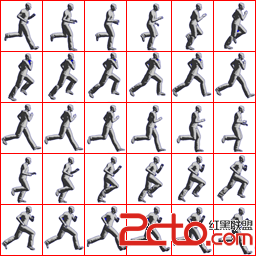
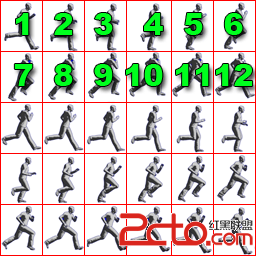
每個紅色方框代表一幀動畫,構成角色跑步過程。使用 TextureRegion.split 方法切割圖片。
關鍵參數 frameDuration:每幀在屏幕顯示的時間。1/frameDuration 即幀率(FPS),即每秒顯示幀數。
注意:默認初始化方法中僅有一個需指定播放模式,其餘默認 PlayMode.NORMAL。可通過 setPlayMode 設置,或在獲取關鍵幀時指定 getKeyFrame(stateTime, true)(true 表示 PlayMode.LOOP)。
stateTime 是一個時間計數器,初始化為 0。通過源碼可見,它計算從動畫開始播放以來經過了多少幀時長,以決定顯示哪一幀:
public int getKeyFrameIndex (float stateTime) {
    if (keyFrames.length == 1) return 0;
    int frameNumber = (int)(stateTime / frameDuration);
    switch (playMode) {
        case NORMAL:
            frameNumber = Math.min(keyFrames.length - 1, frameNumber);
            break;
        case LOOP:
            frameNumber = frameNumber % keyFrames.length;
            break;
        case LOOP_PINGPONG:
            frameNumber = frameNumber % ((keyFrames.length * 2) - 2);
            if (frameNumber >= keyFrames.length)
                frameNumber = keyFrames.length - 2 - (frameNumber - keyFrames.length);
            break;
        case LOOP_RANDOM:
            int lastFrameNumber = (int) ((lastStateTime) / frameDuration);
            if (lastFrameNumber != frameNumber) {
                frameNumber = MathUtils.random(keyFrames.length - 1);
            } else {
                frameNumber = this.lastFrameNumber;
            }
            break;
        case REVERSED:
            frameNumber = Math.max(keyFrames.length - frameNumber - 1, 0);
            break;
        case LOOP_REVERSED:
            frameNumber = frameNumber % keyFrames.length;
            frameNumber = keyFrames.length - frameNumber - 1;
            break;
    }
    lastFrameNumber = frameNumber;
    lastStateTime = stateTime;
    return frameNumber;
}private static final String TAG = AnimationTest.class.getSimpleName();
private static final int FRAME_COLS = 6;
private static final int FRAME_ROWS = 5;
Animation walkAnimation;
Animation reverseWalkAnimation;
Texture walkSheet;
TextureRegion[] walkFrames;
SpriteBatch spriteBatch;
TextureRegion currentFrame;
Vector2 postion;
Direction direction;
float stateTime;
@Override
public void create() {
walkSheet = new Texture(Gdx.files.internal("sprite-animation1.png"));
TextureRegion[][] tmp = TextureRegion.split(walkSheet,
walkSheet.getWidth() / FRAME_COLS,
walkSheet.getHeight() / FRAME_ROWS);
walkFrames = new TextureRegion[FRAME_COLS * FRAME_ROWS];
int index = 0;
for (int i = 0; i < FRAME_ROWS; i++) {
for (int j = 0; j < FRAME_COLS; j++) {
walkFrames[index++] = tmp[i][j];
}
}
walkAnimation = new Animation(0.025f, walkFrames);
spriteBatch = new SpriteBatch();
postion = new Vector2(50, 50);
direction = Direction.RIGHT;
stateTime = 0f;
Gdx.app.log(TAG, "frameDuration=" + walkAnimation.getFrameDuration());
Gdx.app.log(TAG, "frameDuration=" + walkAnimation.getAnimationDuration());
}
@Override
public void render() {
Gdx.gl.glClearColor(0.39f, 0.58f, 0.92f, 1.0f);
Gdx.gl.glClear(GL20.GL_COLOR_BUFFER_BIT);
stateTime += Gdx.graphics.getDeltaTime();
if (direction == Direction.RIGHT) {
postion.x += 50 * Gdx.graphics.getDeltaTime();
walkAnimation.setPlayMode(PlayMode.LOOP);
} else if (direction == Direction.LEFT) {
postion.x -= 50 * Gdx.graphics.getDeltaTime();
walkAnimation.setPlayMode(PlayMode.REVERSED);
}
if (postion.x + walkFrames[0].getRegionWidth() > Gdx.graphics.getWidth() - 50) {
direction = Direction.LEFT;
} else if (postion.x < 50) {
direction = Direction.RIGHT;
}
currentFrame = walkAnimation.getKeyFrame(stateTime, true);
spriteBatch.begin();
spriteBatch.draw(currentFrame, postion.x, postion.y);
spriteBatch.end();
}
@Override
public void dispose() {
walkSheet.dispose();
}
enum Direction { LEFT, RIGHT }日誌輸出:
AnimationTest: frameDuration=0.025
AnimationTest: frameDuration=0.75
動畫效果需自行運行查看。