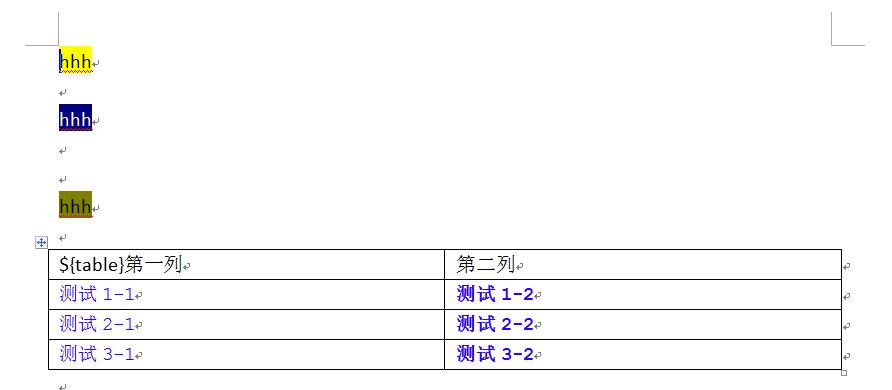
採用 模板填充模式:預先設計 Word 模板(.docx),使用 ${tag} 標記動態內容位置,POI 解析模板 → 替換標籤 → 生成目標文檔。核心優勢:樣式完整保留、業務邏輯與樣式分離、非技術人員可維護模板。
${fieldName} — 對應單一值替換${tableName.colName} — 表格模板行中的列標記${tableName} 識別模板表格痛點:Word 將相同文本的不同樣式拆分為多個 <w:r> (Run) 元素,導致標籤被拆分(如 ${、user、Name} 分屬不同 Run),直接替換失效。
解決方案:僅保留首個 Run 的樣式,後續 Run 內容清空,實現「樣式跟隨首 Run,內容完整替換」。
public XWPFDocument openDocument(File templateFile) throws IOException {
    try (FileInputStream fis = new FileInputStream(templateFile)) {
        return new XWPFDocument(fis);
    }
}

/**
 * 解析所有普通段落標籤
 */
public List parseParagraphTags(XWPFDocument doc, String regex) {
    List tags = new ArrayList<>();
    Pattern pattern = Pattern.compile(regex.isEmpty() ? "\\$\\{.*?\\}" : regex);

    // 普通段落
    for (XWPFParagraph p : doc.getParagraphs()) {
        extractTags(tags, p, pattern);
    }

    // 表格內段落(非模板表格)
    for (XWPFTable table : getNonTemplateTables(doc, regex)) {
        for (XWPFParagraph p : getTableParagraphs(table)) {
            extractTags(tags, p, pattern);
        }
    }
    return tags;
}

private void extractTags(List tags, XWPFParagraph p, Pattern pattern) {
    Matcher matcher = pattern.matcher(p.getText());
    while (matcher.find()) {
        String tag = matcher.group();
        if (!tags.contains(new TagInfo(tag, tag, ""))) {
            tags.add(new TagInfo(tag, tag, ""));
        }
    }
}

/**
 * 解析表格模板標籤
 * 返回:表格名 → [行列表 → [列標籤列表]]
 */
public Map>> parseTableTags(XWPFDocument doc, String regex) {
    Map>> tableMap = new HashMap<>();
    Pattern pattern = Pattern.compile(regex.isEmpty() ? "\\$\\{.*?\\}" : regex);

    for (XWPFTable table : getTemplateTables(doc, regex)) {
        String tableName = getTableName(table, pattern);
        List rowTags = new ArrayList<>();

        // 解析最後一行(模板行)所有單元格標籤
        XWPFTableRow lastRow = table.getRow(table.getRows().size() - 1);
        for (XWPFTableCell cell : lastRow.getTableCells()) {
            for (XWPFParagraph p : cell.getParagraphs()) {
                if (p.getText() != null && !p.getText().isEmpty()) {
                    extractTags(rowTags, p, pattern);
                }
            }
        }
        tableMap.put(tableName, Collections.singletonList(rowTags));
    }
    return tableMap;
} /**
* 段落級標籤替換:自動處理跨 Run 標籤
*/
public void replaceParagraphTags(List tagList, XWPFParagraph para, String regex) {
Pattern pattern = Pattern.compile(regex.isEmpty() ? "\\$\\{.*?\\}" : regex);
List runs = para.getRuns();
for (TagInfo tag : tagList) {
String find = tag.getTagText();
String replace = tag.getTagValue();
// POI searchText 返回標籤所在 Run 範圍
TextSegment found = para.searchText(find, new PositionInParagraph());
if (found == null) continue;
if (found.getBeginRun() == found.getEndRun()) {
// 單 Run 內完整標籤:直接替換
XWPFRun run = runs.get(found.getBeginRun());
run.setText(run.getText(0).replace(find, replace), 0);
} else {
// 跨 Run 標籤:合併文本 → 替換 → 寫回首 Run → 清空其餘 Run
StringBuilder merged = new StringBuilder();
for (int i = found.getBeginRun(); i <= found.getEndRun(); i++) {
merged.append(runs.get(i).getText(0));
}
String replaced = merged.toString().replace(find, replace);
XWPFRun firstRun = runs.get(found.getBeginRun());
firstRun.setText(replaced, 0);
// 清空後續 Run 內容,保留樣式
for (int i = found.getBeginRun() + 1; i <= found.getEndRun(); i++) {
runs.get(i).setText("", 0);
}
}
}
// 遞歸檢查是否有遺漏標籤(巢狀/連續標籤)
if (pattern.matcher(para.getText()).find()) {
replaceParagraphTags(tagList, para, regex);
}
} /**
* 表格數據填充:複製模板行 → 替換標籤 → 移除模板行
*/
public void fillTableData(XWPFTable table, List> rowTagList,
List> dataList, String regex) {
if (dataList.isEmpty()) {
// 無數據:移除模板行
table.removeRow(table.getRows().size() - 1);
return;
}
XWPFTableRow templateRow = table.getRow(table.getRows().size() - 1);
for (Map rowData : dataList) {
// 在模板行之前插入新行
XWPFTableRow newRow = table.insertNewRow(table.getRows().size() - 1);
copyRowStyle(newRow, templateRow);
// 替換該行所有標籤
for (int cellIdx = 0; cellIdx < newRow.getTableCells().size(); cellIdx++) {
XWPFTableCell cell = newRow.getCell(cellIdx);
for (XWPFParagraph p : cell.getParagraphs()) {
List cellTags = rowTagList.get(0).stream()
.filter(t -> t.getTagName().contains("COL" + (cellIdx + 1)))
.collect(Collectors.toList());
// 設置實際值
cellTags.forEach(tag -> tag.setTagValue(rowData.get(tag.getTagName())));
replaceParagraphTags(cellTags, p, regex);
}
}
}
// 移除原始模板行
table.removeRow(table.getRows().size() - 1);
}
/** 深度複製行樣式:屬性、單元格、段落、Run */
private void copyRowStyle(XWPFTableRow target, XWPFTableRow source) {
target.getCtRow().setTrPr(source.getCtRow().getTrPr());
for (int i = 0; i < target.getTableCells().size(); i++) {
copyCellStyle(target.getCell(i), source.getCell(i));
}
}
private void copyCellStyle(XWPFTableCell target, XWPFTableCell source) {
target.getCTTc().setTcPr(source.getCTTc().getTcPr());
// 清空目標段落
for (int i = target.getParagraphs().size() - 1; i >= 0; i--) {
target.removeParagraph(i);
}
// 複製源段落
for (XWPFParagraph sp : source.getParagraphs()) {
XWPFParagraph tp = target.addParagraph();
copyParagraphStyle(tp, sp);
}
}
private void copyParagraphStyle(XWPFParagraph target, XWPFParagraph source) {
target.getCTP().setPPr(source.getCTP().getPPr());
// 清空目標 Run
for (int i = target.getRuns().size() - 1; i >= 0; i--) {
target.removeRun(i);
}
// 複製源 Run
for (XWPFRun sr : source.getRuns()) {
XWPFRun tr = target.createRun();
copyRunStyle(tr, sr);
}
}
private void copyRunStyle(XWPFRun target, XWPFRun source) {
target.getCTR().setRPr(source.getCTR().getRPr()); // 字體、顏色、大小等
target.setText(source.getText(0)); // 文本內容
} public class TagInfo {
private String tagName; // ${userName}
private String tagText; // 解析時的原始文本
private String tagValue; // 替換值
// 構造器、Getter/Setter、equals/hashCode
}
// 輸入數據結構範例
Map data = new HashMap<>();
data.put("formTags", Arrays.asList(
new TagInfo("${userName}", "${userName}", "張三"),
new TagInfo("${orderNo}", "${orderNo}", "ORD-20240118-001")
));
data.put("tableTags", Collections.singletonMap(
"${orderItems}", Arrays.asList(
Arrays.asList(
new TagInfo("${COL1}", "${COL1}", "商品A"),
new TagInfo("${COL2}", "${COL2}", "2")
),
Arrays.asList(
new TagInfo("${COL1}", "${COL1}", "商品B"),
new TagInfo("${COL2}", "${COL2}", "1")
)
)
)); public File generateWord(File templateFile, Map data, File outputFile)
throws IOException {
XWPFDocument doc = openDocument(templateFile);
// 1. 替換普通標籤
List formTags = (List) data.get("formTags");
for (XWPFParagraph p : doc.getParagraphs()) {
replaceParagraphTags(formTags, p, "");
}
// 表格內普通段落
for (XWPFTable table : doc.getTables()) {
for (XWPFParagraph p : getTableParagraphs(table)) {
replaceParagraphTags(formTags, p, "");
}
}
// 2. 填充表格數據
Map>> tableTags = (Map) data.get("tableTags");
for (XWPFTable table : doc.getTables()) {
String tableName = getTableName(table, "");
if (tableTags.containsKey(tableName)) {
fillTableData(table, tableTags.get(tableName),
(List>) data.get(tableName + "_data"), "");
}
}
// 3. 輸出
try (FileOutputStream fos = new FileOutputStream(outputFile)) {
doc.write(fos);
}
return outputFile;
} | 挑戰 | 解決方案 | 核心 API |
|---|---|---|
| 標籤跨 Run 拆分 | 合併文本替換 + 保留首 Run 樣式 | searchText, getRuns, setText |
| 表格動態行數 | 複製模板行樣式結構 | insertNewRow, copyRowStyle |
| 樣式完整保留 | 深度複製 CT 構建屬性 | getCTR/setRPr, getCTP/setPPr, getCTTc/setTcPr |
| 模板與數據分離 | 標籤解析 → 數據綁定 → 統一替換 | TagInfo, 正則匹配 |
addPictureData + createPicture 而非模板佔位