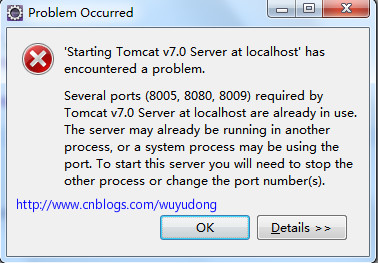
Eclipse/MyEclipse 啟動 Tomcat v7.0 時彈窗報錯:
Several ports (8005, 8080, 8009) required by Tomcat v7.0 Server at localhost are already in use. The server may already be running in another process, or a system process may be using the port. To start this server you will need to stop the other process or change the port number(s).
打開 CMD(管理員權限),執行:
netstat -ano | findstr 8080-a:顯示所有連接和監聽端口-n:直接顯示 IP 和端口號-o:顯示進程 PIDfindstr 8080:篩選 8080 端口(同理可查 8005、8009)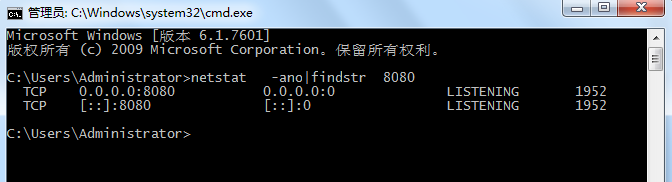
輸出示例:TCP 0.0.0.0:8080 0.0.0.0:0 LISTENING 1952 → PID = 1952 佔用了 8080。
taskkill /pid 1952 /f/pid 1952:指定進程 ID/f:強制終結
返回 Eclipse,重新啟動 Server,問題解決。
若不想殺進程,或需同時運行多個 Tomcat,可修改 conf/server.xml:
<Server port="8005" shutdown="SHUTDOWN">
<Connector port="8080" protocol="HTTP/1.1" ... />
<Connector port="8009" protocol="AJP/1.3" redirectPort="8443" />
將三個端口改為未被佔用的值(如 18005/18080/18009),保存後重啟即可。
# 查找佔用 8080 的進程
lsof -i :8080
# 或
netstat -tlnp | grep 8080

# 終結進程(假設 PID 為 1234)
kill -9 1234taskkill 提示「拒絕訪問」,請以管理員身份運行 CMD。掌握這套「查端口 → 找 PID → 殺進程」流程,端口衝突問題再也不會攔住你的開發節奏。