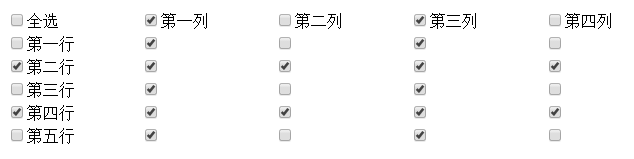
後台管理系統常見需求:數據表格支援「全選/取消」、「按行全選」、「按列全選」三級聯動。本文提供開箱即用的 jQuery 實現,邏輯清晰、兼容性好、易於集成到任何動態渲染的表格中。
...
關鍵約定:
- 表頭「全選」id="checkAll"
- 表頭「列選」class="colCheck" data-col="列索引"
- 行首「行選」class="rowCheck" data-row="行索引"
- 數據單元格 class="cellCheck" data-row="行" data-col="列"
$(function() {
  const $table = $('#dataTable');
  const $checkAll = $('#checkAll');
  const $colChecks = $('.colCheck');
  const $rowChecks = $('.rowCheck');
  const $cellChecks = $('.cellCheck');

  // 1. 全選 / 取消全選
  $checkAll.on('change', function() {
    const checked = this.checked;
    $colChecks.prop('checked', checked);
    $rowChecks.prop('checked', checked);
    $cellChecks.prop('checked', checked);
    $(this).next('label').text(checked ? '取消' : '全選');
  });

  // 2. 列選聯動:該列所有單元格 + 表頭全選狀態維護
  $colChecks.on('change', function() {
    const col = $(this).data('col');
    const checked = this.checked;
    $(`.cellCheck[data-col="${col}"]`).prop('checked', checked);
    updateCheckAllStatus();
  });

  // 3. 行選聯動:該行所有單元格 + 表頭全選狀態維護
  $rowChecks.on('change', function() {
    const row = $(this).data('row');
    const checked = this.checked;
    $(`.cellCheck[data-row="${row}"]`).prop('checked', checked);
    updateCheckAllStatus();
  });

  // 4. 單元格變化 → 反向更新行選/列選/全選狀態
  $cellChecks.on('change', function() {
    updateCheckAllStatus();
  });

  // 核心:根據單元格狀態推導行選、列選、全選
  function updateCheckAllStatus() {
    const totalCells = $cellChecks.length;
    const checkedCells = $cellChecks.filter(':checked').length;

    // 全選狀態
    $checkAll.prop('checked', totalCells > 0 && checkedCells === totalCells);
    $checkAll.next('label').text($checkAll.prop('checked') ? '取消' : '全選');

    // 列選狀態
    $colChecks.each(function() {
      const col = $(this).data('col');
      const colCells = $(`.cellCheck[data-col="${col}"]`);
      $(this).prop('checked', colCells.length > 0 && colCells.filter(':checked').length === colCells.length);
    });

    // 行選狀態
    $rowChecks.each(function() {
      const row = $(this).data('row');
      const rowCells = $(`.cellCheck[data-row="${row}"]`);
      $(this).prop('checked', rowCells.length > 0 && rowCells.filter(':checked').length === rowCells.length);
    });
  }
});
若表格數據通過 AJAX 動態生成,使用事件委託綁定到靜態父容器:
$('#dataTable').on('change', '.cellCheck, .rowCheck, .colCheck, #checkAll', function() {
  // 以上邏輯同樣適用,$(this) 即觸發元素
});
function getSelectedRows() {
  const selected = [];
  $('#dataTable .rowCheck:checked').each(function() {
    const row = $(this).data('row');
    const rowData = { rowIndex: row };
    // 假設每行有 data-* 屬性或隱藏字段存儲業務主鍵
    $(this).closest('tr').find('[data-id]').each(function() {
      rowData[$(this).data('field')] = $(this).data('id');
    });
    selected.push(rowData);
  });
  return selected;
}

// 批量刪除示例
$('#btnBatchDelete').click(function() {
  const ids = getSelectedRows().map(r => r.id);
  if (ids.length === 0) return alert('請選中至少一行');
  $.post('/api/batchDelete', { ids: ids }, function(res) { ... });
});
position: sticky 或虛擬列表庫Set,重渲染後恢復aria-label、鍵盤 Space/Enter 觸發這套方案純前端實現、零後端依賴、邏輯解耦,可直接複製到任何 jQuery 專案中。核心思想是「單元格為真理源,行/列/全選均為衍生狀態」,避免了多源同步的邏輯混亂。