將 Excel 報表轉為 HTML 網頁展示,是報表系統、數據門戶常見需求。本文採用 **Apache POI 讀取 Excel** + **Velocity 模板引擎渲染 HTML** 的輕量級方案,提供完整 Maven 專案代碼,支援 `.xls` (2003/2007) 與 `.xlsx` (2010+) 雙格式。
<dependencies>
    <!-- POI 核心 -->
    <dependency><groupId>org.apache.poi</groupId><artifactId>poi</artifactId><version>3.12</version></dependency>
    <dependency><groupId>org.apache.poi</groupId><artifactId>poi-ooxml</artifactId><version>3.12</version></dependency>
    <dependency><groupId>org.apache.poi</groupId><artifactId>poi-ooxml-schemas</artifactId><version>3.12</version></dependency>
    <!-- Velocity -->
    <dependency><groupId>velocity</groupId><artifactId>velocity</artifactId><version>1.5</version></dependency>
    <!-- XMLBeans (POI 依賴) -->
    <dependency><groupId>org.apache.xmlbeans</groupId><artifactId>xmlbeans</artifactId><version>2.6.0</version></dependency>
</dependencies>
public List readExcel(String path) throws IOException {
    String postfix = Util.getPostfix(path); // 取副檔名
    if ("xlsx".equals(postfix)) return readXlsx(path);
    else if ("xls".equals(postfix)) return readXls(path);
    return null;
}
// XSSF 範例
XSSFWorkbook wb = new XSSFWorkbook(is);
for (int s = 0; s < wb.getNumberOfSheets(); s++) {
    XSSFSheet sheet = wb.getSheetAt(s);
    for (int r = 1; r <= sheet.getLastRowNum(); r++) { // 跳過表頭
        XSSFRow row = sheet.getRow(r);
        Student stu = new Student();
        stu.setNo(getValue(row.getCell(0)));
        stu.setName(getValue(row.getCell(1)));
        stu.setAge(getValue(row.getCell(2)));
        stu.setScore(Float.valueOf(getValue(row.getCell(3))));
        list.add(stu);
    }
}
// getValue 統一處理數值/布爾/字串儲存格類型
<table id="t01">
<tr><th>S/N</th><th>ID</th><th>Name</th><th>Age</th><th>Score</th></tr>
#set( $count = 1 )
#foreach( $student in $students )
<tr>
    <td>$count</td>
    <td>$student.no</td>
    <td>$student.name</td>
    <td>$student.age</td>
    <td>$student.score</td>
</tr>
#set( $count = $count + 1 )
#end
</table>
VelocityEngine ve = new VelocityEngine();
ve.setProperty("input.encoding", "UTF-8");
ve.setProperty("output.encoding", "UTF-8");
ve.init();
Template t = ve.getTemplate("./src/main/java/com/b510/excel/vm/student.vm");
VelocityContext ctx = new VelocityContext();
ctx.put("students", students);
StringWriter sw = new StringWriter();
t.merge(ctx, sw);
Files.write(Paths.get("test.html"), sw.toString().getBytes(StandardCharsets.UTF_8));
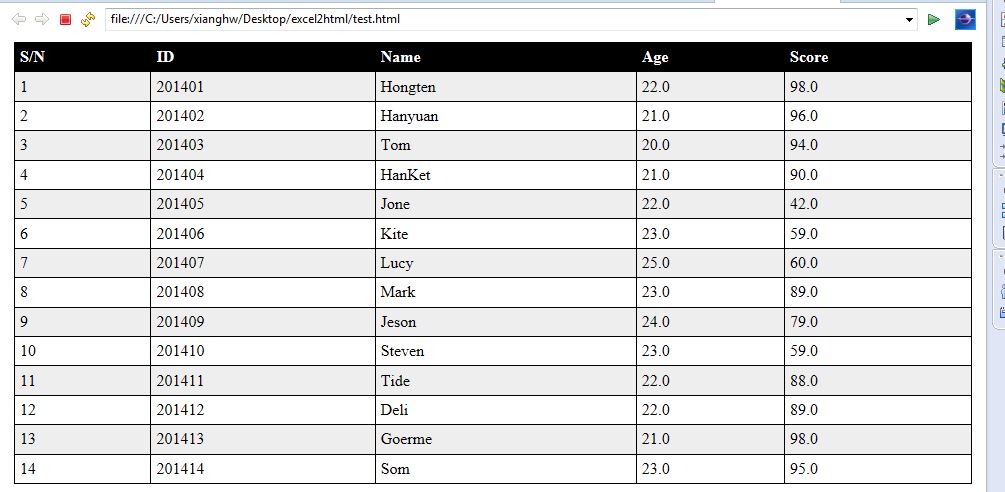
完整 Maven 專案:excel2html.zip
POI + Velocity 組合實現「讀取與展示分離」,代碼量極小、擴展性強。掌握「統一入口判斷格式 → 統一 Cell 取值 → 模板數據綁定」三步曲,即可快速構建 Excel 轉 HTML 服務。