本文記錄在 Eclipse 中建立動態 Web 專案並整合 Spring 4.1 的完整步驟,涵蓋 Jar 包選擇、web.xml 兩種配置方式、核心監聽器原理,適合初次接觸 Spring MVC 的開發者快速上手。
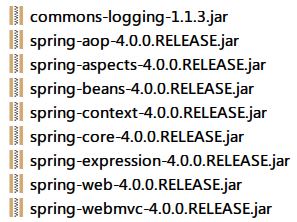
spring-framework-4.1.x.RELEASE-dist.zip。libs 目錄,核心開發需約 20 個 Jar(含 spring-core、spring-context、spring-web、spring-webmvc、spring-tx、spring-jdbc、spring-orm、spring-aop、spring-expression、aopalliance、commons-logging 等)。WebContent/WEB-INF/lib(或 Maven 專案的 pom.xml 依賴中)。Spring 容器啟動靠 ContextLoaderListener,它實現 ServletContextListener,在 Web 應用啟動時初始化 WebApplicationContext。
<listener>
    <listener-class>org.springframework.web.context.ContextLoaderListener</listener-class>
</listener>
/WEB-INF/applicationContext.xml。<context-param>
<param-name>contextConfigLocation</param-name>
<param-value>classpath:spring-application.xml</param-value>
</context-param>
<listener>
<listener-class>org.springframework.web.context.ContextLoaderListener</listener-class>
</listener>
classpath: 前綴表示從 src 根目錄尋找,便於多模組專案統一管理配置。classpath:spring-dao.xml, classpath:spring-service.xml。建立 src/spring-application.xml:
<?xml version="1.0" encoding="UTF-8"?>
<beans xmlns="https://www.springframework.org/schema/beans"
       xmlns:xsi="https://www.w3.org/2001/XMLSchema-instance"
       xmlns:context="https://www.springframework.org/schema/context"
       xsi:schemaLocation="
           https://www.springframework.org/schema/beans
           https://www.springframework.org/schema/beans/spring-beans.xsd
           https://www.springframework.org/schema/context
           https://www.springframework.org/schema/context/spring-context.xsd">

    <!-- 掃描 @Component、@Service、@Repository、@Controller -->
    <context:component-scan base-package="com.example" />

    <!-- 資料源、事務管理等後續再加 -->

</beans>
| 現象 | 原因 | 解決 |
|---|---|---|
啟動報 ClassNotFoundException: ContextLoaderListener | 缺 spring-web.jar | 補齊 spring-web 依賴 |
| 找不到 applicationContext.xml | 路徑寫錯或未放入 classpath | 檢查 contextConfigLocation、確認檔案在 src/ 或 WEB-INF/ |
| 中文亂碼 | 未配置 CharacterEncodingFilter | 在 web.xml 最前面加入編碼過濾器 |
Root WebApplicationContext: initialization completed。@Controller,瀏覽器訪問對應 URL 返回預期結果。Spring 整合的核心只有兩步:放 Jar、配 Listener + contextConfigLocation。掌握 ContextLoaderListener 的載入時機與配置檔尋找規則,即可靈活應對各種專案結構。後續可擴展 Spring MVC DispatcherServlet、Hibernate/MyBatis 整合、聲明式事務等進階主題。