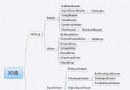
firsthibernatehibernate/lib/required/*.jar + JDBC 驅動 → WEB-INF/libhibernate/project/etc/hibernate.cfg.xml → src 目錄@Entity
@Table(name = "tb_cat")
public class Cat {
@Id
@GeneratedValue(strategy = GenerationType.AUTO)
private Integer id;
@Column(name = "name")
private String name;
@Column(name = "description")
private String description;
@ManyToOne
@JoinColumn(name = "mother_id")
private Cat mother;
@Temporal(TemporalType.TIMESTAMP)
@Column(name = "birthday")
private Date birthday;
// Getter/Setter...
}
關鍵註解說明:
@Entity:標識持久化實體@Table:指定表名@Id + @GeneratedValue:主鍵自增@ManyToOne + @JoinColumn:多對一關聯@Temporal:日期類型映射<hibernate-configuration>
<session-factory>
<property name="connection.driver_class">com.mysql.jdbc.Driver</property>
<property name="connection.url">jdbc:mysql://localhost:3306/hibernate</property>
<property name="connection.username">root</property>
<property name="connection.password">123456</property>
<property name="dialect">org.hibernate.dialect.MySQLDialect</property>
<property name="show_sql">true</property>
<property name="hbm2ddl.auto">create</property>
<property name="current_session_context_class">thread</property>
<mapping class="com.levice.firsthibernate.bean.Cat"/>
</session-factory>
</hibernate-configuration>
關鍵屬性: hbm2ddl.auto=create 啟動時自動建表(僅開發環境使用)。
CREATE DATABASE hibernate;
public class HibernateUtil {
    private static final SessionFactory sessionFactory;
    static {
        try {
            sessionFactory = new AnnotationConfiguration()
                .configure().buildSessionFactory();
        } catch (Throwable ex) {
            throw new ExceptionInInitializerError(ex);
        }
    }
    public static SessionFactory getSessionFactory() {
        return sessionFactory;
    }
}
註:Hibernate 4.3 使用 AnnotationConfiguration,5.x+ 已棄用,改用 Configuration。
public class CatTest {
    public static void main(String[] args) {
        Cat mother = new Cat();
        mother.setName("Mother White");
        mother.setDescription("This is mother cat");
        mother.setBirthday(new Date());

        Cat kitty = new Cat();
        kitty.setMother(mother);
        kitty.setName("Kitty");

        Cat tom = new Cat();
        tom.setMother(mother);
        tom.setName("Tom");

        Session session = HibernateUtil.getSessionFactory().openSession();
        Transaction tx = session.beginTransaction();
        session.persist(mother);
        session.persist(kitty);
        session.persist(tom);

        List cats = session.createQuery("from Cat").list();
        // 遍歷輸出...
        tx.commit();
        session.close();
    }
}
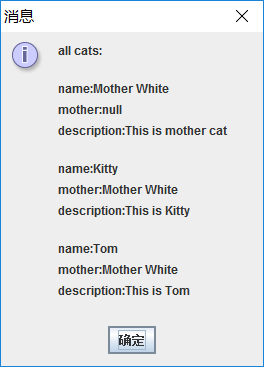
Hibernate: create table tb_cat (id integer not null auto_increment, ...)
Hibernate: insert into tb_cat (birthday, description, mother_id, name) values (?, ?, ?, ?)
Hibernate: select cat0_.id as id1_0_, ... from tb_cat cat0_
自動建表、外鍵關聯、數據插入、查詢全流程無需手寫 SQL。