在 Java Web 開發中,文件上傳與下載是極為常見的業務需求。Struts2 作為經典的 MVC 框架,通過攔截器機制與結果類型封裝了底層的流操作,讓開發者能以極簡的配置完成文件處理。本文將從依賴引入、單/多文件上傳、文件下載三大核心場景,系統梳理實現細節與關鍵配置。
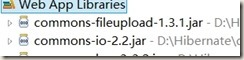
Struts2 的文件上傳功能底層依賴 Apache Commons FileUpload 解析 multipart/form-data 請求,並借助 Commons IO 簡化流操作。專案中必須引入以下兩個 JAR 包:
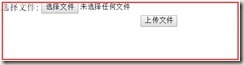
JSP 頁面需設置 enctype="multipart/form-data",並提供 <input type="file" name="upload" /> 控件。name 屬性值將與 Action 中的屬性名對應。
在 <action> 節點下通過 <param> 指定服務端保存路徑 savePath,該路徑相對於 Web 應用根目錄。
<action name="upload" class="cn.wz.upload.action.UploadAction">
    <param name="savePath">/upload</param>
    <result name="success">success.jsp</result>
</action>
UploadAction 需繼承 ActionSupport,並聲明四個關鍵屬性(Struts2 攔截器會自動注入):
File upload:封裝上傳文件的臨時文件對象String uploadFileName:原始文件名String uploadContentType:文件 MIME 類型String savePath:對應配置文件中的保存路徑參數在 execute() 方法中,通過流拷貝將臨時文件持久化到目標目錄:
public String execute() throws Exception {
    byte[] buffer = new byte[1024];
    FileInputStream fis = new FileInputStream(getUpload());
    // 獲取真實物理路徑
    String realPath = ServletActionContext.getServletContext().getRealPath(getSavePath());
    FileOutputStream fos = new FileOutputStream(realPath + "\\" + getUploadFileName());

    int length;
    while ((length = fis.read(buffer)) > 0) {
        fos.write(buffer, 0, length);
    }
    fis.close();
    fos.flush();
    fos.close();
    return SUCCESS;
}
多文件上傳的核心在於前端表單提供多個 name="upload" 的文件控件,後端 Action 將對應屬性改為數組或 List:
File[] uploadString[] uploadFileNameString[] uploadContentType處理邏輯只需遍歷數組,逐個執行單文件上傳的流拷貝操作即可:
public String execute() throws Exception {
    byte[] buffer = new byte[1024];
    for (int i = 0; i < upload.length; i++) {
        FileInputStream fis = new FileInputStream(upload[i]);
        String realPath = ServletActionContext.getServletContext().getRealPath(savePath);
        FileOutputStream fos = new FileOutputStream(realPath + "\\" + uploadFileName[i]);

        int length;
        while ((length = fis.read(buffer)) > 0) {
            fos.write(buffer, 0, length);
        }
        fis.close();
        fos.flush();
        fos.close();
    }
    return SUCCESS;
}Struts2 提供 Stream Result Type 專門處理文件下載,其核心是由 Action 提供一個 InputStream,框架負責將流內容寫入 HTTP 響應體。
| 參數名 | 說明 |
|---|---|
| contentType | 響應 MIME 類型(如 application/msword) |
| contentLength | 文件大小,用於顯示下載進度 |
| contentDisposition | 設置 Content-Disposition 頭,控制瀏覽器彈出下載對話框及默認文件名 |
| inputName | Action 中提供 InputStream 的屬性名(默認 inputStream) |
| bufferSize | 讀寫緩衝區大小,默認 4096 |
DownAction 需提供以下屬性:
String inputPath:文件存儲相對路徑(對應上傳的 savePath)String fileName:下載文件名InputStream inputStream:文件輸入流(通過 getter 方法惰性創建)String contentType:文件 MIME 類型public InputStream getInputStream() throws FileNotFoundException {
String path = ServletActionContext.getServletContext().getRealPath(inputPath);
return new BufferedInputStream(new FileInputStream(path + "\\" + fileName));
}
<action name="down" class="cn.wz.upload.action.DownAction">
    <param name="inputPath">/upload</param>
    <result name="success" type="stream">
        <param name="contentType">application/msword</param>
        <param name="inputName">inputStream</param>
        <param name="contentDisposition">attachment;filename="${fileName}"</param>
        <param name="bufferSize">4096</param>
    </result>
</action>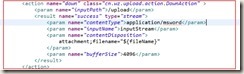
| 文件類型 | ContentType 值 |
|---|---|
| Word 文檔 | application/msword |
| Excel 表格 | application/vnd.ms-excel |
| PPT 簡報 | application/vnd.ms-powerpoint |
| 圖片 (GIF/BMP/JPEG) | image/gif、image/bmp、image/jpeg |
| 純文本 | text/plain |
| HTML 網頁 | text/html |
| 可執行文件/通用二進制 | application/octet-stream |
File.renameTo() 或 NIO Files.move() 替代流拷貝,提升性能;或引入分片上傳、斷點續傳機制。掌握上述核心配置與代碼模式,即可在 Struts2 專案中靈活實現文件上傳下載功能。實際專案中建議封裝通用的文件服務組件,進一步解耦業務邏輯與框架細節。