本項目演示如何使用 MongoDB(NoSQL 文檔型數據庫)搭配傳統 JSP/Servlet 技術棧,構建一個功能完整的電商購物車系統。涵蓋用戶註冊登錄、Cookie 記住密碼、商品分頁展示、購物車增刪改查、總價計算等核心業務,附帶完整代碼結構、關鍵邏輯解析與部署要點。

userInfo、good)MongodbBean(單例模式管理連接)package com.liuzhen.shop;
import com.mongodb.*;
import java.util.*;
public class MongodbBean {
private static final String HOST = "localhost";
private static final int PORT = 27017;
private static final String DB_NAME = "library";
private static final int PAGE_SIZE = 5;
// 靜態內部類單例持有 MongoClient(線程安全、連接復用)
private static class MongoHolder {
static final MongoClient CLIENT = new MongoClient(HOST, PORT);
}
public static MongoClient getClient() { return MongoHolder.CLIENT; }
public static DB getDB() { return getClient().getDB(DB_NAME); }
// 通用查詢轉 Map
@SuppressWarnings("rawtypes")
private static Map toMap(DBObject obj) { return obj.toMap(); }
// --- 商品相關 ---
public static String[][] getGoodList(int page) {
DBCollection coll = getDB().getCollection("good");
DBCursor cursor = coll.find().skip((page - 1) * PAGE_SIZE).limit(PAGE_SIZE);
List list = new ArrayList<>();
while (cursor.hasNext()) {
Map m = toMap(cursor.next());
list.add(new String[]{
(String) m.get("sid"),
(String) m.get("sname"),
(String) m.get("sprice")
});
}
return list.toArray(new String[0][]);
}
public static int getTotalPage() {
long count = getDB().getCollection("good").count();
return (int) Math.ceil((double) count / PAGE_SIZE);
}
public static double getPrice(String sid) {
Map m = toMap(getDB().getCollection("good").findOne(new BasicDBObject("sid", sid)));
return Double.parseDouble((String) m.get("sprice"));
}
public static String[] getDetail(String sid) {
Map m = toMap(getDB().getCollection("good").findOne(new BasicDBObject("sid", sid)));
return new String[]{(String) m.get("sname"), (String) m.get("sprice")};
}
// --- 用戶相關 ---
public static boolean validateUser(String username, String password) {
DBCollection coll = getDB().getCollection("userInfo");
DBObject q = new BasicDBObject("username", username).append("password", password);
return coll.findOne(q) != null;
}
public static void registerUser(String username, String password) {
DBCollection coll = getDB().getCollection("userInfo");
coll.insert(new BasicDBObject("username", username).append("password", password));
}
}
ShopCartBeanpackage com.liuzhen.shop;
import java.util.*;
public class ShopCartBean {
private final Map items = new HashMap<>(); // sid -> count
private double total = 0;
public void add(String sid) {
int cnt = items.getOrDefault(sid, 0) + 1;
items.put(sid, cnt);
total += MongodbBean.getPrice(sid);
}
public void setCount(int count, String sid) {
int old = items.getOrDefault(sid, 0);
total += (count - old) * MongodbBean.getPrice(sid);
if (count <= 0) items.remove(sid);
else items.put(sid, count);
}
public void deleteFromCart(String sid) {
int cnt = items.getOrDefault(sid, 0);
total -= cnt * MongodbBean.getPrice(sid);
items.remove(sid);
}
public boolean isEmpty() { return items.isEmpty(); }
public double getTotal() { return total; }
public String[][] getCart() {
String[][] res = new String[items.size()][4];
int i = 0;
for (Map.Entry e : items.entrySet()) {
String[] detail = MongodbBean.getDetail(e.getKey());
res[i++] = new String[]{e.getKey(), detail[0], detail[1], e.getValue().toString()};
}
return res;
}
}
<%-- login.jsp 讀取 Cookie 自動填充 --%>
<%
    String username = "", password = "";
    Cookie[] cookies = request.getCookies();
    if (cookies != null) {
        for (Cookie c : cookies) {
            if ("username".equals(c.getName()))
                username = java.net.URLDecoder.decode(c.getValue(), "UTF-8");
            else if ("password".equals(c.getName()))
                password = java.net.URLDecoder.decode(c.getValue(), "UTF-8");
        }
    }
%>
<input name="username" value="<%=username%>" />
<input name="password" value="<%=password%>" />

<%-- login_action.jsp 驗證並寫入 Cookie --%>
<%
    boolean ok = MongodbBean.validateUser(userName, passWord);
    if (ok) {
        if ("save".equals(savePassword)) {
            Cookie uc = new Cookie("username", URLEncoder.encode(userName, "UTF-8"));
            Cookie pc = new Cookie("password", URLEncoder.encode(passWord, "UTF-8"));
            uc.setMaxAge(60*60*24*3); pc.setMaxAge(60*60*24*3);
            response.addCookie(uc); response.addCookie(pc);
        }
        response.sendRedirect("welcome.jsp");
    } else {
        response.sendRedirect("login_Fail.jsp");
    }
%>
Buy.jsp(Model 1 模式)<%@ page import="com.liuzhen.shop.ShopCartBean" %>
<jsp:useBean id="cart" scope="session" class="com.liuzhen.shop.ShopCartBean"/>
<%
String action = request.getParameter("action");
String sid = request.getParameter("sid");
if ("buy".equals(action)) cart.add(sid);
else if ("gc".equals(action)) cart.setCount(Integer.parseInt(request.getParameter("count")), sid);
else if ("del".equals(action)) cart.deleteFromCart(sid);
response.sendRedirect("Cart.jsp");
%>
Cart.jsp<jsp:useBean id="cart" scope="session" class="com.liuzhen.shop.ShopCartBean"/>
<% if (!cart.isEmpty()) { %>
<table>
<% for (String[] row : cart.getCart()) { %>
<tr>
<td><%=row[0]%></td><td><%=row[1]%></td>
<td><%=row[2]%></td>
<td><form action="Buy.jsp" method="post">
<input name="count" value="<%=row[3]%>" />
<input type="hidden" name="sid" value="<%=row[0]%>" />
<input type="hidden" name="action" value="gc" />
</form></td>
<td><a href="Buy.jsp?sid=<%=row[0]%>&action=del">刪除</a></td>
</tr>
<% } %>
</table>
總價:<%= Math.round(cart.getTotal()*100)/100.0 %>
<% } else { %>購物車為空<% } %>
// userInfo 集合
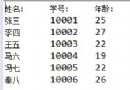
{ "_id": ObjectId("..."), "username": "zhangsan", "password": "123456" }

// good 集合
{ "_id": ObjectId("..."), "sid": "1", "sname": "紅米 Note 12", "sprice": "1299" }
{ "_id": ObjectId("..."), "sid": "2", "sname": "《三體》全集", "sprice": "189" }
library 及集合 userInfo、goodmongo-java-driver-3.3.0.jar 至 WEB-INF/libWEB-INF/classes/com/liuzhen/shophttps://localhost:8080/shop/login.jspMongoClientSettings.builder().applyConnectionPoolSettings(...) 配置連接池本項目完整演示了 MongoDB + JSP 構建購物車的全流程,從數據模型、JavaBean 封裝、Session 狀態管理、Cookie 持久化到前端交互,代碼結構清晰、邏輯閉環。雖屬教學級 Model 1 架構,但核心業務邏輯(分頁、購物車狀態機、BSON 轉換)具備實戰參考價值,可作為進階 Maven/Spring Boot + MongoDB 重構的基石。