SVNKit 是純 Java 實現的 Subversion 客戶端庫,無需本地安裝 svn 命令列工具,即可在 JVM 應用中程式化操作版本控制。核心優勢:
svn://、svn+ssh://、http(s)://、file:/// 多種協議| 術語 | 說明 |
|---|---|
| Repository (倉庫) | 版本化數據的中央存儲,記錄所有修訂歷史 |
| Working Copy (工作副本) | 本地檢出的文件樹,含 .svn 元數據目錄 |
| Revision (修訂版) | 全局遞增版本號,每次提交 +1,對應一個快照 |
| URL 格式 | svn://host/path、https://host/svn/repo、file:///local/path |
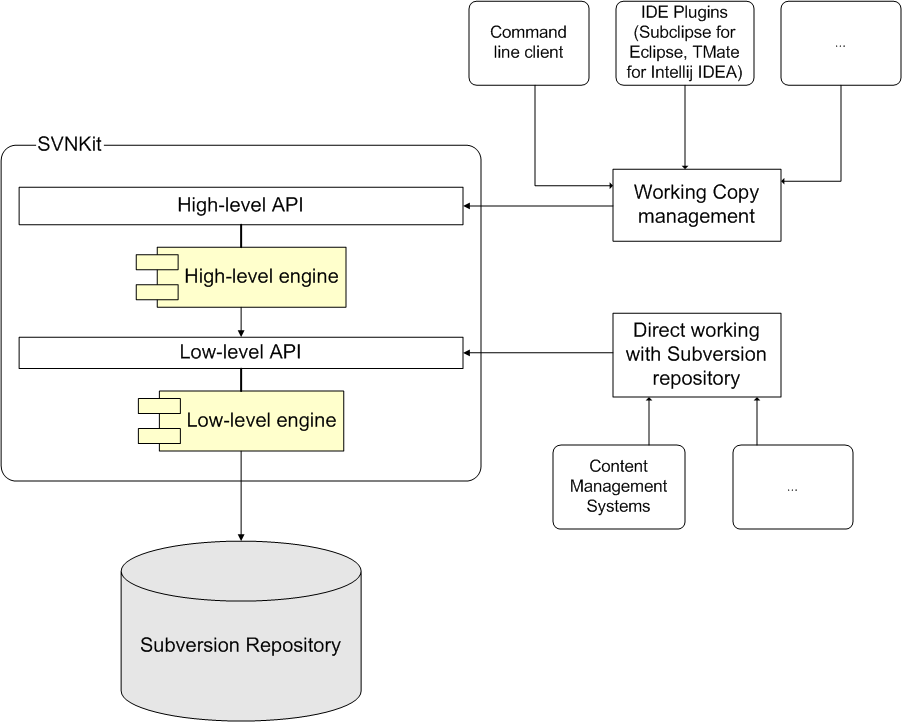
SVNClientManagerSVNUpdateClient (checkout/update/switch/export)、SVNCommitClient、SVNStatusClient、SVNDiffClient...SVNRepositorySVNRepositoryFactory 實現類對應協議| 協議 | 工廠類 | 備註 |
|---|---|---|
| svn:// / svn+ssh:// | SVNRepositoryFactoryImpl | 最常用,支援 SSH 隧道 |
| https:// / https:// | DAVRepositoryFactory | WebDAV over HTTP |
| file:/// | FSRepositoryFactory | 僅支援 FSFS 格式倉庫 |
// 1. 初始化協議工廠 (僅需一次,靜態方法)
SVNRepositoryFactoryImpl.setup();        // svn://
DAVRepositoryFactory.setup();            // http(s)://
FSRepositoryFactory.setup();             // file:///

// 2. 解析倉庫 URL
SVNURL url = SVNURL.parseURIDecoded("svn://host/repo/path");

// 3. 創建 Repository 驅動
SVNRepository repository = SVNRepositoryFactory.create(url, null);

// 4. 設置認證管理器
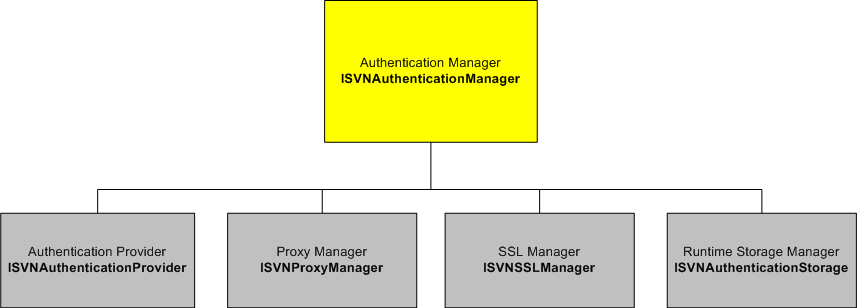
ISVNAuthenticationManager authManager = new BasicAuthenticationManager("user", "pass");
repository.setAuthenticationManager(authManager);

// 5. 執行操作示例:獲取最新修訂號
long latestRev = repository.getLatestRevision();
System.out.println("最新修訂版: " + latestRev);

// 6. 遍歷目錄項目
Collection entries = repository.getDir("", -1, null, (Collection) null);
for (SVNDirEntry entry : entries) {
    System.out.println(entry.getKind() + " " + entry.getName() + " " + entry.getSize());
} 
| 類型 | 類 | 適用協議/場景 |
|---|---|---|
| PASSWORD | SVNPasswordAuthentication | svn://, http(s):// 用戶名/密碼 |
| SSH | SVNSSHAuthentication | svn+ssh:// 隧道連接 |
| SSL | SVNSSLAuthentication | https:// 客戶端證書 |
| USERNAME | SVNUserNameAuthentication | file:/// 本地系統用戶 |
// 實現 ISVNAuthenticationManager 接口,覆寫 acknowledgeAuthentication
public class ForcedAuthManager implements ISVNAuthenticationManager {
    private final ISVNAuthenticationManager delegate;

    public ForcedAuthManager(ISVNAuthenticationManager delegate) {
        this.delegate = delegate;
    }

    @Override
    public void acknowledgeAuthentication(boolean accepted, String realm,
                                          SVNAuthentication auth, SVNErrorMessage error) {
        delegate.acknowledgeAuthentication(accepted, realm, auth, error);
    }

    // ... 其他委派方法 ...

    @Override
    public int getAuthenticationType() {
        return FORCE_AUTHENTICATION; // 強制每次請求都驗證
    }
}DOMAIN\\user// Basic/Digest
ISVNAuthenticationManager auth = new BasicAuthenticationManager("user", "pass");
// NTLM (需 jcifs 或 JDK 內建支援)
ISVNAuthenticationManager auth = new BasicAuthenticationManager("DOMAIN\\user", "pass");// 代理設置 (BasicAuthenticationManager 構造器)
ProxyManager proxyManager = new DefaultProxyManager(
"proxy.host", 8080, "proxyUser", "proxyPass");
authManager.setProxyManager(proxyManager);
// SSL 信任所有憑證 (僅測試環境)
DefaultSVNAuthenticationManager authManager = new DefaultSVNAuthenticationManager();
authManager.setSSLManager(new TrustAllSSLManager());// 命令列
svnadmin create /data/svn/repo
svn mkdir file:///data/svn/repo/trunk -m "初始化目錄"
// SVNKit 程式化創建 (需 FSRepositoryFactory)
File repoDir = new File("/data/svn/repo");
FSRepositoryFactory factory = new FSRepositoryFactory();
SVNRepository repository = factory.create(SVNURL.parseURIDecoded("file://" + repoDir.getAbsolutePath()));
// 實際創建通常仍建議用命令列或 svnadminrepository.closeSession() 釋放網絡連接getLatestRevision() 防止防火牆斷開SVNCommitClient.doCommit() 批次提交SVNURL.parseURIEncoded(),確保 UTF-8