在實際開發與運維場景中,大文件傳輸常受限於存儲介質容量或網絡限制。例如:
此時,將大文件切割為多個小文件分別傳輸,最後在目標端合併還原,便能輕鬆破解難題。本文將通過完整的 Java 代碼演示如何實現文件的分割與合併功能。
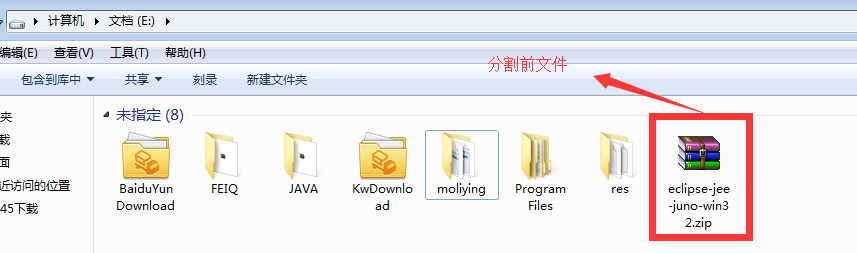
本文以本地文件 E:\eclipse-jee-juno-win32.zip 為例進行演示。分割前文件完整獨立;分割後將生成多個帶序號的分片文件(如 eclipse-jee-juno-win32_data1.zip、eclipse-jee-juno-win32_data2.zip...)。
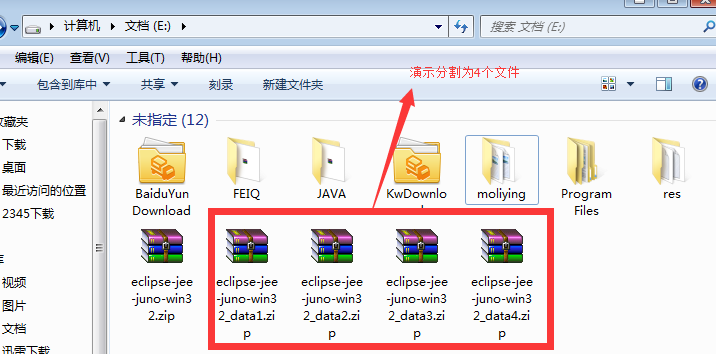
分割原理:讀取源文件總長度,按指定份數計算每片大小,循環讀取寫入新文件,直至達到單片大小上限。
/**
 * 文件分割核心方法
 * @param src 源文件對象
 * @param partCount 分割份數
 */
private static void splitFile(File src, int partCount) {
    if (!src.isFile()) return;

    long totalSize = src.length();
    String fileName = src.getName().substring(0, src.getName().lastIndexOf("."));
    String extension = src.getName().substring(src.getName().lastIndexOf("."));
    long partSize = totalSize / partCount; // 每片理論大小

    try (InputStream in = new FileInputStream(src)) {
        byte[] buffer = new byte[10 * 1024 * 1024]; // 10MB 緩衝區
        int bytesRead;

        for (int i = 1; i <= partCount; i++) {
            File partFile = new File(src.getParent(), fileName + "_data" + i + extension);
            try (OutputStream out = new FileOutputStream(partFile)) {
                long written = 0;
                while (written < partSize && (bytesRead = in.read(buffer)) != -1) {
                    int toWrite = (int) Math.min(bytesRead, partSize - written);
                    out.write(buffer, 0, toWrite);
                    written += toWrite;
                }
            }
            System.out.println("已生成分片:" + partFile.getAbsolutePath());
        }
    } catch (IOException e) {
        e.printStackTrace();
    }
}written 變量確保每片不超過理論大小,最後一片自動包含剩餘數據合併原理:按序號順序讀取所有分片,依次追加寫入目標文件。
/**
 * 文件合併核心方法
 * @param partPaths 分片文件路徑陣列(需按正確順序傳入)
 */
private static void mergeFiles(String... partPaths) {
    if (partPaths == null || partPaths.length == 0) return;

    // 從第一個分片推導目標文件名(去除 _dataN 後綴)
    File firstPart = new File(partPaths[0]);
    String targetName = firstPart.getName().replaceFirst("_data\\d+", "") + firstPart.getName().substring(firstPart.getName().lastIndexOf("."));
    File targetFile = new File(firstPart.getParent(), targetName);

    try (OutputStream out = new FileOutputStream(targetFile, true)) { // 追加模式
        byte[] buffer = new byte[10 * 1024 * 1024];
        int bytesRead;

        for (String path : partPaths) {
            File part = new File(path);
            try (InputStream in = new FileInputStream(part)) {
                while ((bytesRead = in.read(buffer)) != -1) {
                    out.write(buffer, 0, bytesRead);
                }
            }
            System.out.println("已合併分片:" + part.getName());
        }
    } catch (IOException e) {
        e.printStackTrace();
    }

    System.out.println("文件合併完成!輸出文件:" + targetFile.getAbsolutePath());
}new FileOutputStream(targetFile, true) 確保後續分片內容追加而非覆蓋public class FileSplitMergeDemo {
public static void main(String[] args) {
File srcFile = new File("E:\\eclipse-jee-juno-win32.zip");
// 1. 分割為 3 片
System.out.println("=== 開始分割 ===");
splitFile(srcFile, 3);
// 2. 合併還原
System.out.println("\n=== 開始合併 ===");
String parent = srcFile.getParent();
String baseName = srcFile.getName().replaceFirst("\\.zip$", "");
String ext = ".zip";
String[] parts = new String[3];
for (int i = 1; i <= 3; i++) {
parts[i-1] = parent + "\\" + baseName + "_data" + i + ext;
}
mergeFiles(parts);
}
// ... 此處放入上述 splitFile 與 mergeFiles 方法
}MappedByteBuffer 提升性能文件分割與合併雖屬基礎 IO 操作,但掌握其核心邏輯——精確控制讀寫邊界、合理設置緩衝區、妥善管理資源釋放——是處理大文件傳輸、分布式存儲、斷點續傳等場景的基石。實際項目中建議封裝為通用工具類,並加入校驗與異常重試機制。