基於 Spring MVC + Spring + MyBatis 框架,整合第三方短信接口 (以 WebChinese 為例),實現註冊/登錄場景的短信驗證碼發送、Session 存儲、前端校驗閉環。
<dependency>
  <groupId>commons-httpclient</groupId>
  <artifactId>commons-httpclient</artifactId>
  <version>3.1</version>
</dependency>
<dependency>
  <groupId>commons-codec</groupId>
  <artifactId>commons-codec</artifactId>
  <version>1.4</version>
</dependency>
<dependency>
  <groupId>commons-logging</groupId>
  <artifactId>commons-logging</artifactId>
  <version>1.1.1</version>
</dependency>
public class SendMsg_webchineseController {
    public static HashMap<String, String> getMessageStatus(String phone) throws Exception {
        HashMap<String, String> result = new HashMap<>();
        HttpClient client = new HttpClient();
        PostMethod post = new PostMethod("https://gbk.sms.webchinese.cn");

        post.addRequestHeader("Content-Type", "application/x-www-form-urlencoded;charset=gbk");

        String code = VerifyingCodeGenerator.generate(); // 6位隨機碼
        NameValuePair[] data = {
            new NameValuePair("Uid", "你的用戶名"),
            new NameValuePair("Key", "你的密鑰"),
            new NameValuePair("smsMob", phone),
            new NameValuePair("smsText", "您正在註冊本站會員,本次驗證碼為:" + code + ",有效期5分鐘")
        };

        post.setRequestBody(data);
        client.executeMethod(post);

        String status = new String(post.getResponseBodyAsString().getBytes("gbk"));
        result.put("code", code);
        result.put("result", status); // "1" 表示成功

        post.releaseConnection();
        return result;
    }
}
@ResponseBody
@RequestMapping(value = UrlDefine.Register.CHECKMESSAGEWORK, method = RequestMethod.POST)
public Object sendCheckMessage(HttpServletRequest request, @RequestBody UserBean user) throws Exception {
    String phone = user.getTelephone();

    // 1. 檢查手機號是否已註冊
    if (userService.getByPhone(phone) != null) {
        return new Response(Status.ERROR, "該手機號已被註冊");
    }

    // 2. 調用短信接口
    HashMap<String, String> smsResult = SendMsg_webchineseController.getMessageStatus(phone);
    String status = smsResult.get("result");

    if ("1".equals(status.trim())) {
        // 3. 發送成功,存入 Session
        String code = smsResult.get("code");
        HttpSession session = request.getSession();
        session.setAttribute("sms_code", code);
        session.setMaxInactiveInterval(60 * 5); // 5分鐘過期
        logger.info("發送驗證碼: " + code);
        return new Response(Status.SUCCESS, "發送成功");
    } else {
        return new Response(Status.ERROR, "短信發送失敗: " + status);
    }
}
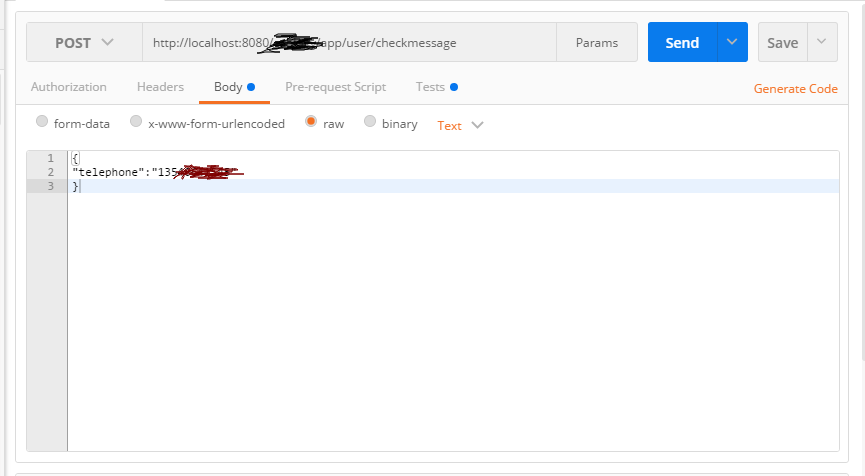
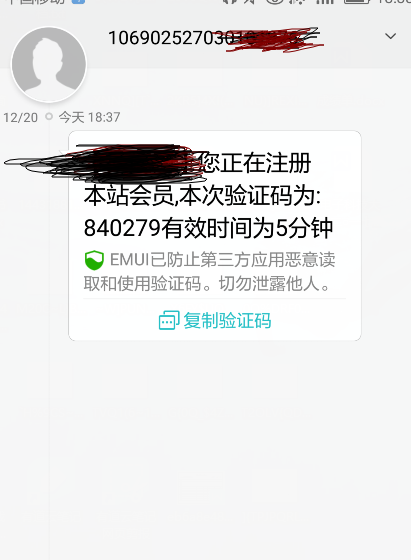
請求:POST /register/checkMessageWork Body: {"telephone":"13800138000"}
響應:{"status":"SUCCESS","message":"發送成功"}
@RequestMapping(value = UrlDefine.Register.REGISTER, method = RequestMethod.POST)
public Object register(HttpServletRequest request, @RequestBody RegisterForm form) {
    HttpSession session = request.getSession();
    String sessionCode = (String) session.getAttribute("sms_code");

    if (sessionCode == null || !sessionCode.equals(form.getSmsCode())) {
        return new Response(Status.ERROR, "驗證碼錯誤或已過期");
    }

    // 驗證通過,執行註冊業務...
    session.removeAttribute("sms_code"); // 一次性使用,移除
    return userService.register(form);
}
| 環節 | 關鍵點 | 避坑提示 |
|---|---|---|
| 隨機碼生成 | 使用 SecureRandom 或工具類,保證熵 | 避免 Math.random() 可預測性 |
| 接口編碼 | 第三方要求 GBK,需 getBytes("gbk") 解碼響應 | 響應體編碼與請求頭 charset 一致 |
| Session 存儲 | setMaxInactiveInterval(300) 設置 5 分鐘 TTL | 分佈式環境需用 Redis 共享 Session |
| 防刷機制 | 同手機號 60 秒限流、IP 限流、圖形驗證碼輔助 | 防止短信轟炸攻擊 |
| 錯誤碼處理 | 第三方返回非 "1" 均視為失敗,記錄日誌告警 | 建立短信發送成功率監控大盤 |
短信驗證碼看似簡單,實則涉及安全、可用性、合規多個維度。從「能跑通」到「經得住生產考驗」,還有很長的路要走。