發送郵件需引入 JavaMail API 與 Java Activation Framework (JAF)。JDK 9+ 已內置 JAF,JDK 8 需額外引入。
<dependency>
    <groupId>com.sun.mail</groupId>
    <artifactId>javax.mail</artifactId>
    <version>1.6.2</version>
</dependency>
<!-- JDK 8 需額外添加 -->
<dependency>
    <groupId>javax.activation</groupId>
    <artifactId>activation</artifactId>
    <version>1.1.1</version>
</dependency>
或下載 JAR 包手動加入 Classpath:mail.jar、activation.jar。
public void sendTextMail(String to, String subject, String content) {
    Properties props = new Properties();
    props.put("mail.smtp.host", "smtp.example.com");
    props.put("mail.smtp.port", "25"); // 或 587 (TLS), 465 (SSL)
    props.put("mail.smtp.auth", "true");

    Session session = Session.getInstance(props, new Authenticator() {
        protected PasswordAuthentication getPasswordAuthentication() {
            return new PasswordAuthentication("username", "password");
        }
    });

    try {
        MimeMessage message = new MimeMessage(session);
        message.setFrom(new InternetAddress("from@example.com"));
        message.addRecipient(Message.RecipientType.TO, new InternetAddress(to));
        message.setSubject(subject);
        message.setText(content); // 純文本
        Transport.send(message);
    } catch (MessagingException e) {
        throw new RuntimeException("郵件發送失敗", e);
    }
}
message.setContent("<h1>歡迎註冊</h1><p>您的驗證碼:<strong>123456</strong></p>", "text/html;charset=UTF-8");
setContent(Object, String) 設置 MIME 類型為 text/htmlcharset=UTF-8 防止中文亂碼// 1. 創建文本部分
MimeBodyPart textPart = new MimeBodyPart();
textPart.setContent("詳細內容請查看附件", "text/html;charset=UTF-8");
// 2. 創建附件部分
MimeBodyPart filePart = new MimeBodyPart();
DataSource source = new FileDataSource(new File("/path/to/report.pdf"));
filePart.setDataHandler(new DataHandler(source));
filePart.setFileName(MimeUtility.encodeText("月度報告.pdf")); // 編碼中文文件名
// 3. 組裝 Multipart
MimeMultipart multipart = new MimeMultipart();
multipart.addBodyPart(textPart);
multipart.addBodyPart(filePart);
// 4. 設置到 Message
message.setContent(multipart);
多附件:重複步驟 2-3 添加多個 MimeBodyPart。
內嵌圖片:附件部分設置 filePart.setHeader("Content-ID", "<logo>"),HTML 中引用 <img src="cid:logo">。
smtp.qq.com,端口:465 (SSL) 或 587 (TLS)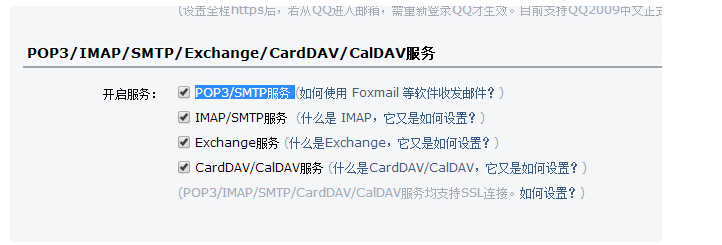
public void sendQQMail(String to, String subject, String content) {
    Properties props = new Properties();
    props.put("mail.smtp.host", "smtp.qq.com");
    props.put("mail.smtp.port", "465");
    props.put("mail.smtp.auth", "true");
    props.put("mail.smtp.socketFactory.class", "javax.net.ssl.SSLSocketFactory");
    props.put("mail.smtp.socketFactory.port", "465");
    // TLS 方案 (端口 587)
    // props.put("mail.smtp.starttls.enable", "true");

    Session session = Session.getInstance(props, new Authenticator() {
        protected PasswordAuthentication getPasswordAuthentication() {
            return new PasswordAuthentication("your_qq@qq.com", "授權碼");
        }
    });

    try {
        MimeMessage message = new MimeMessage(session);
        message.setFrom(new InternetAddress("your_qq@qq.com", "發件人昵稱", "UTF-8"));
        message.addRecipient(Message.RecipientType.TO, new InternetAddress(to));
        message.setSubject(subject, "UTF-8");
        message.setContent(content, "text/html;charset=UTF-8");
        Transport.send(message);
        System.out.println("發送成功");
    } catch (MessagingException | UnsupportedEncodingException e) {
        throw new RuntimeException("QQ郵件發送失敗", e);
    }
}
| 服務商 | SMTP 服務器 | SSL 端口 | TLS 端口 | 備註 |
|---|---|---|---|---|
| QQ 郵箱 | smtp.qq.com | 465 | 587 | 需開啟服務獲取授權碼 |
| 163 郵箱 | smtp.163.com | 465/994 | 25/587 | 需開啟客戶端授權密碼 |
| Gmail | smtp.gmail.com | 465 | 587 | 需開啟「不太安全的應用」或應用專用密碼 |
| Outlook | smtp.office365.com | 587 (TLS) | - | 僅支持 STARTTLS |
| 企業郵箱 | smtp.exmail.qq.com | 465 | 587 | 騰訊企業郵 |
@Async("mailExecutor")
public void sendAsync(MailRequest request) {
    sendMail(request);
}

// 配置線程池
@Bean
public ThreadPoolTaskExecutor mailExecutor() {
    ThreadPoolTaskExecutor executor = new ThreadPoolTaskExecutor();
    executor.setCorePoolSize(5);
    executor.setMaxPoolSize(20);
    executor.setQueueCapacity(100);
    executor.setThreadNamePrefix("mail-sender-");
    return executor;
}
整合 Thymeleaf/FreeMarker/Velocity,分離業務邏輯與模板:
@Autowired private TemplateEngine templateEngine;

public String buildHtml(String templateName, Context context) {
    return templateEngine.process(templateName, context);
}
Session 和 Transport 連接Transport.connect() → 循環 transport.sendMessage() → transport.close()Return-Path / Disposition-Notification-To 頭| 錯誤現象 | 可能原因 | 解決方案 |
|---|---|---|
| 535 Error: authentication failed | 用戶名/授權碼錯誤、未開啟 SMTP 服務 | 檢查授權碼、網頁端開啟服務、嘗試 SSL/TLS 切換 |
| Could not connect to SMTP host | 網絡不通、防火牆攔截、端口錯誤 | telnet 測試連通性、檢查安全組、確認端口 |
| 中文亂碼/附件文件名亂碼 | 編碼未指定 UTF-8 | MimeUtility.encodeText()、setSubject(content, "UTF-8") |
| 郵件進垃圾箱 | 無 SPF/DKIM、內容敏感詞、IP 信譽差 | 配置域名認證、優化內容、使用專業發送服務 |
| javax.net.ssl.SSLHandshakeException | JDK 版本過低、證書不信任 | 升級 JDK 8u161+、設置信任所有證書(測試環境) |
JavaMail API 提供了完整、標準的郵件發送能力。掌握 Session/Message/Transport 核心三件套、MimeMultipart 組裝複雜內容、SSL/TLS 安全傳輸、異步化/模板化/批量化 工程化實踐,能構建穩定、高效、合規的郵件通知系統。現代項目建議封裝為通用 MailService 組件,接入配置中心、監控告警、鏈路追蹤,作為基礎設施服務提供給上層業務調用。