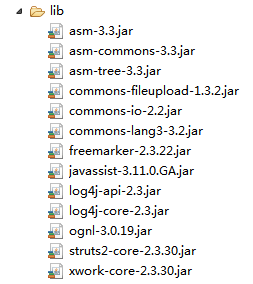
現代 Web 開發普遍採用前端攔截 + 後端把關的雙層校驗策略。前端常用 jQuery Validation 插件,後端則首選 Hibernate Validator(Bean Validation 規範 JSR 303/349/380 的參考實現)。本文將詳細記錄在 SSM(Spring + Spring MVC + MyBatis)項目中整合 Hibernate Validator 的完整流程。
<!-- Bean Validation API -->
<dependency>
    <groupId>javax.validation</groupId>
    <artifactId>validation-api</artifactId>
    <version>${validation.api.version}</version>
</dependency>
<!-- Hibernate Validator 實現 -->
<dependency>
    <groupId>org.hibernate</groupId>
    <artifactId>hibernate-validator</artifactId>
    <version>${hibernate.version}</version>
</dependency><!-- 1. 國際化消息源:支援校驗錯誤信息多語言 -->
<bean id="messageSource" class="org.springframework.context.support.ReloadableResourceBundleMessageSource">
<property name="basenames">
<list><value>classpath:resource/ValidationMessages</value></list>
</property>
<property name="useCodeAsDefaultMessage" value="true" />
</bean>
<!-- 2. 註冊全局 Validator -->
<mvc:annotation-driven validator="validator" />
<bean id="validator" class="org.springframework.validation.beanvalidation.LocalValidatorFactoryBean">
<property name="providerClass" value="org.hibernate.validator.HibernateValidator" />
<!-- 關鍵:關聯上述 messageSource,實現錯誤信息國際化 -->
<property name="validationMessageSource" ref="messageSource" />
</bean>val.age.message=年齡不能超過20歲
username.not.null=用戶名不能為空
pwd.not.null=密碼不能為空
username.length=用戶名最大不能超過{max},最小不能少於{min}
email.format.error=郵箱格式不正確
title.not.null=推送主題不能為空public class ValBean {
private Long id;
@Max(value = 20, message = "{val.age.message}")
private Integer age;
@NotBlank(message = "{username.not.null}")
@Length(max = 6, min = 3, message = "{username.length}")
private String username;
@NotBlank(message = "{pwd.not.null}")
@Pattern(regexp = "^(?![0-9]+$)(?![a-zA-Z]+$)[0-9A-Za-z]{6,10}$", message = "密碼必須是6~10位數字和字母的組合")
private String password;
@Pattern(regexp = "^((13[0-9])|(15[^4,\\D])|(18[0,5-9]))\\d{8}$", message = "手機號格式不正確")
private String phone;
@Email(message = "{email.format.error}")
private String email;
// getter/setter 省略
}@Controller
@RequestMapping("/val")
public class ValidateController {
@PostMapping("/val")
@ResponseBody
public LeeJSONResult val(@Valid @RequestBody ValBean bean, BindingResult result) {
if (result.hasErrors()) {
Map<String, String> errors = getErrors(result);
return LeeJSONResult.error(errors);
}
// 業務邏輯...
return LeeJSONResult.ok();
}
private Map<String, String> getErrors(BindingResult result) {
Map<String, String> map = new HashMap<>();
for (FieldError error : result.getFieldErrors()) {
map.put(error.getField(), error.getDefaultMessage());
}
return map;
}
}| 註解 | 說明 |
|---|---|
| @NotNull / @NotBlank / @NotEmpty | 非空校驗(語義略有不同) |
| @Size / @Length | 長度範圍 |
| @Min / @Max / @DecimalMin / @DecimalMax | 數值範圍 |
| @Pattern | 正則表達式 |
| 郵箱格式 | |
| @Past / @Future | 日期過去/未來 |
| @AssertTrue / @AssertFalse | 布爾值校驗 |
通過 @Valid + BindingResult 即可優雅實現參數校驗與錯誤收集。配合國際化消息源,實現錯誤信息的靈活維護與多語言支持。這是企業級應用後端校驗的標準做法。