本文示範如何使用 JDBC(Java Database Connectivity)連接 MySQL 資料庫,涵蓋驅動下載、Eclipse 匯入、建立測試資料表、插入資料與完整查詢程式碼。
Java 連接 MySQL 需要 MySQL Connector/J 驅動包:
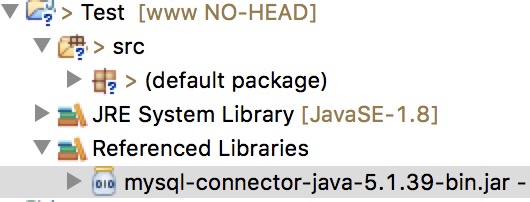
mysql-connector-java-5.1.39-bin.jar解壓後取得 JAR 檔,在 Eclipse 中右鍵專案 → Build Path → Add External Archives 匯入。
CREATE DATABASE RUNOOB;
USE RUNOOB;
CREATE TABLE `websites` (
  `id` int(11) NOT NULL AUTO_INCREMENT,
  `name` char(20) NOT NULL DEFAULT '' COMMENT '站點名稱',
  `url` varchar(255) NOT NULL DEFAULT '',
  `alexa` int(11) NOT NULL DEFAULT '0' COMMENT 'Alexa 排名',
  `country` char(10) NOT NULL DEFAULT '' COMMENT '國家',
  PRIMARY KEY (`id`)
) ENGINE=InnoDB DEFAULT CHARSET=utf8;
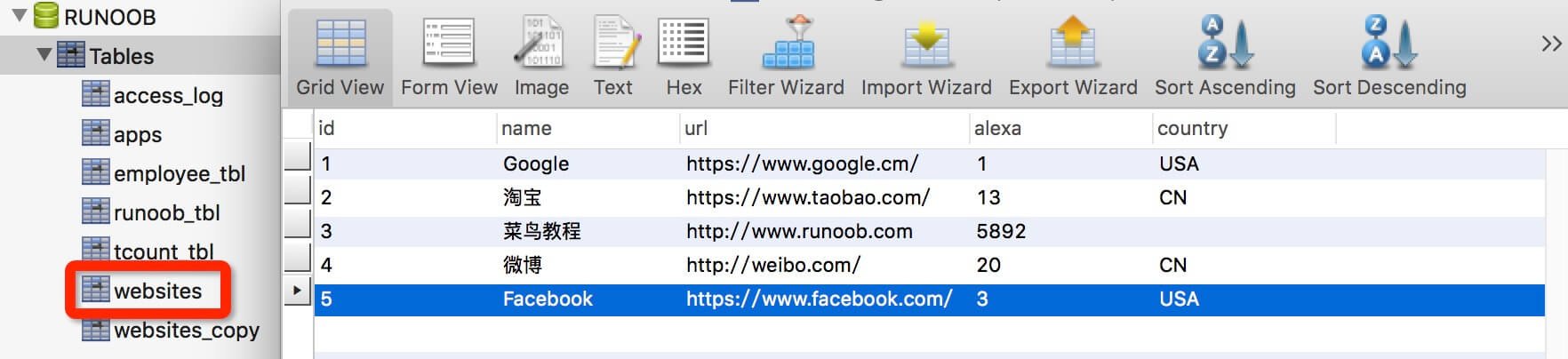
INSERT INTO `websites` VALUES
('1', 'Google', 'https://www.google.cm/', '1', 'USA'),
('2', '淘寶', 'https://www.taobao.com/', '13', 'CN'),
('3', '菜鳥教程', 'https://www.runoob.com', '5892', ''),
('4', '微博', 'https://weibo.com/', '20', 'CN'),
('5', 'Facebook', 'https://www.facebook.com/', '3', 'USA');
package com.runoob.test;

import java.sql.*;

public class MySQLDemo {
    static final String JDBC_DRIVER = "com.mysql.jdbc.Driver";
    static final String DB_URL = "jdbc:mysql://localhost:3306/RUNOOB";
    static final String USER = "root";
    static final String PASS = "123456";

    public static void main(String[] args) {
        Connection conn = null;
        Statement stmt = null;
        try {
            Class.forName(JDBC_DRIVER);
            System.out.println("連接資料庫...");
            conn = DriverManager.getConnection(DB_URL, USER, PASS);
            System.out.println("實例化 Statement 物件...");
            stmt = conn.createStatement();
            String sql = "SELECT id, name, url FROM websites";
            ResultSet rs = stmt.executeQuery(sql);

            while (rs.next()) {
                int id = rs.getInt("id");
                String name = rs.getString("name");
                String url = rs.getString("url");
                System.out.print("ID: " + id);
                System.out.print(", 站點名稱: " + name);
                System.out.print(", 站點 URL: " + url);
                System.out.print("\n");
            }
            rs.close();
            stmt.close();
            conn.close();
        } catch (SQLException se) {
            se.printStackTrace();
        } catch (Exception e) {
            e.printStackTrace();
        } finally {
            try { if (stmt != null) stmt.close(); } catch (SQLException se2) {}
            try { if (conn != null) conn.close(); } catch (SQLException se) { se.printStackTrace(); }
        }
        System.out.println("Goodbye!");
    }
}

Class.forName()DriverManager.getConnection()conn.createStatement()stmt.executeQuery() 回傳 ResultSetrs.next() + getInt()/getString()ResultSet → Statement → Connection(反序關閉)