FCKeditor(現已更名為 CKEditor)曾是 Web 應用中廣泛採用的富文本編輯器。本文記錄在 Java 環境下整合 FCKeditor 2.2 與 FCKeditor.Java 2.3 的完整部署流程,供維護舊專案或參考歷史技術棧的開發者查閱。
於 Tomcat 建立 Web 應用目錄 webapps/TestFCKeditor,並依以下結構配置:
TestFCKeditor/
├── FCKeditor/                 ← 解壓 FCKeditor 2.2 完整目錄至此
└── WEB-INF/
    ├── lib/
    │   ├── fckeditor.jar      ← 來自 FCKeditor.Java 2.3
    │   └── ...其他依賴 jar
    ├── FCKeditor.tld          ← 來自 FCKeditor.Java 2.3 src 目錄
    └── web.xml                ← 需合併 FCKeditor.Java 提供的 servlet 定義
將 FCKeditor.Java 提供的 web.xml 內容合併至專案 WEB-INF/web.xml,重點修改:
SimpleUploader Servlet 的 enabled 參數設為 true 啟用上傳功能Connector Servlet 的 baseDir 指定上傳檔案儲存路徑<taglib> <taglib-uri>/TestFCKeditor</taglib-uri> <taglib-location>/WEB-INF/FCKeditor.tld</taglib-location> </taglib>
因編輯器資源位於 /FCKeditor/ 下,需在原映射路徑前加上前綴:
/FCKeditor/editor/filemanager/browser/default/connectors/jsp/connector/FCKeditor/editor/filemanager/upload/simpleuploader若僅需預設外觀與中文介面,可刪除多餘檔案:
skins/default/,刪除 silver/、office2003/fckconfig.js、fckeditor.js、fckstyles.xml、fcktemplates.xml_source/、各連接器非 JSP 實作、語言包僅保留 en.js、zh.js、zh-cn.js、fcklanguagemanager.js// 設定預設語言
FCKConfig.DefaultLanguage = 'zh-cn';
// 瀏覽/上傳 URL 指向已調整的 Servlet 映射
FCKConfig.LinkBrowserURL = FCKConfig.BasePath + "filemanager/browser/default/browser.html?Connector=connectors/jsp/connector";
FCKConfig.ImageBrowserURL = FCKConfig.BasePath + "filemanager/browser/default/browser.html?Type=Image&Connector=connectors/jsp/connector";
FCKConfig.FlashBrowserURL = FCKConfig.BasePath + "filemanager/browser/default/browser.html?Type=Flash&Connector=connectors/jsp/connector";
FCKConfig.LinkUploadURL = FCKConfig.BasePath + 'filemanager/upload/simpleuploader?Type=File';
FCKConfig.ImageUploadURL = FCKConfig.BasePath + 'filemanager/upload/simpleuploader?Type=Image';
FCKConfig.FlashUploadURL = FCKConfig.BasePath + 'filemanager/upload/simpleuploader?Type=Flash';
// 啟用 Tab 鍵縮排
FCKConfig.TabSpaces = 1;
// 前台安全:移除圖片、連結、Flash 等上傳功能
FCKConfig.ToolbarSets["Basic"] = [
['Bold','Italic','-','OrderedList','UnorderedList','-','Unlink','-','Style','FontSize','TextColor','BGColor','-','Smiley','SpecialChar','Replace','Preview']
];
// 右鍵選單同步移除高風險項目
FCKConfig.ContextMenu = ['Generic','Anchor','Flash','Select','Textarea','Checkbox','Radio','TextField','HiddenField','Button','BulletedList','NumberedList','TableCell','Table','Form'];
// 擴充中文字體
FCKConfig.FontNames = '宋體;黑體;隸書;楷體_GB2312;Arial;Comic Sans MS;Courier New;Tahoma;Times New Roman;Verdana';注意:修改後必須以 UTF-8 編碼儲存。
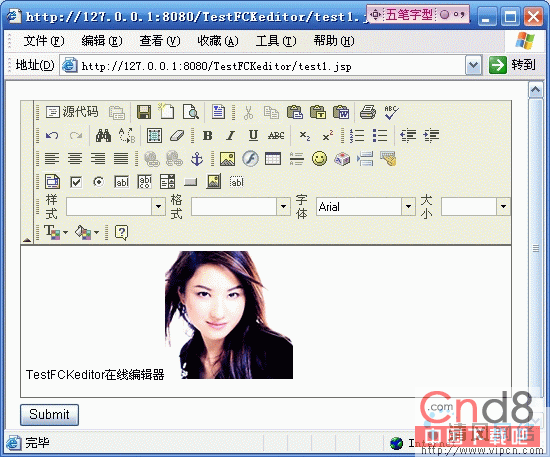
建立 test.jsp 驗證整合,展示三種呼叫方式:
<%@ page language="java" import="com.fredck.FCKeditor.*" %>
<%@ taglib uri="/TestFCKeditor" prefix="FCK" %>
<script type="text/javascript" src="/TestFCKeditor/FCKeditor/fckeditor.js"></script>

<form action="show.jsp" method="post" target="_blank">
  <!-- 方式二:JavaScript API 呼叫(推薦) -->
  <textarea id="content" name="content">input</textarea>
  <script type="text/javascript">
    var oFCKeditor = new FCKeditor('content');
    oFCKeditor.BasePath = "/TestFCKeditor/FCKeditor/";
    oFCKeditor.Height = 400;
    oFCKeditor.ToolbarSet = "Default";
    oFCKeditor.ReplaceTextarea();
  </script>
  <input type="submit" value="Submit">
</form>
show.jsp 簡單接收並顯示內容:
<% String content = request.getParameter("content"); out.print(content); %>啟動 Tomcat,訪問 https://localhost:8080/TestFCKeditor/test.jsp。若編輯器正常載入、工具列顯示、圖片上傳功能運作,即代表部署成功。
baseDir 路徑權限與 Servlet 映射前綴fckconfig.js 為 UTF-8、JSP 頁面指定 pageEncoding="UTF-8"SimpleUploader 已啟用、目錄可寫入FCKeditor 在 Java 環境的整合核心在於:前端資源路徑對應、後端 Servlet 映射正確、上傳路徑權限充足、前台安全配置得當。雖然 FCKeditor 已停止維護,但理解其整合機制有助於遷移至 CKEditor 或其他現代編輯器。