承接前三篇基礎 IO 操作,本文深入探討物件序列化、執行緒間管道通訊、基本類型資料流等進階主題,這些是分散式系統、高效能 IO 與資料持久化的核心基礎。
序列化將物件狀態轉為位元組序列,可持久化至磁碟或透過網路傳輸;反序列化則還原物件。核心介面:java.io.Serializable(標記介面,無方法)。
import java.io.*;

class Person implements Serializable {
    private static final long serialVersionUID = 1L;
    private String name;
    private int age;
    public Person(String name, int age) { this.name = name; this.age = age; }
    @Override public String toString() { return "Name:" + name + ", Age:" + age; }
}

public class Demo {
    public static void main(String[] args) {
        String path = "demo.ser";
        Person p1 = new Person("張三", 12);
        Person p2 = new Person("李四", 14);

        try (FileOutputStream fos = new FileOutputStream(path);
             ObjectOutputStream oos = new ObjectOutputStream(fos)) {
            oos.writeObject(p1);
            oos.writeObject(p2);
            System.out.println("序列化完成");
        } catch (IOException e) {
            e.printStackTrace();
        }
    }
}
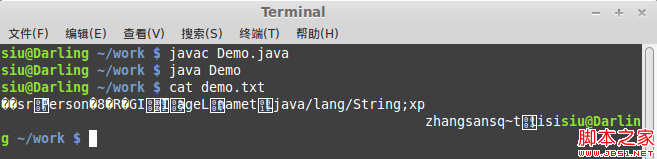
關鍵點:
Serializable,建議顯式宣告 serialVersionUID 避免版本不兼容transient 關鍵字可排除敏感/非持久化欄位public class Demo {
public static void main(String[] args) {
String path = "demo.ser";
try (FileInputStream fis = new FileInputStream(path);
ObjectInputStream ois = new ObjectInputStream(fis)) {
Person p = (Person) ois.readObject(); // 需向下轉型
System.out.println(p); // 輸出: Name:張三, Age:12
} catch (IOException | ClassNotFoundException e) {
e.printStackTrace();
}
}
}
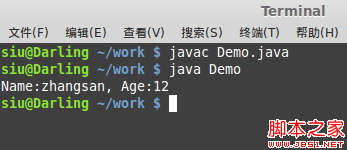
注意: 反序列化需類別定義一致(含 serialVersionUID),否則拋 InvalidClassException。
管道流 (PipedInputStream/PipedOutputStream) 實現記憶體內生產者-消費者模式,無需中間緩衝陣列,直接連接兩條流。
import java.io.*;

class Reader implements Runnable {
    private PipedInputStream in;
    public Reader(PipedInputStream in) { this.in = in; }
    @Override public void run() {
        try (BufferedInputStream bis = new BufferedInputStream(in)) {
            byte[] buf = new byte[1024];
            int len;
            while ((len = bis.read(buf)) != -1) {
                System.out.println("收到: " + new String(buf, 0, len));
            }
        } catch (IOException e) { e.printStackTrace(); }
    }
}

class Writer implements Runnable {
    private PipedOutputStream out;
    public Writer(PipedOutputStream out) { this.out = out; }
    @Override public void run() {
        try (PrintStream ps = new PrintStream(out)) {
            ps.println("管道輸出測試訊息");
        } catch (IOException e) { e.printStackTrace(); }
    }
}

public class Demo {
    public static void main(String[] args) {
        PipedInputStream in = new PipedInputStream();
        PipedOutputStream out = new PipedOutputStream();
        try {
            in.connect(out); // 關鍵:連接管道
            new Thread(new Reader(in)).start();
            new Thread(new Writer(out)).start();
        } catch (IOException e) { e.printStackTrace(); }
    }
}
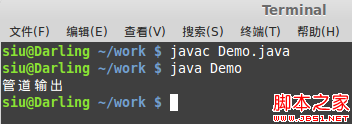
原理: 一端寫入阻塞直到另一端讀取,天然實現同步。另有字符版 PipedReader/PipedWriter。
專門處理 Java 八大基本類型與 String 的二進制讀寫,跨平台一致(大端序),適合資料檔案交換。
try (DataOutputStream dos = new DataOutputStream(new FileOutputStream("data.bin"))) {
    dos.writeInt(12);
    dos.writeBoolean(true);
    dos.writeDouble(12.2223);
    dos.writeChar('a'); // 寫入字符編碼值 97
    dos.writeUTF("中文測試"); // 修改 UTF-8 編碼字串
    dos.flush();
}
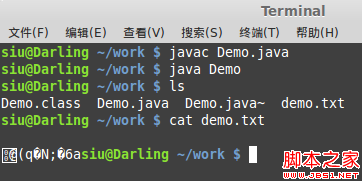
try (DataInputStream dis = new DataInputStream(new FileInputStream("data.bin"))) {
    System.out.println(dis.readInt());    // 12
    System.out.println(dis.readBoolean()); // true
    System.out.println(dis.readDouble());  // 12.2223
    System.out.println(dis.readChar());    // a
    System.out.println(dis.readUTF());     // 中文測試
}
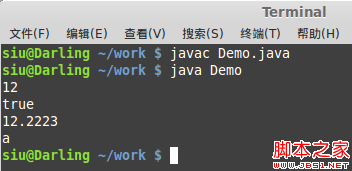
鐵律: 讀取順序必須與寫入順序完全一致,否則資料錯位導致讀取錯誤或 EOFException。
雖非流,但結合 seek() 實現檔案隨機讀寫,適合大檔案斷點續傳、索引建立:
try (RandomAccessFile raf = new RandomAccessFile("data.db", "rw")) {
    raf.seek(100); // 移動指標
    raf.writeInt(999);
    raf.seek(0);
    System.out.println(raf.readInt());
}
| 功能 | 類別/介面 | 適用場景 | 關鍵限制 |
|---|---|---|---|
| 物件持久化 | Serializable + ObjectOutputStream | 物件深度複製、RPC 參數傳遞、Session 儲存 | 需實作 Serializable,版本控制嚴格 |
| 執行緒通訊 | PipedInputStream/OutputStream | 生產者-消費者、記憶體內資料流 | 單向、緩衝區有限、死鎖風險 |
| 基本類型二進制 | DataInputStream/OutputStream | 跨平台資料交換、二進制協定解析 | 嚴格順序、無自描述能力 |
| 隨機存取 | RandomAccessFile | 大檔案部分讀寫、索引檔案 | 非流體系、檔案鎖機制依賴 OS |