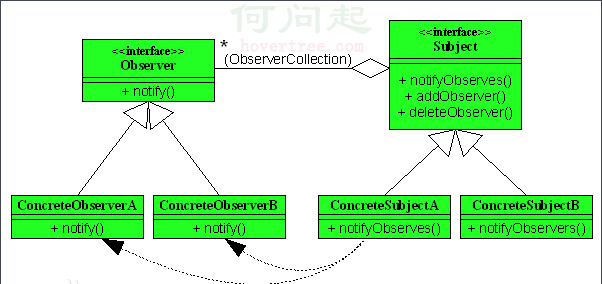
Java AWT 採用「事件委派模型」:事件源 → 事件物件 → 事件監聽器。Applet 繼承自 Component,可直接註冊各類監聽器。
public class AppletEvent extends Applet {
    int x = 100, y = 40;
    Button btn;
    Color clr = Color.red;

    public AppletEvent() {
        btn = new Button("你就按著玩兒吧!");
        add("Center", btn);  // BorderLayout.CENTER
    }

    public void paint(Graphics g) {
        g.setColor(Color.red);
        g.setFont(new Font("Helvetica", Font.PLAIN, 24));
        g.drawString("InofCD歡迎您!", x, y);
    }

    // Java 1.0 風格事件處理 (已淘汰)
    public boolean action(Event ev, Object arg) {
        if (ev.target instanceof Button) {
            y += 10; x -= 10;
            if (y >= 250) y = 10;
            if (x <= 0) x = 100;
            repaint();
            return true;  // 事件已處理
        }
        return false;  // 向上傳遞
    }
}action(Event, Object) 屬於 Java 1.0 事件模型,自 Java 1.1 起標記為 @DeprecatedActionListener 介面Event 類別已被 AWTEvent 子類別取代 (ActionEvent、MouseEvent 等)public class ModernAppletEvent extends Applet implements ActionListener {
int x = 100, y = 40;
Button btn;
public void init() {
setLayout(new BorderLayout());
btn = new Button("你就按著玩兒吧!");
btn.addActionListener(this); // 註冊監聽器
add(btn, BorderLayout.CENTER);
}
public void paint(Graphics g) {
g.setColor(Color.red);
g.setFont(new Font("Helvetica", Font.PLAIN, 24));
g.drawString("歡迎您!", x, y);
}
@Override
public void actionPerformed(ActionEvent e) {
if (e.getSource() == btn) {
y += 10; x -= 10;
if (y >= 250) y = 10;
if (x <= 0) x = 100;
repaint();
}
}
}| 事件類型 | 監聽器介面 | 事件類別 | 註冊方法 |
|---|---|---|---|
| 按鈕點擊 | ActionListener | ActionEvent | addActionListener |
| 滑鼠點擊/移動 | MouseListener / MouseMotionListener | MouseEvent | addMouseListener |
| 鍵盤輸入 | KeyListener | KeyEvent | addKeyListener |
| 視窗狀態 | WindowListener | WindowEvent | addWindowListener |
| 元件大小/位置 | ComponentListener | ComponentEvent | addComponentListener |
| 焦點變化 | FocusListener | FocusEvent | addFocusListener |
| 滑鼠滾輪 | MouseWheelListener | MouseWheelEvent | addMouseWheelListener |
// 匿名類別 (Java 7 相容)
btn.addActionListener(new ActionListener() {
    public void actionPerformed(ActionEvent e) { ... }
});

// Lambda 表示式 (Java 8+)
btn.addActionListener(e -> { ... });

// 方法參考
btn.addActionListener(this::handleButtonClick);actionPerformed 中執行耗時操作會凍結介面,應使用 SwingWorker 或執行緒池addActionListener 導致事件觸發多次KeyListener 需元件擁有焦點,建議使用 KeyBinding (Swing)