javax.microedition.lcdui.game 套件僅含五個類,卻提供兩大關鍵功能:
paint 與 input 執行緒。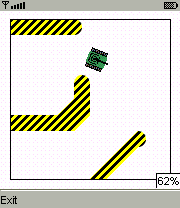
public class MicroTankCanvas extends Canvas implements Runnable {
  public void run() {
    while (true) { updateGameState(); repaint(); delay(); }
  }
  public void paint(Graphics g) { /* 繪圖碼 */ }
  protected void keyPressed(int keyCode) { /* 按鍵處理 */ }
}
問題:邏輯分散於 run、paint、keyPressed 三執行緒,repaint() 非同步導致繪製時機不可控,按鍵處理與繪製同步困難,易造成畫面撕裂、動畫卡頓。
getGraphics() 直接取得 Graphics 物件,繪圖至離屏緩衝區。flushGraphics() 將緩衝區複製到螢幕,阻塞至繪製完成,提供精確時序控制。getKeyStates() 輪詢當前按鍵狀態,取代事件驅動的 keyPressed(),邏輯與渲染同步在單一迴圈。public class MicroTankCanvas extends GameCanvas implements Runnable {
public void run() {
Graphics g = getGraphics();
while (true) {
updateGameState();
int keyState = getKeyStates();
handleInput(keyState);
render(g);
flushGraphics();
delayOneStep();
}
}
}import javax.microedition.lcdui.*;
import javax.microedition.lcdui.game.*;
public class SimpleGameCanvas extends GameCanvas implements Runnable {
private boolean running;
private long frameDelay = 20;
private int x, y, state;
public SimpleGameCanvas() {
super(true); // 啟用離屏緩衝
x = getWidth() / 2;
y = getHeight() / 2;
}
public void start() {
running = true;
new Thread(this).start();
}
public void stop() { running = false; }
public void run() {
Graphics g = getGraphics();
while (running) {
tick();
input();
render(g);
try { Thread.sleep(frameDelay); } catch (InterruptedException ignored) {}
}
}
private void tick() { state = (state + 1) % 20; }
private void input() {
int ks = getKeyStates();
if ((ks & LEFT_PRESSED) != 0) x = Math.max(0, x - 1);
if ((ks & RIGHT_PRESSED) != 0) x = Math.min(getWidth(), x + 1);
if ((ks & UP_PRESSED) != 0) y = Math.max(0, y - 1);
if ((ks & DOWN_PRESSED) != 0) y = Math.min(getHeight(), y + 1);
}
private void render(Graphics g) {
g.setColor(0xffffff);
g.fillRect(0, 0, getWidth(), getHeight());
g.setColor(0x0000ff);
g.drawLine(x, y, x - 10 + state, y - 10);
g.drawLine(x, y, x + 10, y - 10 + state);
g.drawLine(x, y, x + 10 - state, y + 10);
g.drawLine(x, y, x - 10, y + 10 - state);
flushGraphics();
}
}此範例展示極精簡的遊戲迴圈:tick() 更新狀態、input() 處理輸入、render() 繪圖、flushGraphics() 呈現,所有邏輯集中在單一執行緒,結構清晰、效能穩定。