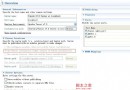
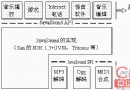
C:\tomcatconf/server.xml:將默認端口 80 改為未佔用端口(如 9000)CLASSPATH 包含 JDK_HOME/lib/tools.jar(JDK 1.2.x 必須)bin/startup.bat,訪問 https://localhost:9000/ 驗證JDK_HOME/bin、JSDK 路徑)Apache/conf/httpd.conf:ServerName、Porttomcat-apache.conf)httpd.conf 末尾添加:Include "Tomcat_Home/conf/tomcat-apache.conf"apache.exe 命令行啟動查看錯誤;常見 apj*: can't be specified more than once per host 需註釋 jserv.conf 中重複行C:\tomcat\webapps 下建 testdir,其下建 jsp、classes 目錄server.xml <ContextManager> 內添加:
<Context path="/testdir" docBase="webapps/testdir" debug="0" reloadable="true">
</Context>
webapps/testdir/classes 加入系統 CLASSPATHhelloworld.jsp)<% for(int i=1;i<6;i++){ out.println("<h"+i+">Hello World</h"+i+">"); } %>
訪問:https://localhost:apache_port/testdir/jsp/helloworld.jsp
HelloWorld.java)public class HelloWorld extends HttpServlet {
public void service(HttpServletRequest req, HttpServletResponse res)
throws IOException, ServletException {
res.setContentType("text/html");
ServletOutputStream out = res.getOutputStream();
out.println("<html><body><h1>Hello World</h1></body></html>");
}
}
編譯至 classes 目錄,訪問:https://localhost:apache_port/testdir/servlet/HelloWorld
netstat -an