Java 標準庫雖提供 `java.util.Date`、`Calendar`、`DateFormat` 等日期處理類別,但 Swing 缺乏原生日期選擇元件。本文呈現一套完整的自定義解決方案:`DateButton` (顯示/觸發按鈕) + `CalendarChooser` (彈出式月曆對話框),支援視覺化日期選擇、無效日期攔截、多國語系月份/星期顯示。
| 類別 | 職責 | 關鍵 API |
|---|---|---|
`DateButton` | 繼承 `JButton`,顯示格式化日期,點擊彈出 ` | `getDate()`、` |
`CalendarChooser` | 繼承 `JDialog`,月曆網格、年/月下拉選單、確定/取消按鈕 | `select(Date)`、` |
public class DateButton extends JButton {
    private Date date;
    private DateFormat formatter = DateFormat.getDateInstance(DateFormat.SHORT);

    public DateButton() { this(new Date()); }
    public DateButton(Date d) { setDate(d); addActionListener(e -> showChooser()); }

    public Date getDate() { return date; }
    public void setDate(Date d) {
        Date old = this.date;
        this.date = d;
        setText(formatter.format(d));
        firePropertyChange("date", old, d); // 支援 Bean 綁定
    }

    private void showChooser() {
        CalendarChooser chooser = new CalendarChooser(SwingUtilities.getWindowAncestor(this));
        Date selected = chooser.select(date);
        if (selected != null) setDate(selected);
    }
}
GregorianCalendar` 計算某月 1 號星期幾、該月天數。JButton` 矩陣 (6 行 x 7 列),空白格填入前/後月日期 (灰色)。JComboBox`:年份範圍由常數 `FIRST_YEAR` (如 1900) 至 `LAST_YEAR` (如 2100) 定義;月份使用 `DateFormatSymbols.getMonths()` 取得當地化名稱。
public Date select(Date initialDate) {
    setDate(initialDate); // 設定內部日曆顯示
    setVisible(true);     // 阻塞直到使用者按確定/取消/關閉
    return selectedDate;  // 確定回傳選中日期,取消/關閉回傳 null
}
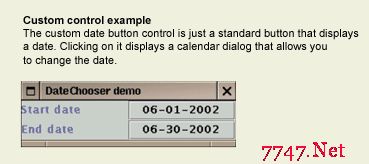
圖 A:DateButton 外觀 — 標準按鈕顯示格式化日期 (如「2024/03/15」)。
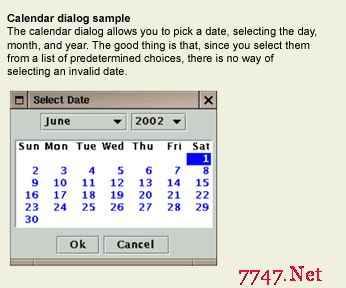
圖 B:CalendarChooser 月曆對話框 — 年/月下拉選單、星期標題、日期網格、確定/取消按鈕。
Locale.getDefault()` 取得預設語系,`DateFormatSymbols` 提供月份/星期名稱。若需指定語系,建構子傳入 `Locale` 參數。DateButton` 使用 `DateFormat.getDateInstance(SHORT, locale)`,符合各地習慣 (如美式 MM/dd/yyyy、歐式 dd.MM.yyyy)。TODAY_COLOR`、`SELECTED_COLOR`、`WEEKEND_COLOR`) 集中定義,易於主題切換。
JPanel panel = new JPanel();
DateButton db = new DateButton(); // 預設今日
panel.add(db);

// 監聽日期變更
db.addPropertyChangeListener("date", evt -> {
    Date newDate = (Date) evt.getNewValue();
    System.out.println("使用者選擇: " + newDate);
    // 觸發業務邏輯:查詢該日期報表、設定截止日等
});
CalendarChooser` 內部月曆網格由 `JPanel` 容器管理 `JButton` 子元件。CalendarChooser.select()` 靜態工廠方法封裝對話框建立、顯示、回傳流程。DateButton` 透過 `PropertyChangeSupport` 發射日期變更事件。這套元件展示了 Swing 輕量級元件模型的擴充威力:無需原生對等體 (Peer),純 Java 即可構建豐富、跨平台、可高度客製化的 UI 控制項。