SWT Image 的像素資料封裝於 ImageData 物件中:
width/height:圖像尺寸depth:色彩深度(1/2/4/8/16/24/32 bits per pixel)palette:PaletteData,索引色彩存調色盤,直接色彩存 RGB 位移資訊data:byte[] 像素緩衝區,編碼方式視 depth 而定bytesPerLine:每掃描行佔用位元組數(含可能的填充位元組)transparentPixel:透明色彩索引/值bytesPerLine 決定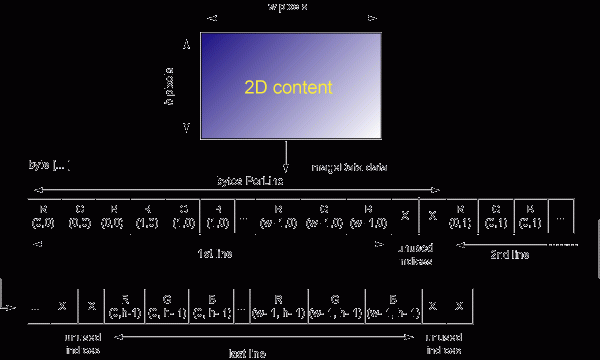
將 AWT int[] (ARGB) 轉為 SWT byte[] (RGB 24-bit):
int step = swtImageData.depth / 8;  // 24-bit → 3
byte[] data = swtImageData.data;
awtImage.getRGB(clipX, clipY, clipW, clipH, awtPixels, 0, clipW);

for (int i = 0; i < clipH; i++) {
    int idx = (clipY + i) * swtImageData.bytesPerLine + clipX * step;
    for (int j = 0; j < clipW; j++) {
        int rgb = awtPixels[j + i * clipW];
        // 忽略 Alpha,寫入 RGB 三個位元組(高位元組優先)
        for (int k = swtImageData.depth - 8; k >= 0; k -= 8) {
            data[idx++] = (byte) ((rgb >> k) & 0xFF);
        }
    }
}package swtgraphics2d;
import java.awt.Graphics2D;
import java.awt.image.BufferedImage;
import org.eclipse.swt.graphics.*;
import org.eclipse.swt.widgets.Display;
import org.eclipse.draw2d.Graphics;
import org.eclipse.draw2d.geometry.Rectangle;
public class Graphics2DRenderer {
private static final PaletteData PALETTE_DATA =
new PaletteData(0xFF0000, 0xFF00, 0xFF); // RGB 直接色彩
private static final int TRANSPARENT_COLOR = 0x123456; // 保留透明色
private BufferedImage awtImage;
private Image swtImage;
private ImageData swtImageData;
private int[] awtPixels;
// 準備渲染區域(支援 SWT GC 與 Draw2D Graphics)
public void prepareRendering(GC gc) { ... }
public void prepareRendering(Graphics graphics) { ... }
private void prepareRendering(int x, int y, int w, int h) {
checkOffScreenImages(w, h);
Graphics awtG = awtImage.getGraphics();
awtG.setColor(new java.awt.Color(TRANSPARENT_COLOR));
awtG.fillRect(x, y, w, h); // 清除為透明色
}
public Graphics2D getGraphics2D() {
return (awtImage != null) ? (Graphics2D) awtImage.getGraphics() : null;
}
// 完成渲染並繪製到目標
public void render(GC gc) { ... }
public void render(Graphics graphics) { ... }
private void transferPixels(int x, int y, int w, int h) { ... } // 核心轉換邏輯
private void checkOffScreenImages(int w, int h) {
if (swtImage == null || w > swtImage.getBounds().width || h > swtImage.getBounds().height) {
dispose();
awtImage = new BufferedImage(w, h, BufferedImage.TYPE_INT_ARGB);
swtImageData = new ImageData(w, h, 24, PALETTE_DATA);
swtImageData.transparentPixel = TRANSPARENT_COLOR;
awtPixels = new int[w * h];
}
}
public void dispose() { ... } // 釋放資源
}// 在 SWT PaintListener 中
Graphics2DRenderer renderer = new Graphics2DRenderer();
renderer.prepareRendering(gc);
Graphics2D g2d = renderer.getGraphics2D();
// 任意 Java 2D 繪圖操作
g2d.setRenderingHint(RenderingHints.KEY_ANTIALIASING, RenderingHints.VALUE_ANTIALIAS_ON);
g2d.rotate(Math.PI / 6);
g2d.drawString("旋轉文字", 50, 50);
g2d.draw(new Ellipse2D.Double(10, 10, 100, 50));
renderer.render(gc); // 刷新到 SWT 元件
renderer.dispose(); // 釋放資源gc.getClipping()),減少像素搬移開銷TRANSPARENT_COLOR 必須為繪圖中不會用到的特殊值,避免誤判透明區域dispose() 必須成對呼叫,防止 SWT 圖像資源洩漏此技術適用於中小型圖形、文字旋轉、向量圖示等場景。大面積高解析度影像轉換開銷較大,建議:
Image 避免重複轉換