延遲載入 (Lazy Loading) 透過代理物件延遲關聯資料查詢,直到真正存取時才發送 SQL,避免不必要的資料庫往返與記憶體佔用。配置關鍵在 lazy 屬性與特定關聯類型的額外設定。
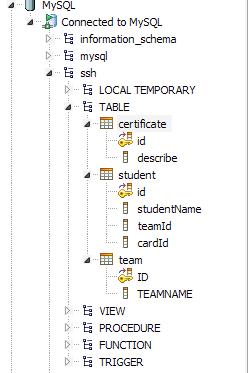
範例領域:Team (班級) 1:N Student (學生) 1:1 Certificate (身份證)
<hibernate-mapping>
    <class name="edu.dgut.ke.model.Team" table="TEAM" lazy="true">
        <id name="id" type="string">
            <column name="ID" length="32"/>
            <generator class="uuid.hex"/>
        </id>
        <property name="teamname" type="string">
            <column name="TEAMNAME" length="32" not-null="true" unique="true"/>
        </property>
        <!-- 一對多:Set 集合加 lazy="true" -->
        <set name="students" inverse="true" cascade="all" lazy="true">
            <key><column name="TEAMID" length="32" not-null="true"/></key>
            <one-to-many class="edu.dgut.ke.model.Student"/>
        </set>
    </class>
</hibernate-mapping>
<hibernate-mapping>
    <class name="edu.dgut.ke.model.Certificate" table="CERTIFICATE" lazy="true">
        <id name="id" type="string">
            <column name="ID" length="32"/>
            <generator class="uuid"/>
        </id>
        <property name="describe" type="string">
            <column name="DESCRIBE" length="50" not-null="true"/>
        </property>
        <!-- 一對一:class 標籤 lazy + one-to-one constrained="true" -->
        <one-to-one name="student"
            class="edu.dgut.ke.model.Student"
            constrained="true" />
    </class>
</hibernate-mapping>
<hibernate-mapping>
    <class name="edu.dgut.ke.model.Student" table="STUDENT" lazy="true">
        <id name="id" type="string">
            <column name="ID" length="32"/>
            <generator class="uuid.hex"/>
        </id>
        <!-- 多對一:預設即延遲,無需額外配置 -->
        <many-to-one name="certificate"
            class="edu.dgut.ke.model.Certificate"
            unique="true" column="cardId" cascade="all"/>
        <many-to-one name="team"
            class="edu.dgut.ke.model.Team"
            column="TEAMID" not-null="true"/>
        <property name="studentname" type="string">
            <column name="STUDENTNAME" length="16" not-null="true" unique="true"/>
        </property>
    </class>
</hibernate-mapping>
| 關聯類型 | 配置位置 | 關鍵屬性 | 備註 |
|---|---|---|---|
多對一 (many-to-one) | class 標籤 | lazy="true" (預設) | 預設即代理,可設 lazy="false" 關閉 |
一對多 (set/list/bag) | 集合標籤 | lazy="true" | 預設 true,代理集合 |
| 多對多 | 集合標籤 | lazy="true" | 同一對多 |
一對一 (one-to-one) | class + one-to-one | class lazy="true" + constrained="true" | 雙重配置缺一不可,否則退化為預設抓取 (join) |
// 錯誤:Session 關閉後存取延遲屬性
Session s = factory.openSession();
Team t = s.get(Team.class, id);
s.close();
Set stus = t.getStudents(); // 拋出異常
解決方案:
from Team t left join fetch t.students where t.id=:idselect new dto.TeamDTO(t.id, t.name, s.id, s.name) ...Hibernate.initialize(t.getStudents()) 在 Session 開啟時預載遍歷集合觸發 N 次額外查詢:
List teams = session.createQuery("from Team").list();
for (Team t : teams) {
    System.out.println(t.getStudents().size()); // 每次觸發 SELECT * FROM STUDENT WHERE TEAMID=?
}
解決:批次抓取 @BatchSize(size=10) 或 <set batch-size="10">,或改用 FETCH JOIN。
@Entity @Table(name="TEAM")
@Proxy(lazy = true) // 類別級代理
public class Team {
    @Id @GeneratedValue(generator = "uuid") @GenericGenerator(name="uuid", strategy="uuid2")
    @Column(name="ID", length=32) String id;

    @OneToMany(mappedBy = "team", cascade = CascadeType.ALL, fetch = FetchType.LAZY)
    @BatchSize(size = 20) // 批次抓取優化
    private Set students = new HashSet<>();
}

@Entity @Table(name="CERTIFICATE")
public class Certificate {
    @OneToOne(mappedBy = "certificate", fetch = FetchType.LAZY, optional = false)
    @MapsId // 共享主鍵 = constrained="true"
    private Student student;
}
hibernate.default_batch_fetch_size)FETCH JOIN / EntityGraph / DTO 精確載入