使用 Java 應用程式發送 E-mail 需安裝 JavaMail API 與 Java Activation Framework (JAF)。
解壓後將 mail.jar、activation.jar 加入 CLASSPATH。
import java.util.*;
import javax.mail.*;
import javax.mail.internet.*;
import javax.activation.*;

public class SendEmail {
    public static void main(String[] args) {
        String to = "abcd@gmail.com";
        String from = "web@gmail.com";
        String host = "localhost";

        Properties props = System.getProperties();
        props.setProperty("mail.smtp.host", host);
        Session session = Session.getDefaultInstance(props);

        try {
            MimeMessage msg = new MimeMessage(session);
            msg.setFrom(new InternetAddress(from));
            msg.addRecipient(Message.RecipientType.TO, new InternetAddress(to));
            msg.setSubject("This is the Subject Line!");
            msg.setText("This is actual message");
            Transport.send(msg);
            System.out.println("Sent message successfully....");
        } catch (MessagingException mex) { mex.printStackTrace(); }
    }
}
編譯執行:java SendEmail → Sent message successfully....
void addRecipients(Message.RecipientType type, Address[] addresses)
type:TO、CC(副本)、BCC(密件副本)addresses:InternetAddress[] 陣列// ... 相同設定 ...
msg.setContent("<h1>This is actual message</h1>", "text/html");
Transport.send(msg);
關鍵差異:使用 setContent() 並指定 MIME 類型 text/html。
// ... 相同設定 ...
BodyPart msgBodyPart = new MimeBodyPart();
msgBodyPart.setText("This is message body");

Multipart multipart = new MimeMultipart();
multipart.addBodyPart(msgBodyPart);

// 附件部分
msgBodyPart = new MimeBodyPart();
String filename = "file.txt";
DataSource source = new FileDataSource(filename);
msgBodyPart.setDataHandler(new DataHandler(source));
msgBodyPart.setFileName(filename);
multipart.addBodyPart(msgBodyPart);

msg.setContent(multipart);
Transport.send(msg);
若郵件伺服器需帳密驗證:
props.put("mail.smtp.auth", "true");
props.setProperty("mail.user", "myuser");
props.setProperty("mail.password", "mypwd");
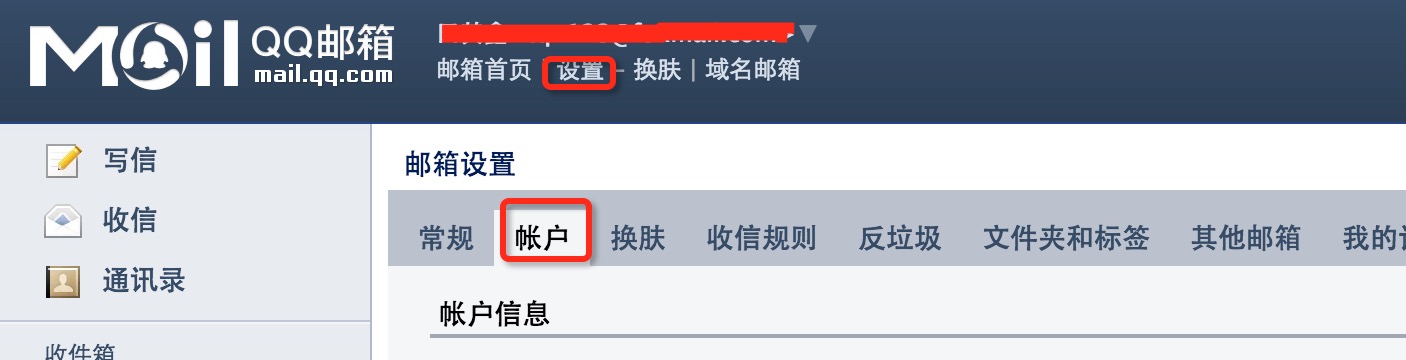
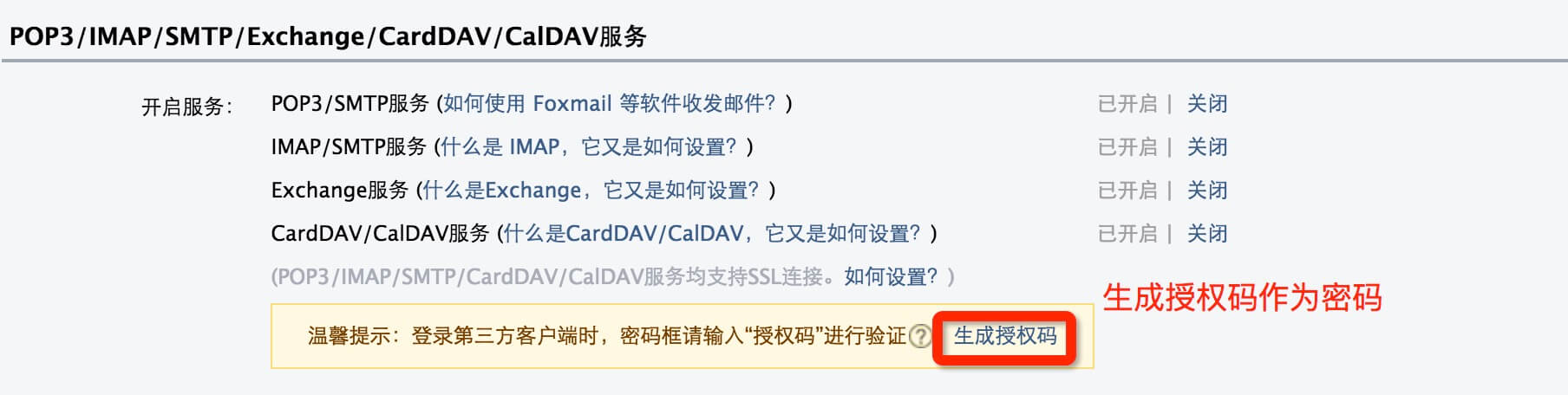
import java.util.Properties;
import javax.mail.*;

public class SendEmail2 {
    public static void main(String[] args) {
        String to = "xxx@qq.com";
        String from = "xxx@qq.com";
        String host = "smtp.qq.com";

        Properties props = System.getProperties();
        props.setProperty("mail.smtp.host", host);
        props.put("mail.smtp.auth", "true");

        Session session = Session.getDefaultInstance(props, new Authenticator() {
            protected PasswordAuthentication getPasswordAuthentication() {
                return new PasswordAuthentication("xxx@qq.com", "qq郵箱授權碼");
            }
        });

        try {
            MimeMessage msg = new MimeMessage(session);
            msg.setFrom(new InternetAddress(from));
            msg.addRecipient(Message.RecipientType.TO, new InternetAddress(to));
            msg.setSubject("This is the Subject Line!");
            msg.setText("This is actual message");
            Transport.send(msg);
            System.out.println("Sent message successfully....from w3cschool.cc");
        } catch (MessagingException mex) { mex.printStackTrace(); }
    }
}