在視窗中點擊滑鼠右鍵彈出選單,選單項為單選按鈕 (顏色選擇),選擇後變更視窗背景色。
import java.awt.*;
import java.awt.event.*;
import javax.swing.*;

public class JPopMenuDemo extends JFrame {
    JRadioButtonMenuItem[] items;
    Color[] colors = {Color.BLUE, Color.PINK, Color.YELLOW, Color.RED, Color.ORANGE};
    JPopupMenu popupMenu;

    public JPopMenuDemo() {
        super("右鍵彈出選單");
        ChangeColorAction action = new ChangeColorAction();
        String[] names = {"Blue","Pink","Yellow","Red","Orange"};
        ButtonGroup group = new ButtonGroup();
        popupMenu = new JPopupMenu();
        items = new JRadioButtonMenuItem[5];

        for (int i = 0; i < 5; i++) {
            items[i] = new JRadioButtonMenuItem(names[i]);
            popupMenu.add(items[i]);
            group.add(items[i]);
            items[i].addActionListener(action);
        }

        addMouseListener(new MouseAdapter() {
            public void mousePressed(MouseEvent e) { triggerEvent(e); }
            public void mouseReleased(MouseEvent e) { triggerEvent(e); }
            private void triggerEvent(MouseEvent e) {
                if (e.isPopupTrigger())
                    popupMenu.show(e.getComponent(), e.getX(), e.getY());
            }
        });

        getContentPane().setBackground(Color.WHITE);
        setSize(230, 160);
        setVisible(true);
        setDefaultCloseOperation(JFrame.EXIT_ON_CLOSE);
    }

    class ChangeColorAction implements ActionListener {
        public void actionPerformed(ActionEvent e) {
            for (int i = 0; i < 5; i++) {
                if (e.getSource() == items[i]) {
                    getContentPane().setBackground(colors[i]);
                    repaint();
                    return;
                }
            }
        }
    }

    public static void main(String[] args) {
        new JPopMenuDemo();
    }
}
MouseAdapter 監聽 mousePressed/mouseReleased,透過 e.isPopupTrigger() 判斷平台相關的彈出觸發事件。ButtonGroup 確保單選行為。ActionListener 統一處理選單項事件,依來源切換背景色。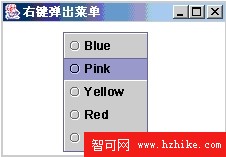
本文來自編程入門網:原文連結