本文為《你好,OSGi》系列第六部分。前文介紹 Spring DM 定義,本篇將詳細說明如何建置 Spring DM 開發環境,準備開發首個 Hello World 應用。
Spring DM 1.0 支援 OSGi Specification Release 4+ 與 JDK 1.4+,經測試相容三大開源 OSGi 容器:Equinox 3.2.2、Felix 1.0.1、Knopflerfish 2.0.3。本文使用 Eclipse 3.3(內建 Equinox 3.3)與 JDK 1.5 測試。Eclipse IDE 對 OSGi Bundle 開發、執行、除錯支援極佳。
spring-osgi-1.0.2-with-dependencies.zip 或最新版c:\softwarec:\sample\springdmC:\software\spring-osgi-1.0.2\dist(圖 1)org.springframework.osgi.bundle.core、org.springframework.osgi.bundle.extender、org.springframework.osgi.bundle.io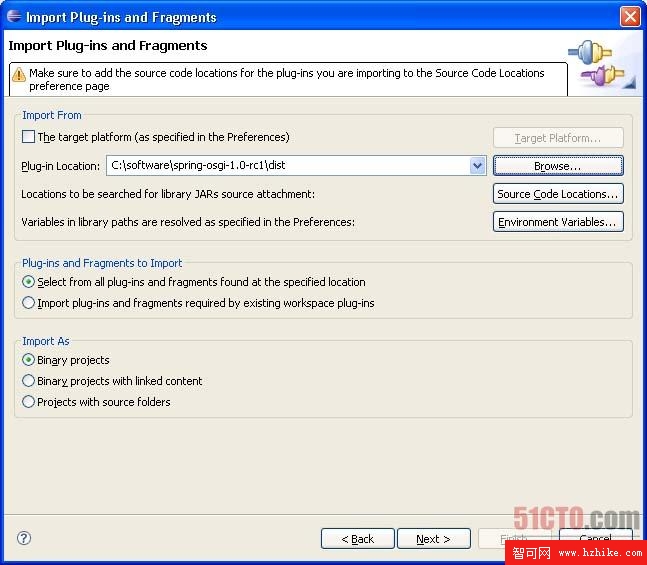
圖 1. 匯入 Spring DM JAR 檔案
C:\software\spring-osgi-1.0.2\lib 匯入以下七個外掛:
org.springframework.bundle.spring.aoporg.springframework.bundle.spring.beansorg.springframework.bundle.spring.contextorg.springframework.bundle.spring.coreorg.springframework.bundle.spring.jdbcorg.springframework.bundle.spring.txorg.springframework.osgi.aopalliance.osgibackport-util-concurrent.osgi-3.0-SNAPSHOT.jar(僅 JDK 1.4 需要)Spring DM 採用 Apache Commons Logging,提供 OSGi 格式的 Commons Logging 與 Log4j JAR,但 Eclipse 匯入可能失敗。解決方案:自建包含兩個 JAR 的 OSGi 外掛:
commons-logging.jar 與 log4j-1.2.14.jar(圖 2)org.apache.commons.logging,Target Platform 選 OSGi Framework > Standard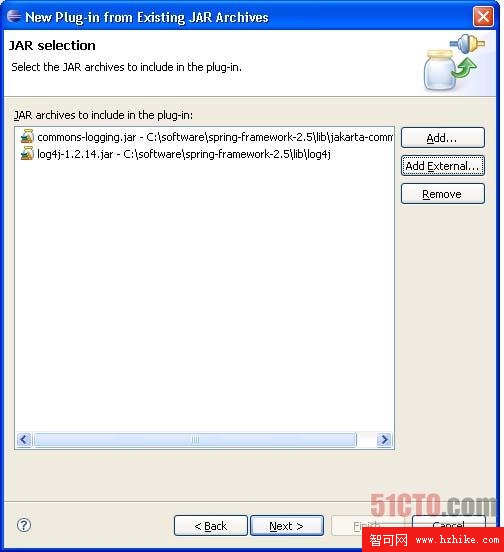
圖 2. 選擇外掛中要包含的 JAR
至此 Spring DM 開發環境建置完成,下一篇將使用 Spring DM 開發首個 Hello World 應用。