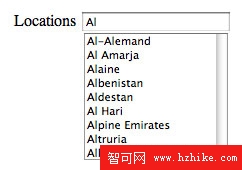
 圖 3 輸入 "Al" 後自動完成建議:Albania, Algeria 等。
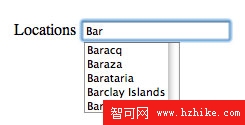 圖 4 輸入 "Bar" 後建議:Barbados 等。
<!DOCTYPE html>
<html xmlns="https://www.w3.org/1999/xhtml"
      xmlns:h="https://java.sun.com/jsf/html"
      xmlns:util="https://java.sun.com/jsf/composite/util">
  <h:head>
    <title>#{msgs.autoCompleteWindowTitle}</title>
  </h:head>
  <h:body>
    <div style="padding: 20px;">
      <h:form>
        <h:panelGrid columns="2">
          #{msgs.locationsPrompt}
          <util:autoComplete value="#{user.country}"
                             completionItems="#{autoComplete.countries}" />
        </h:panelGrid>
      </h:form>
    </div>
  </h:body>
</html>
value:綁定 Managed Bean user 的 country 屬性 (雙向)。completionItems:初始建議清單,來源為 autoComplete.countries (Managed Bean 提供)。@ManagedBean
@SessionScoped
public class User {
private String country;
public String getCountry() { return country; }
public void setCountry(String country) { this.country = country; }
}
resources/util/autoComplete.xhtml,使用者只需引用標籤。resources/ 目錄,無需 faces-config.xml 註冊。