本範例示範如何結合 CTreeCtrl (左側目錄樹) 與 CListCtrl (右側檔案清單) 打造類似 Windows 資源管理器的介面。核心技術:CImageList 管理圖示、SHGetFileInfo 取得系統檔案圖示、CFileFind 列舉檔案、動態載入子目錄。
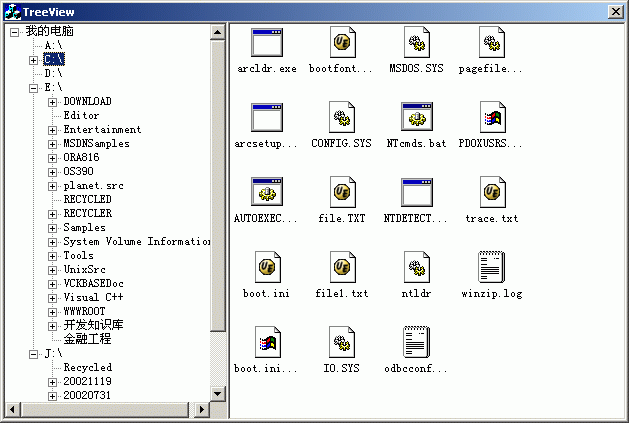
圖 1:程式執行介面,左側樹狀目錄,右側檔案圖示清單。
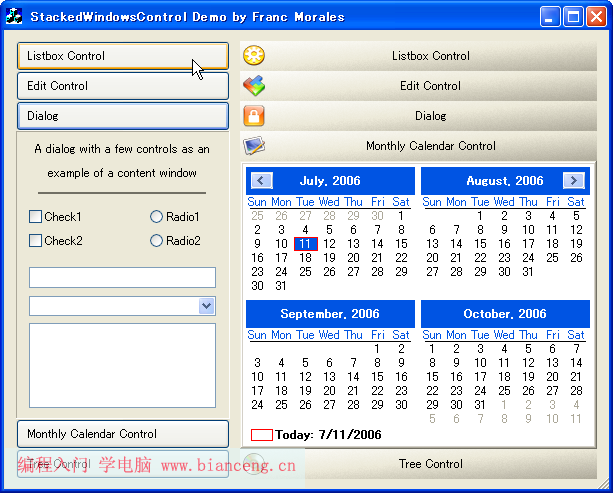
圖 2:另一視角截圖。
CTreeCtrl、CListCtrl、CImageListCFileFind (MFC 檔案搜尋封裝)SHGetFileInfo (Shell API 取得檔案圖示與顯示名稱)
BOOL CTreeViewDlg::OnInitDialog()
{
    CDialog::OnInitDialog();

    // 設定樹狀控件風格:按鈕、連線、根連線
    DWORD dwStyle = GetWindowLong(m_tree.m_hWnd, GWL_STYLE);
    dwStyle |= TVS_HASBUTTONS | TVS_HASLINES | TVS_LINESATROOT;
    SetWindowLong(m_tree.m_hWnd, GWL_STYLE, dwStyle);

    // 建立根節點「我的電腦」
    m_hRoot = m_tree.InsertItem(_T("我的電腦"));

    // 載入本機邏輯磁碟機
    GetLogicalDrives(m_hRoot);

    // 影像清單 (供 Tree/List 共用)
    m_ImageList.Create(16, 16, ILC_COLOR32 | ILC_MASK, 0, 10);
    m_tree.SetImageList(&m_ImageList, TVSIL_NORMAL);
    m_list.SetImageList(&m_ImageList, LVSIL_SMALL);

    return TRUE;
}
void CTreeViewDlg::GetLogicalDrives(HTREEITEM hParent)
{
    DWORD dwLen = GetLogicalDriveStrings(0, NULL);
    CString strDrives;
    LPTSTR pBuf = strDrives.GetBuffer(dwLen);
    GetLogicalDriveStrings(dwLen, pBuf);
    strDrives.ReleaseBuffer();

    CString strDrive;
    int pos = 0;
    while ((pos = strDrives.Find(_T('\0'), pos)) != -1)
    {
        strDrive = strDrives.Mid(pos - (strDrives.Find(_T('\0'), pos-1) + 1),
                                pos - (strDrives.Find(_T('\0'), pos-1) + 1));
        // 簡化:實際應用請用 _tcstok 或迴圈解析雙重 null 結尾字串
        if (!strDrive.IsEmpty())
            m_tree.InsertItem(strDrive, hParent);
        pos++;
    }
}
註: GetLogicalDriveStrings 回傳雙重 null 結尾字串,建議用標準迴圈解析:
TCHAR szDrives[MAX_PATH];
GetLogicalDriveStrings(MAX_PATH, szDrives);
for (LPTSTR p = szDrives; *p; p += _tcslen(p) + 1)
    m_tree.InsertItem(p, hParent);
void CTreeViewDlg::OnItemexpandedTree(NMHDR* pNMHDR, LRESULT* pResult)
{
    NM_TREEVIEW* pNMTV = (NM_TREEVIEW*)pNMHDR;
    HTREEITEM hItem = pNMTV->itemNew.hItem;
    if (hItem == m_hRoot) { *pResult = 0; return; }

    // 避免重複載入:檢查是否已有子項 (除佔位符外)
    HTREEITEM hChild = m_tree.GetChildItem(hItem);
    if (hChild && m_tree.GetItemText(hChild) != _T("...")) { *pResult = 0; return; }

    // 移除佔位符
    while (hChild) { HTREEITEM hNext = m_tree.GetNextSiblingItem(hChild); m_tree.DeleteItem(hChild); hChild = hNext; }

    AddSubDir(hItem); // 真實載入子目錄
    *pResult = 0;
}
void CTreeViewDlg::AddSubDir(HTREEITEM hParent)
{
    CString strPath = GetFullPath(hParent); // 取得完整路徑
    if (strPath.Right(1) != _T("\\")) strPath += _T("\\");
    strPath += _T("*.*");

    CFileFind finder;
    BOOL bFound = finder.FindFile(strPath);
    while (bFound)
    {
        bFound = finder.FindNextFile();
        if (finder.IsDirectory() && !finder.IsDots())
        {
            HTREEITEM hItem = m_tree.InsertItem(finder.GetFileName(), hParent);
            // 插入佔位符,讓節點顯示 '+' 號,展開時再真實載入
            m_tree.InsertItem(_T("..."), hItem);
        }
    }
}
CString CTreeViewDlg::GetFullPath(HTREEITEM hItem)
{
    CString strPath = m_tree.GetItemText(hItem);
    HTREEITEM hParent = m_tree.GetParentItem(hItem);
    while (hParent && hParent != m_hRoot)
    {
        strPath = m_tree.GetItemText(hParent) + _T("\\") + strPath;
        hParent = m_tree.GetParentItem(hParent);
    }
    if (hParent == m_hRoot) // 根節點為「我的電腦」,取磁碟機代號
        strPath = m_tree.GetItemText(hItem); // 此處簡化,實際需對應磁碟機字母
    return strPath;
}
void CTreeViewDlg::OnSelchangedTree(NMHDR* pNMHDR, LRESULT* pResult)
{
    NM_TREEVIEW* pNMTV = (NM_TREEVIEW*)pNMHDR;
    HTREEITEM hItem = pNMTV->itemNew.hItem;
    if (hItem == m_hRoot) { *pResult = 0; return; }

    m_list.DeleteAllItems();

    CString strPath = GetFullPath(hItem);
    if (strPath.Right(1) != _T("\\")) strPath += _T("\\");
    strPath += _T("*.*");

    CFileFind finder;
    BOOL bFound = finder.FindFile(strPath);
    int nIdx = 0;
    while (bFound)
    {
        bFound = finder.FindNextFile();
        if (!finder.IsDirectory() && !finder.IsDots())
        {
            SHFILEINFO sfi = {0};
            CString strFull = strPath.Left(strPath.GetLength()-3) + finder.GetFileName();
            SHGetFileInfo(strFull, 0, &sfi, sizeof(sfi), SHGFI_DISPLAYNAME | SHGFI_ICON | SHGFI_SMALLICON);

            int nImgIdx = m_ImageList.Add(sfi.hIcon);
            m_list.InsertItem(nIdx++, sfi.szDisplayName, nImgIdx);
        }
    }
    *pResult = 0;
}
NM_DBLCLK,使用 ShellExecute 開啟。ON_NOTIFY_REFLECT(NM_RCLICK, ...) 彈出複製、刪除、重新命名選單。SHGetFileInfo 取得圖示後以檔案副檔名為 Key 快取 HICON,避免重複呼叫提升效能。PostMessage 通知 UI 更新。開發環境:VC6 / Windows XP 編譯通過。現代 Visual Studio 專案需在 stdafx.h 加入 #include 並連結 Shell32.lib。