標準控制項庫缺乏「堆疊式窗格」這類複合控制項,本文逐步引導開發一個泛型 CStackedWndCtrl,支援任意 CWnd 衍生類作為標題列與內容面板,單一展開面板、點擊標題切換、自動佈局重排、尺寸變更即時回應。
每個窗格包含:標題視窗指標 m_pwndRubric、內容視窗指標 m_pwndContent、展開狀態 m_bOpen。以 CArray<PTDS_PANE, PTDS_PANE> 動態陣列管理多窗格。
typedef struct {
    CWnd* m_pwndRubric;
    CWnd* m_pwndContent;
    BOOL  m_bOpen;
} TDS_PANE, *PTDS_PANE;

CArray m_arrPanes;
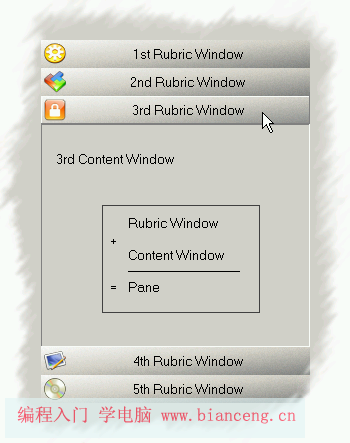
AddPaneRearrangeStack 重排佈局,回傳索引。RearrangeStack - 視覺魔法核心演算法:取得用戶區矩形,從上而下疊放標題列(固定高度 m_iRubricHeight)。展開面板的內容視窗高度 = 剩餘高度 - 後續標題列總高度。未展開面板隱藏內容視窗。關鍵程式碼:
void CStackedWndCtrl::RearrangeStack()
{
    CRect rFrame;
    GetClientRect(&rFrame);
    for (int i = 0; i < m_arrPanes.GetSize(); i++)
    {
        // 標題列永遠顯示
        m_arrPanes[i]->m_pwndRubric->SetWindowPos(NULL, 0, rFrame.top,
            rFrame.Width(), m_iRubricHeight, SWP_NOZORDER | SWP_SHOWWINDOW);

        if (m_arrPanes[i]->m_bOpen)
        {
            int iContentWndBottom = rFrame.bottom - ((m_arrPanes.GetSize() - i) * m_iRubricHeight);
            m_arrPanes[i]->m_pwndContent->SetWindowPos(NULL, 0, rFrame.top + m_iRubricHeight,
                rFrame.Width(), iContentWndBottom - rFrame.top, SWP_NOZORDER | SWP_SHOWWINDOW);
            rFrame.top = iContentWndBottom; // 下一標題列起始位置
        }
        else
        {
            m_arrPanes[i]->m_pwndContent->ShowWindow(SW_HIDE);
        }
        rFrame.top += m_iRubricHeight; // 標題列佔用空間
    }
}
OnSize單純呼叫 RearrangeStack 即可實現即時重排。
自訂訊息 WM_RUBRIC_WND_CLICKED_ON (WM_APP + 04100)。標題列按鈕衍生自 CButton,BN_CLICKED 反射處理中送出此訊息至父視窗(攜帶自身 HWND)。控制項處理函數 OnRubricWndClicked 遍歷陣列比對 HWND,切換對應面板展開狀態並重排。
無類型限制:按鈕、靜態文字、列表方塊、樹狀控制項、編輯控制項、自訂控制項皆可。唯一約束:標題視窗必須能發送點擊通知訊息。示範專案包含一般按鈕版與陰影按鈕+圖示版,控制項核心碼零修改。
解構函數遍歷陣列,依序呼叫 DestroyWindow、delete 釋放標題/內容視窗物件,最後 delete 窗格結構體並 RemoveAll 清空陣列,杜絕記憶體洩漏。
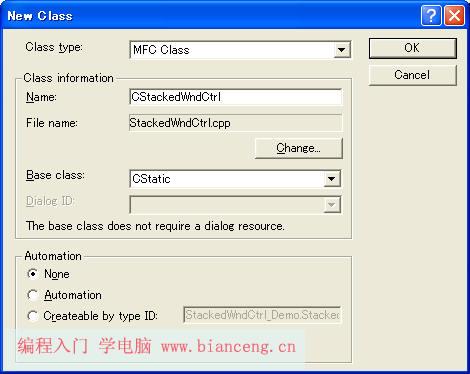
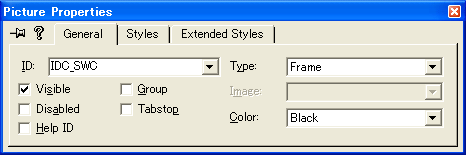
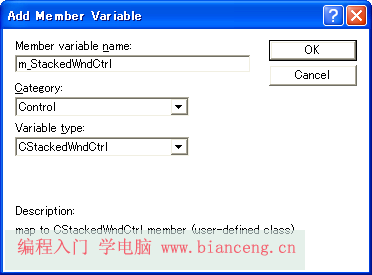
CStatic 衍生類 CStackedWndCtrl。m_StackedWndCtrl。OnInitDialog 中建立測試面板(按鈕作標題、ListBox/Edit 作內容)並 AddPane。執行畫面:
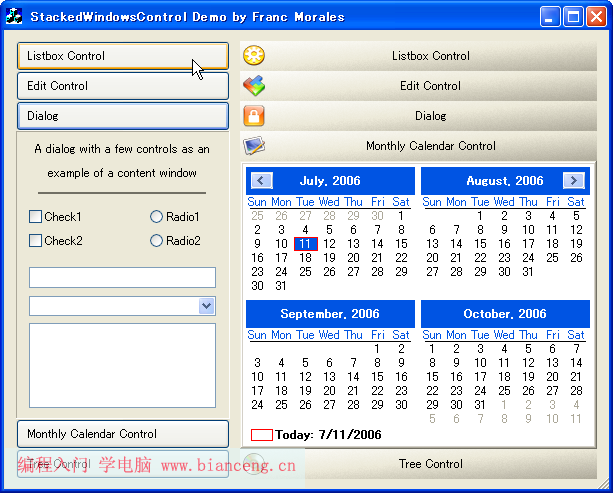
堆疊式窗格控制項本質是「矩形切割與狀態機」的結合。掌握 SetWindowPos 座標運算與訊息路由機制,即可輕鬆構建類 Outlook、Spybot 風格的導覽介面。本實作強調泛型化與關注點分離,極易整合既有專案並擴充動畫切換、拖曳排序等進階功能。