效果演示
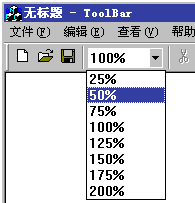
實現步驟
- 創建單文檔專案,資源編輯器添加工具欄按鈕(ID:
ID_TOOL_ZOOM),作為佔位符。
- 派生
CMainToolBar : public CToolBar,聲明 CFlatComboBox m_wndZoom(使用 Kirk Stowell 的扁平下拉框類)。
MainFrm.h 包含頭文件,將 m_wndToolBar 類型改為 CMainToolBar。OnCreate 中定位佔位按鈕,設置寬度、獲取矩形區域,在該區域創建下拉框並填充項目。- 資源編輯器將工具欄按鈕高度改為 20 像素,容納下拉框。
- 添加
FlatComboBox.h/cpp 到專案,替換 CComboBox 為 CFlatComboBox 實現扁平風格。
- 在
CMainFrame 添加 ON_CBN_SELENDOK(ID_TOOL_ZOOM, OnSelectZoomed) 處理選擇變更消息。
關鍵代碼
// OnCreate 末尾
int idx = 0;
while (m_wndToolBar.GetItemID(idx) != ID_TOOL_ZOOM) ++idx;
m_wndToolBar.SetButtonInfo(idx, ID_TOOL_ZOOM, TBBS_SEPARATOR, 80);
CRect rc; m_wndToolBar.GetItemRect(idx, &rc);
rc.top += 2; rc.bottom += 200;
m_wndToolBar.m_wndZoom.Create(WS_CHILD|WS_VISIBLE|CBS_AUTOHSCROLL|CBS_DROPDOWNLIST|CBS_HASSTRINGS, rc, &m_wndToolBar, ID_TOOL_ZOOM);
m_wndToolBar.m_wndZoom.ShowWindow(SW_SHOW);
m_wndToolBar.m_wndZoom.AddString(_T("25%")); // ... 添加 50%-200%
m_wndToolBar.m_wndZoom.SetCurSel(3); // 默認 100%

// 消息處理
void CMainFrame::OnSelectZoomed()
{
    CString str; m_wndToolBar.m_wndZoom.GetWindowText(str);
    AfxMessageBox(str);
}
三大問題解決
| 問題 | 解決方案 |
|---|
| 工具欄高度不足 | 資源編輯器調整按鈕 Height=20 |
| 下拉框非扁平 | 引入 CFlatComboBox 類替換 CComboBox |
| 無法捕獲選擇消息 | 手動添加 ON_CBN_SELENDOK 映射到 CMainFrame |