安裝 QQ 後,在 IE 位址列輸入 tencent://Message/?uin=12345 即可啟動 QQ 並開啟臨時會話。Skype 等應用同樣支援此機制。本質上是向系統註冊私有 URI 協議,瀏覽器遇到未知協議時會查詢系統註冊表並啟動關聯程式。
MSDN 說明:瀏覽器無法識別協議時,會建立已註冊的 IURLSearchHook 物件並呼叫 Translate 方法。但更簡單的方式是直接在 HKEY_CLASSES_ROOT 註冊協議處理器。
int RegWebProtocol(LPCTSTR lpszProtocolName, LPCTSTR lpszAssociatedApp, int nIconIndex = 0)
{
    // 參數驗證
    if (!lpszProtocolName || !lpszAssociatedApp) return 0;

    // 檢查是否已存在
    HKEY hKey;
    if (RegOpenKeyEx(HKEY_CLASSES_ROOT, lpszProtocolName, 0, KEY_ALL_ACCESS, &hKey) == ERROR_SUCCESS) {
        RegCloseKey(hKey);
        return 2; // 已存在
    }

    // 1. 建立協議主鍵與描述
    CString csDesc; csDesc.Format(_T("%sProtocol"), lpszProtocolName);
    WriteRegister(HKEY_CLASSES_ROOT, lpszProtocolName, _T(""), REG_EXPAND_SZ, csDesc);

    // 2. 設定 URL Protocol 標識
    WriteRegister(HKEY_CLASSES_ROOT, lpszProtocolName, _T("URL Protocol"), REG_EXPAND_SZ, lpszAssociatedApp);

    // 3. DefaultIcon 子鍵:圖示資源
    CString csSubKey; csSubKey.Format(_T("%s\\DefaultIcon"), lpszProtocolName);
    CreateRegisterSubKey(HKEY_CLASSES_ROOT, csSubKey);
    CString csIcon; csIcon.Format(_T("%s,%d"), lpszAssociatedApp, nIconIndex);
    WriteRegister(HKEY_CLASSES_ROOT, csSubKey, _T(""), REG_EXPAND_SZ, csIcon);

    // 4. shell\open\command:啟動命令
    csSubKey.Format(_T("%s\\shell\\open\\command"), lpszProtocolName);
    CreateRegisterSubKey(HKEY_CLASSES_ROOT, csSubKey);
    CString csCmd; csCmd.Format(_T("\"%s\" \"%%1\""), lpszAssociatedApp);
    WriteRegister(HKEY_CLASSES_ROOT, csSubKey, _T(""), REG_EXPAND_SZ, csCmd);

    return 1; // 成功
}
BOOL UnRegWebProtocol(LPCTSTR lpszProtocolName) {
    if (!lpszProtocolName) return FALSE;
    return RegDeleteAllSubKey(HKEY_CLASSES_ROOT, lpszProtocolName);
}
註冊 HXXP 協議關聯至本程式,點擊測試按鈕或在 IE 輸入 HXXP://Param1/Param2,程式第二個實例啟動並解析出參數:
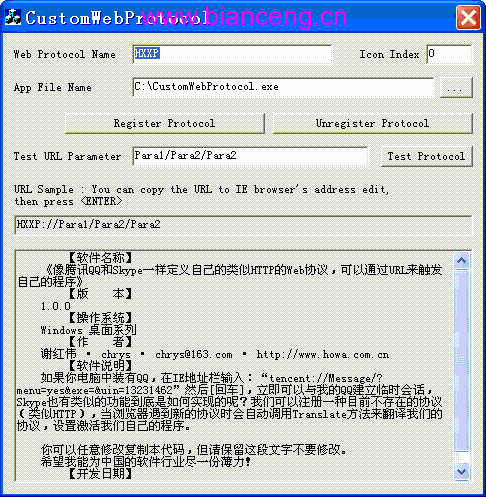
圖一 程式介面:協議註冊與測試
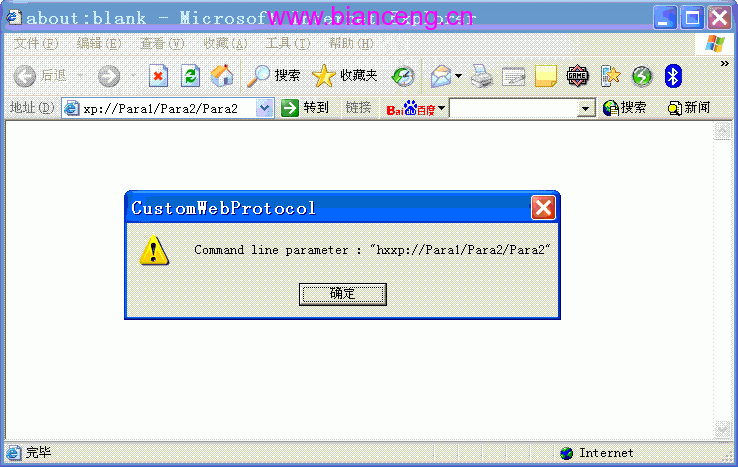
圖二 IE 瀏覽器觸發自定義協議效果
主程式 WinMain 或 InitInstance 中解析命令列參數 lpCmdLine,即可取得 URL 完整字串(含協議前綴),自行解析路徑與查詢參數。
此技術廣泛應用於深度連結、單一登入回調、桌面應用網頁喚醒等場景。完整範例原始碼已提供。