七段數碼管 (7-Segment) 是經典數位顯示元件。本文實作一個 CDigitalClock 控制項 (繼承 CStatic),純 GDI 繪製七段數碼管造型,支援前景色/背景色自訂、無位圖相依、雙重緩衝無閃爍,效果逼真且輕量。
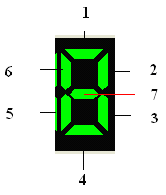
每個數字由 7 段組成 (1~7):
CDigitalClockclass CDigitalClock : public CStatic
{
CDC m_memDC; CBitmap m_memBmp; CBitmap* m_pOldBmp;
COLORREF m_crText; // 前景色 (段亮色)
COLORREF m_crBack; // 背景色
int m_nWidth, m_nHeight; // 單個數字寬/高
int m_nYMargin; // 垂直邊距
// 繪製單段
void DrawSection1(int nLeft); // 頂橫段
void DrawSection2(int nLeft); // 右上
void DrawSection3(int nLeft); // 右下
void DrawSection4(int nLeft); // 底橫段
void DrawSection5(int nLeft); // 左下
void DrawSection6(int nLeft); // 左上
void DrawSection7(int nLeft); // 中橫段
// 繪製單一數字 (0-9)
void DrawSingleNumber(int nNum, int nLeft);
// 繪製時/分/秒/冒號
void DrawHour(int nLeft);
void DrawMinute(int nLeft);
void DrawSecond(int nLeft);
void Draw2Dot(int nLeft); // 冒號:兩個實心圓
};void CDigitalClock::DrawSection1(int nLeft)
{
if (!m_memDC.m_hDC) return;
CPoint pts[4];
// 梯形四頂點:寬度 0.1~0.9,高度 0.2*width
pts[0] = { nLeft + (int)(0.1*m_nWidth), m_nYMargin };
pts[1] = { nLeft + (int)(0.9*m_nWidth), m_nYMargin };
pts[2] = { nLeft + (int)(0.7*m_nWidth), (int)(0.2*m_nWidth) + m_nYMargin };
pts[3] = { nLeft + (int)(0.3*m_nWidth), (int)(0.2*m_nWidth) + m_nYMargin };
CBrush brush(m_crText); CRgn rgn;
rgn.CreatePolygonRgn(pts, 4, ALTERNATE);
m_memDC.FillRgn(&rgn, &brush); // 填充
// 畫邊框線增強立體感
m_memDC.MoveTo(pts[0]); m_memDC.LineTo(pts[1]);
m_memDC.MoveTo(pts[1]); m_memDC.LineTo(pts[2]);
m_memDC.MoveTo(pts[2]); m_memDC.LineTo(pts[3]);
m_memDC.MoveTo(pts[3]); m_memDC.LineTo(pts[0]);
brush.DeleteObject(); rgn.DeleteObject();
}void CDigitalClock::DrawSingleNumber(int nNum, int nLeft)
{
switch (nNum)
{
case 0: DrawSection1(nLeft); DrawSection2(nLeft); DrawSection3(nLeft);
DrawSection4(nLeft); DrawSection5(nLeft); DrawSection6(nLeft); break;
case 1: DrawSection2(nLeft); DrawSection3(nLeft); break;
case 2: DrawSection1(nLeft); DrawSection2(nLeft); DrawSection4(nLeft);
DrawSection5(nLeft); DrawSection7(nLeft); break;
case 3: DrawSection1(nLeft); DrawSection2(nLeft); DrawSection3(nLeft);
DrawSection4(nLeft); DrawSection7(nLeft); break;
case 4: DrawSection2(nLeft); DrawSection3(nLeft); DrawSection6(nLeft);
DrawSection7(nLeft); break;
case 5: DrawSection1(nLeft); DrawSection3(nLeft); DrawSection4(nLeft);
DrawSection6(nLeft); DrawSection7(nLeft); break;
case 6: DrawSection1(nLeft); DrawSection3(nLeft); DrawSection4(nLeft);
DrawSection5(nLeft); DrawSection6(nLeft); DrawSection7(nLeft); break;
case 7: DrawSection1(nLeft); DrawSection2(nLeft); DrawSection3(nLeft); break;
case 8: DrawSection1(nLeft); DrawSection2(nLeft); DrawSection3(nLeft);
DrawSection4(nLeft); DrawSection5(nLeft); DrawSection6(nLeft);
DrawSection7(nLeft); break;
case 9: DrawSection1(nLeft); DrawSection2(nLeft); DrawSection3(nLeft);
DrawSection4(nLeft); DrawSection6(nLeft); DrawSection7(nLeft); break;
}
}void CDigitalClock::Draw2Dot(int nLeft)
{
if (!m_memDC.m_hDC) return;
CBrush brush(m_crText);
CRect r(nLeft + (int)(0.3*m_nWidth), (int)(0.4*m_nWidth) + m_nYMargin,
nLeft + (int)(0.6*m_nWidth), (int)(0.7*m_nWidth) + m_nYMargin);
m_memDC.Ellipse(&r);
CRgn rgn; rgn.CreateEllipticRgnIndirect(&r);
m_memDC.FillRgn(&rgn, &brush);
r.OffsetRect(0, (int)(0.8*m_nWidth)); // 下圓
m_memDC.Ellipse(&r);
rgn.CreateEllipticRgnIndirect(&r);
m_memDC.FillRgn(&rgn, &brush);
brush.DeleteObject(); rgn.DeleteObject();
}// OnPaint: 僅 BitBlt 記憶體位圖
void CDigitalClock::OnPaint()
{
CPaintDC dc(this);
CRect rect; GetClientRect(&rect);
if (!m_memDC.m_hDC) InitMemDC(rect); // 首次建立記憶體 DC/位圖
dc.BitBlt(0, 0, rect.Width(), rect.Height(), &m_memDC, 0, 0, SRCCOPY);
}
// 計時器: 每秒更新一次
void CDigitalClock::OnTimer(UINT nID)
{
RecalcLayout(); // 重新計算佈局 (支援動態縮放)
DrawTime(); // 在記憶體 DC 繪製完整時間
Invalidate(FALSE); // 觸發 OnPaint (不擦除背景)
}
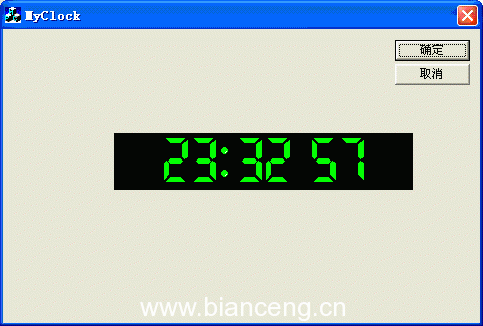
CDigitalClock m_wndClock; (Control 類型)。m_wndClock.SetColors(RGB(255,0,0), RGB(0,0,0)); m_wndClock.Start();| 方向 | 說明 |
|---|---|
| 抗鋸齒 | 改用 GDI+ Graphics::SetSmoothingMode 或 Direct2D |
| 段間間隙/圓角 | 調整多邊形頂點座標,模擬實體數碼管段間距 |
| 閃爍/呼吸效果 | 冒號改為 500ms 閃爍;段亮度漸變模擬 LED PWM |
| 多語系數字 | 擴充 DrawSingleNumber 支援全形數字、羅馬數字 |
| 無 MFC 版本 | 移除 CStatic 依賴,純 Win32 CreateWindow("STATIC") + 子類別化 |
七段數碼管風格時鐘展示了「幾何建模 + 多邊形填充 + 雙重緩衝」的經典 GDI 繪圖模式。無外部資源相依、色彩可配、效能極佳,適合嵌入式模擬器、工業監控介面、復古風格應用。感謝 Kevin Cheng、李宏亮、redcheek 等前輩文章提供靈感。
本文配套原始碼可供下載。