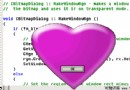
GDI+ 提供豐富的繪圖原語 (線、橢圓、矩形、路徑),但缺乏直接繪製圓角矩形的函數。若呼叫 GDI RoundRect 則失去 GDI+ 紋理筆刷、漸層、透明度等進階特性。解決方案:使用 GraphicsPath 組合四條弧線與四條直線構建圓角矩形路徑,再以任意 Brush 填充或 Pen 描邊。
GraphicsPath* MakeRoundRect(Point topLeft, Point bottomRight, INT percentageRounded)
{
    // 參數驗證
    ASSERT(percentageRounded >= 1 && percentageRounded <= 100);

    // 正規化座標
    INT left   = min(topLeft.X, bottomRight.X);
    INT right  = max(topLeft.X, bottomRight.X);
    INT top    = min(topLeft.Y, bottomRight.Y);
    INT bottom = max(topLeft.Y, bottomRight.Y);

    // 圓角半徑 = 短邊長度 * percentage / 100
    INT offsetX = (right - left) * percentageRounded / 100;
    INT offsetY = (bottom - top)  * percentageRounded / 100;

    // 構建路徑:順時針四個 90° 圓弧 + 閉合
    GraphicsPath tempPath;
    GraphicsPath* path = tempPath.Clone(); // GDI+ 禁止 new GraphicsPath,需用 Clone

    // 右上角 (270°→360°)
    path->AddArc(right - offsetX, top, offsetX, offsetY, 270, 90);
    // 右下角 (0°→90°)
    path->AddArc(right - offsetX, bottom - offsetY, offsetX, offsetY, 0, 90);
    // 左下角 (90°→180°)
    path->AddArc(left, bottom - offsetY, offsetX, offsetY, 90, 90);
    // 左上角 (180°→270°)
    path->AddArc(left, top, offsetX, offsetY, 180, 90);
    // 閉合頂邊直線
    path->AddLine(left + offsetX, top, right - offsetX/2, top);

    return path; // 呼叫端負責 delete
}
GDI+ 類別 (GraphicsPath, Bitmap, Font 等) 內部使用參考計數/共享控制代碼機制,直接 new GraphicsPath 會導致執行階段錯誤。正確模式:建立區域暫存物件 → Clone() 取得堆疊配置的獨立實例 → 回傳指標。此設計為配合 .NET 語言 (無指標) 的統一物件模型。
1 → 極微圓角 (近似銳角)50 → 圓角半徑 = 短邊一半 (長方形變膠囊形)100 → 圓角半徑 = 短邊 (正方形變圓形)搭配滑桿控制項即時調整,極適合 UI 原型設計。
void CMyView::OnDraw(CDC* pDC)
{
    Graphics g(pDC->GetSafeHdc());

    // 1. 建立圓角矩形路徑
    GraphicsPath* path = MakeRoundRect(Point(50,50), Point(300,200), 30);

    // 2. 紋理筆刷填充
    TextureBrush brush(L"texture.jpg", WrapModeTile);
    g.FillPath(&brush, path);

    // 3. 半透明紅色描邊
    Pen pen(Color(180, 255, 0, 0), 3.0f);
    g.DrawPath(&pen, path);

    delete path; // 釋放
}
同樣路徑可用於:
AddPolygon + AddArc 組合GraphicsPath 做 IsVisible 點擊測試percentageRounded 僅套用上偏移GraphicsPath* 需呼叫端 delete,易忘記洩漏。建議改回傳 std::unique_ptr (C++11) 或封裝為 RAII 類別。AddLine(left + offsetX, top, right - offsetX/2, top) 結尾座標應為 right - offsetX,原碼 /2 疑為筆誤。AddRectangle、AddEllipse 等輔助函數構建幾何圖形庫。GraphicsPath 是 GDI+ 矢量繪圖核心,掌握路徑構建即可繪製任意複雜形狀並享受完整筆刷/筆畫功能。MakeRoundRect 以參數化圓角程度展示路徑組合技巧,可直接整合至專案作為 UI 繪圖基元。完整原始碼含滑桿即時調整圓角示範專案,請下載附件。