Ajax(Asynchronous JavaScript and XML)讓網頁無需重新整理即可與伺服器交換資料。本文從核心概念到完整前後端代碼,帶你打造第一個即時郵遞區號查詢應用。
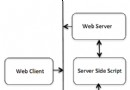
XMLHttpRequest 負責攔截請求、發送、監聽回應<script>
var xmlHttp = false;
if (!xmlHttp && typeof XMLHttpRequest != 'undefined') {
xmlHttp = new XMLHttpRequest();
}
function callServer() {
var city = document.getElementById("city").value;
if (city == null || city == "") return;
var url = "/testAjax/getZipcode.php?city=" + escape(city);
xmlHttp.open("GET", url, true); // true = 非同步
xmlHttp.onreadystatechange = updatePage;
xmlHttp.send(null);
}
function updatePage() {
if (xmlHttp.readyState == 4) {
var response = xmlHttp.responseText;
document.getElementById("zipcode").value = response;
}
}
</script>
<form>
<p>City: <input type="text" name="city" id="city" size="25" onchange="callServer();"></p>
<p>Zip Code: <input type="text" name="zipcode" id="zipcode" size="5"></p>
</form><?php
if (!isset($_GET["city"])) {
echo "URL:city parameter is set?";
} else {
$city = $_GET["city"];
if ($city != null && $city != "") {
echo $city . "_010"; // 模擬回傳郵遞區號
} else {
echo "city is null?";
}
}
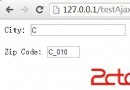
?>使用者在 City 欄位輸入城市名並切換焦點,Zip Code 欄位即時顯示「城市名_010」,無頁面重整。
fetch API 或 Axios 取代原生 XHR,語法更簡潔JSON.parse() 解析,擴展性更強onerror、HTTP 狀態碼檢查)