本文演示如何完全基於 Java Socket、不依賴任何第三方庫,構建一個極簡 HTTP 文件下載客戶端。涵蓋:發送 HTTP 請求頭、接收並解析 HTTP 響應頭與響應體、文件內容保存、使用 SwingWorker 實現 UI 即時進度刷新。
界面包含「添加下載」與「清除完成」兩個按鈕。點擊「添加下載」彈出對話框輸入 URL,確認後啟動下載任務;「清除完成」移除已完成的任務記錄。下載狀態枚舉:NOT_STARTED、IN_PROCESS、COMPLETED、ERROR。
核心 UI 代碼片段:
final JDialog dialog = new JDialog(this, "Add File Link", true);
final URLFilePanel panel = new URLFilePanel();
panel.setUpListener(e -> {
    if ("OK".equals(e.getActionCommand()) && panel.validateInput()) {
        tableModel.getData().add(new DownloadDetailStatusInfoModel(panel.getValidFileURL()));
        startDownload();
        refreshUI();
        dialog.dispose();
    } else if ("Cancel".equals(e.getActionCommand())) {
        dialog.dispose();
    }
});
dialog.setVisible(true);
標準 HTTP 請求由請求行、請求頭、空行、消息體組成。請求行格式:Method SP Request-URI SP HTTP-Version CRLF。例如:GET /pub/WWW/TheProject.html HTTP/1.1\r\n。簡單 GET 請求示例:
GET /pub/WWW/TheProject.html HTTP/1.1\r\n
Host: www.w3.org\r\n
\r\n
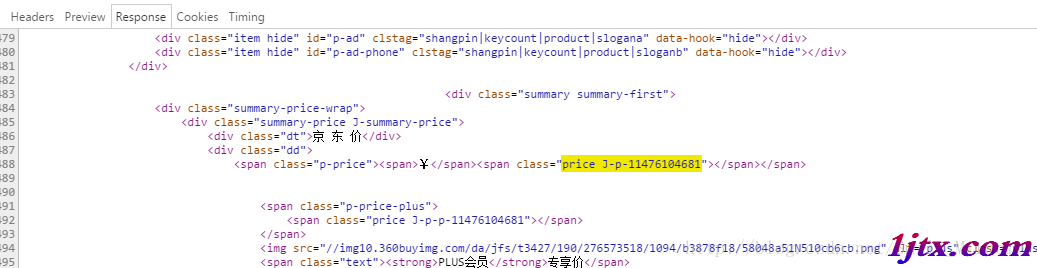
響應由狀態行、響應頭、空行、響應體組成。狀態行格式:HTTP-Version SP Status-Code SP Reason-Phrase CRLF,如 HTTP/1.1 200 OK。下載文件關鍵在於解析 Content-Length(文件長度)和 Content-Type(文件類型),Accept-Ranges 支持多線程斷點續傳。
URL url = new URL(fileInfo.getFileURL());
String host = url.getHost();
int port = (url.getPort() == -1) ? url.getDefaultPort() : url.getPort();
Socket socket = new Socket();
socket.connect(new InetSocketAddress(host, port));
BufferedWriter writer = new BufferedWriter(new OutputStreamWriter(socket.getOutputStream(), "UTF-8"));
String requestLine = "GET " + url.getFile() + " HTTP/1.1\r\n";
writer.write(requestLine);
writer.write("Host: " + host + "\r\n");
writer.write("Accept: text/html,application/xhtml+xml,application/xml;q=0.9,*/*;q=0.8\r\n");
writer.write("Accept-Charset: GBK,utf-8;q=0.7,*;q=0.3\r\n");
writer.write("Accept-Language: zh-CN,zh;q=0.8\r\n");
writer.write("Connection: close\r\n");
writer.write("\r\n"); // 請求頭結束標記
writer.flush();
自定義 CustomDataInputStream 逐行讀取響應頭,交由 HttpResponseHeaderParser 解析關鍵字段:
public class HttpResponseHeaderParser {
    private final Map<String, String> headerMap = new HashMap<>();
    public void addResponseHeaderLine(String line) {
        if (line.contains(":")) {
            String[] kv = line.split(": ", 2);
            headerMap.put(kv[0], kv[1]);
        }
    }
    public int getFileLength() {
        return headerMap.getOrDefault("Content-Length", "0").isEmpty() ? 0 : Integer.parseInt(headerMap.get("Content-Length"));
    }
    public String getFileType() { return headerMap.get("Content-Type"); }
}
BufferedOutputStream output = new BufferedOutputStream(new FileOutputStream(myFile));
byte[] buffer = new byte[2048];
int totalBytes = responseHeader.getFileLength();
int offset = 0, read;
while ((read = input.read(buffer)) > 0 && offset < totalBytes) {
    offset += read;
    float progress = (float) offset / totalBytes * 100;
    if (offset > totalBytes) { read += totalBytes - offset; progress = 100; }
    output.write(buffer, 0, read);
    updateStatus(progress); // 通知 UI 更新
}
此極簡客戼端適合教學與輕量級嵌入場景,生產環境建議使用成熟庫(如 Apache HttpClient、OkHttp)以獲得健壯性、連接池、SSL、重試等高級特性。