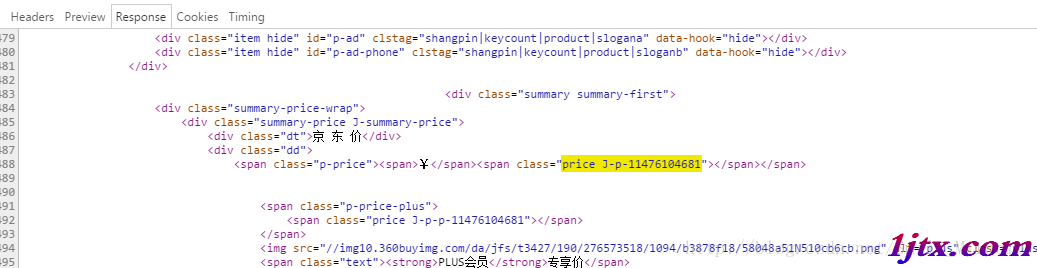
Jsoup 擅長解析靜態 HTML,但面對現代網站普遍採用的「前端渲染、異步載入」架構,單純用 Jsoup 往往只能拿到空殼頁面。以京東商品頁為例,商品價格並非寫死在 HTML 中,而是由前端 JavaScript 通過回調介面動態填充。
瀏覽器開發者工具(Network 面板)是破解動態數據的關鍵。以京東商品頁 https://item.jd.com/11476104681.html 為例:
String startPage = "https://item.jd.com/11476104681.html";
Document document = Jsoup.connect(startPage)
    .userAgent("Mozilla/5.0 (Windows NT 10.0; WOW64) AppleWebKit/537.36")
    .get();
此時 document 已包含完整 DOM,但價格區塊為空。
在 Network 面板過濾 XHR/Fetch,搜尋關鍵字「price」或觀察載入時序,可發現如下介面:
https://p.3.cn/prices/mgets?callback=jQuery9734926&type=1&area=1&skuIds=J_11476104681&source=item-pc
參數精簡實驗:逐個移除參數測試,最終發現只需核心參數即可:
https://p.3.cn/prices/mgets?callback=jQuery9734926&type=1&area=1&skuIds=J_11476104681&source=item-pc
String url = "https://p.3.cn/prices/mgets?callback=jQuery9734926&type=1&area=1&skuIds=J_11476104681&source=item-pc";
String response = HttpUtils.doGet(url, null);
System.out.println(response);
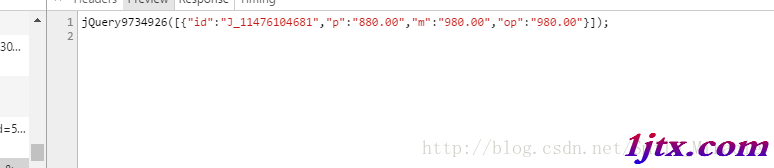
// 輸出:jQuery9734926([{"id":"J_11476104681","p":"880.00","m":"980.00","op":"980.00"}]);
回應為 JSONP 格式,需去除回調函數包裹:
String jsonStr = response.replace("jQuery9734926(", "").replace(")", "");
JSONArray array = JSON.parseArray(jsonStr);
JSONObject priceObj = array.getJSONObject(0);
String currentPrice = priceObj.getString("p");  // 現價
String maxPrice = priceObj.getString("m");      // 原價
部分網站將數據經 JavaScript 加密/混淆後內嵌在頁面中。此時需:
<script> 標籤將 Jsoup(靜態解析)+ HttpClient(API 呼叫)+ 無頭瀏覽器(複雜渲染)封裝為統一介面:
public interface Fetcher {
    String fetch(String url);
}

public class CompositeFetcher implements Fetcher {
    private final List<Fetcher> fetchers = Arrays.asList(
        new JsoupFetcher(),
        new ApiFetcher(),
        new HeadlessFetcher()
    );

    @Override
    public String fetch(String url) {
        for (Fetcher f : fetchers) {
            try {
                String result = f.fetch(url);
                if (isValid(result)) return result;
            } catch (Exception ignored) {}
        }
        throw new FetchException("All fetchers failed");
    }
}
掌握「找 API、模擬請求、解析數據」三步曲,絕大多數動態載入場景都能應對。