Swing 應用常需在使用者關閉視窗時彈出確認對話框。JFrame/JDialog 繼承自 Window,透過重寫 processWindowEvent 攔截;JInternalFrame 為輕量級組件,需重寫 doDefaultCloseAction。本文提供完整實作與最佳實踐。
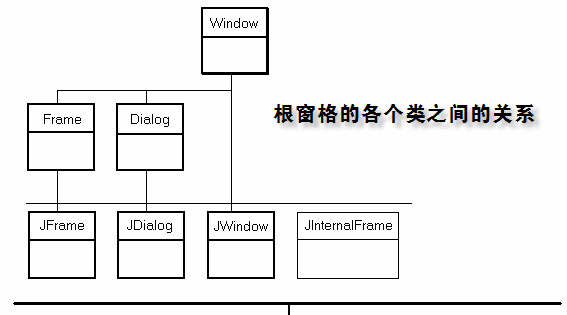
JFrame 與 JDialog 均繼承自 java.awt.Window,關閉事件流經 processWindowEvent(WindowEvent e);JInternalFrame 獨立體系,關閉邏輯在 BasicInternalFrameTitlePane 中觸發 doDefaultCloseAction()。
@Override
protected void processWindowEvent(WindowEvent e) {
    if (e.getID() == WindowEvent.WINDOW_CLOSING) {
        int result = JOptionPane.showConfirmDialog(
            this,
            "確認要關閉嗎?",
            "關閉確認",
            JOptionPane.YES_NO_OPTION,
            JOptionPane.QUESTION_MESSAGE
        );

        if (result == JOptionPane.YES_OPTION) {
            // 執行關閉前清理工作
            performCleanup();
            super.processWindowEvent(e); // 繼續預設關閉流程
        }
        // NO_OPTION 或關閉對話框:不做任何事,視窗保持開啟
    } else {
        super.processWindowEvent(e); // 其他視窗事件正常處理
    }
}

private void performCleanup() {
    // 儲存設定、釋放資源、停止執行緒等
}
JInternalFrame internalFrame = new JInternalFrame("標題", true, true, true, true) {
    @Override
    public void doDefaultCloseAction() {
        int result = JOptionPane.showConfirmDialog(
            this,
            "確認要關閉內部視窗嗎?",
            "關閉確認",
            JOptionPane.YES_NO_OPTION
        );
        if (result == JOptionPane.YES_OPTION) {
            super.doDefaultCloseAction(); // 交由父類處理(依據 setDefaultCloseOperation)
        }
    }
};
import java.awt.event.WindowEvent;
import javax.swing.*;

public class CloseFrameDemo extends JFrame {
    public CloseFrameDemo() {
        setTitle("視窗關閉攔截示範");
        setDefaultCloseOperation(JFrame.DO_NOTHING_ON_CLOSE); // 關鍵:交由 processWindowEvent 處理
        setSize(800, 600);
        setLocationRelativeTo(null);
        initComponents();
        setVisible(true);
    }

    private void initComponents() {
        JDesktopPane desktop = new JDesktopPane();
        JInternalFrame internalFrame = createInternalFrame();
        desktop.add(internalFrame);
        internalFrame.setSize(400, 300);
        internalFrame.setVisible(true);
        add(desktop);
    }

    private JInternalFrame createInternalFrame() {
        return new JInternalFrame("內部視窗", true, true, true, true) {
            @Override
            public void doDefaultCloseAction() {
                int result = JOptionPane.showConfirmDialog(
                    this, "確認關閉內部視窗?", "確認", JOptionPane.YES_NO_OPTION);
                if (result == JOptionPane.YES_OPTION) {
                    super.doDefaultCloseAction();
                }
            }
        };
    }

    @Override
    protected void processWindowEvent(WindowEvent e) {
        if (e.getID() == WindowEvent.WINDOW_CLOSING) {
            int result = JOptionPane.showConfirmDialog(
                this, "確認退出應用程式?", "退出確認", JOptionPane.YES_NO_OPTION);
            if (result == JOptionPane.YES_OPTION) {
                System.exit(0);
            }
        } else {
            super.processWindowEvent(e);
        }
    }

    public static void main(String[] args) {
        SwingUtilities.invokeLater(CloseFrameDemo::new);
    }
}
| 組件 | 攔截方法 | 關鍵設定 | 預設關閉行為 |
|---|---|---|---|
| JFrame | processWindowEvent | setDefaultCloseOperation(DO_NOTHING_ON_CLOSE) | HIDE_ON_CLOSE |
| JDialog | processWindowEvent | setDefaultCloseOperation(DO_NOTHING_ON_CLOSE) | HIDE_ON_CLOSE |
| JInternalFrame | doDefaultCloseAction | setDefaultCloseOperation(DISPOSE_ON_CLOSE 等) | HIDE_ON_CLOSE |
BaseJFrame、BaseJInternalFrame 封裝通用邏輯DO_NOTHING_ON_CLOSE 導致視窗直接關閉processWindowEvent 中直接呼叫 System.exit() 而未檢查事件類型super.processWindowEvent(e) 或 super.doDefaultCloseAction() 繼續預設流程