習慣了前後端分離、只寫 JSON API 的後端開發者,偶爾也需要快速搭建一個服務端渲染的 Web 頁面。本文手把手教你用 Spring Boot 整合 Thymeleaf,實現靜態資源訪問、表單驗證、錯誤回顯、Session 登錄態管理與重定向傳值的完整流程。
<dependency><groupId>org.springframework.boot</groupId><artifactId>spring-boot-starter-thymeleaf</artifactId></dependency>
<dependency><groupId>org.projectlombok</groupId><artifactId>lombok</artifactId><version>1.12.6</version></dependency>@Data @NoArgsConstructor @AllArgsConstructor
public class User {
@NotEmpty(message = "用戶名不能為空")
@Length(min = 5, message = "用戶名長度不能小於5位")
private String username;
@NotEmpty(message = "密碼不能為空")
@Length(min = 6, message = "密碼長度不能小於6位")
private String password;
public static boolean isUserValid(User u) {
return "admin".equals(u.getUsername()) && "123456".equals(u.getPassword());
}
}
@Data @NoArgsConstructor @AllArgsConstructor
public class Apple {
private Float price; private String color;
public static List generateApples() {
return Arrays.asList(2.5f, 1.3f, 3.2f).stream()
.flatMap(p -> Arrays.asList("red","green","black").stream().map(c -> new Apple(p,c)))
.collect(Collectors.toList());
}
} Lombok 註解:@Data 包含 getter/setter/toString/equals/hashCode/全參構造;@NoArgsConstructor/@AllArgsConstructor 分別生成無參/全參構造。
@Controller @RequestMapping("/user")
public class UserController {
    @GetMapping
    public ModelAndView toLoginForm(@ModelAttribute("errorMsg") String errorMsg,
                                    @ModelAttribute("user") User user) {
        return new ModelAndView("login"); // 對應 templates/login.html
    }

    @PostMapping("/login")
    public ModelAndView login(HttpServletRequest request, @Valid User user,
                              BindingResult result, RedirectAttributes redirect) {
        // 1. JSR-303 校驗失敗,回顯錯誤
        if (result.hasErrors()) {
            return new ModelAndView("login", "formErrors", result.getAllErrors());
        }
        // 2. 業務校驗失敗,用 FlashAttribute 傳遞錯誤訊息並重定向
        if (!User.isUserValid(user)) {
            redirect.addFlashAttribute("errorMsg", "登錄失敗,用戶名或密碼錯誤");
            return new ModelAndView("redirect:/user");
        }
        // 3. 登錄成功,寫 Session 並重定向
        request.getSession().setAttribute("userLogin", true);
        return new ModelAndView("redirect:/user/apples");
    }

    @GetMapping("/apples")
    public ModelAndView apples(HttpServletRequest request) {
        Boolean logged = (Boolean) request.getSession().getAttribute("userLogin");
        if (logged != null && logged) {
            ModelAndView mv = new ModelAndView("apple");
            mv.addObject("apples", Apple.generateApples());
            return mv;
        }
        return new ModelAndView("redirect:/user");
    }
}
關鍵點:
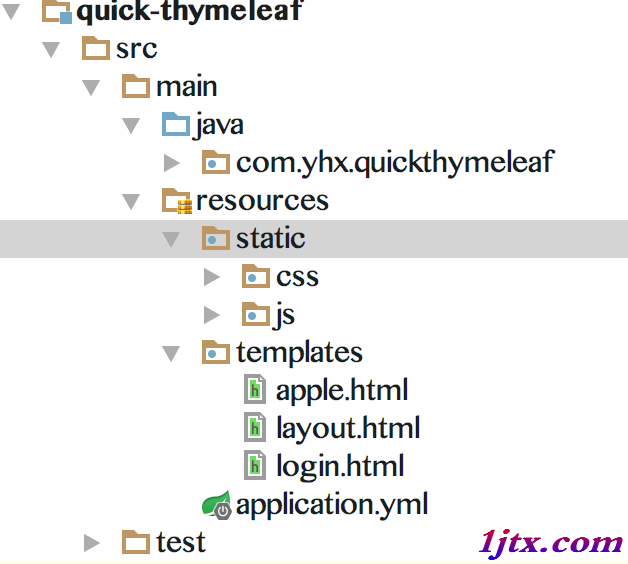
@ModelAttribute 讓頁面直接取到 errorMsg、user 對象BindingResult 必須緊跟 @Valid 參數,收集校驗錯誤RedirectAttributes.addFlashAttribute 實現重定向後一次性訊息傳遞(刷新即失效)/apples 路由src/main/resources ├── static │ ├── css/style.css │ └── js/main.js ├── templates │ ├── layout.html # 佈局頁(含 fragment) │ ├── login.html # 登錄頁 │ └── apple.html # 蘋果列表頁 └── application.yml
<!DOCTYPE html>
<html xmlns:th="https://www.thymeleaf.org">
<head>
    <meta charset="UTF-8"/>
    <title th:text="${title}">Demo</title>
    <link rel="stylesheet" th:href="@{/css/style.css}"/>
</head>
<body>
    <div th:replace="~{layout :: header}"></div>
    <main><div th:fragment="content"></div></main>
    <div th:replace="~{layout :: footer}"></div>
</body></html><!DOCTYPE html>
<html xmlns:th="https://www.thymeleaf.org" th:replace="~{layout :: layout (~{::body})}">
<body>
<form th:action="@{/user/login}" method="post" th:object="${user}">
<div th:if="${errorMsg}" class="error" th:text="${errorMsg}"></div>
<div th:if="${formErrors}" class="error">
<ul><li th:each="err : ${formErrors}" th:text="${err.defaultMessage}"></li></ul>
</div>
<label>用戶名: <input type="text" th:field="*{username}"/></label>
<label>密碼: <input type="password" th:field="*{password}"/></label>
<button type="submit">登錄</button>
</form>
</body></html><!DOCTYPE html>
<html xmlns:th="https://www.thymeleaf.org" th:replace="~{layout :: layout (~{::body})}">
<body>
<h2>蘋果列表</h2>
<table>
<tr><th>價格</th><th>顏色</th></tr>
<tr th:each="apple : ${apples}">
<td th:text="${apple.price}"></td>
<td th:text="${apple.color}"></td>
</tr>
</table>
</body></html>server:
port: 8088
spring:
thymeleaf:
cache: false # 開發關閉緩存,修改即時生效
mode: HTML5@SpringBootApplication
public class Application extends WebMvcConfigurerAdapter {
public static void main(String[] args) {
SpringApplication.run(Application.class, args);
}
}訪問 https://localhost:8088/user
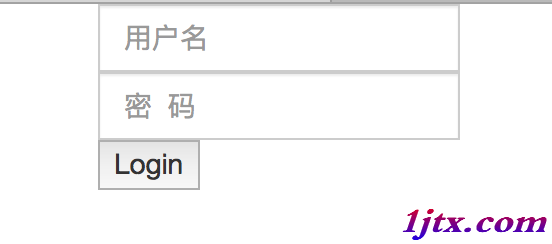 | 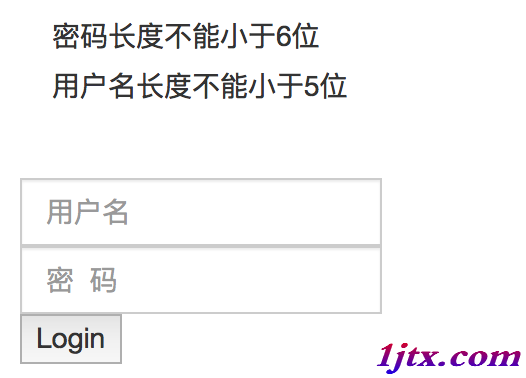 |
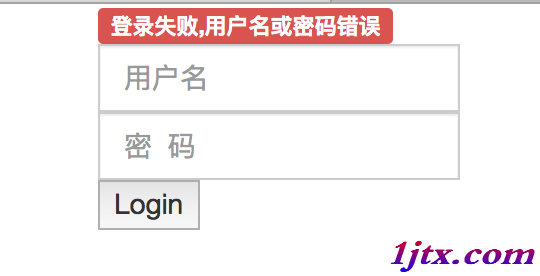 | 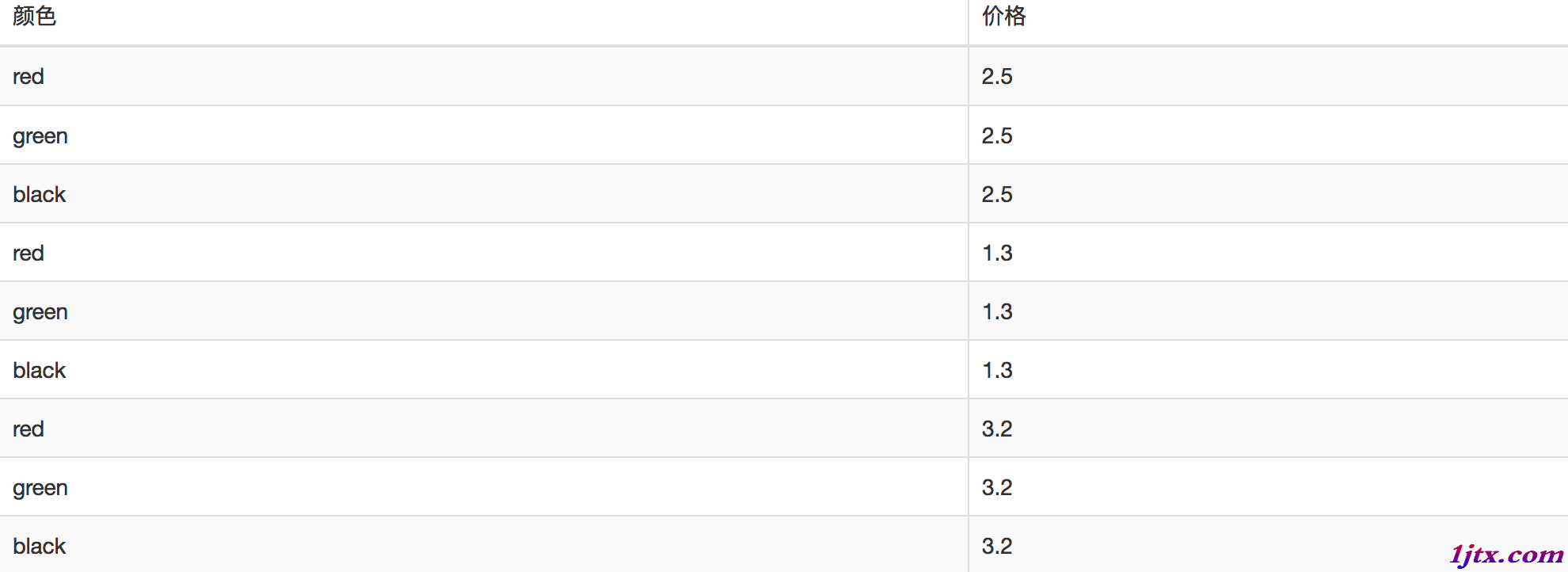 |
spring-boot-devtools,修改代碼/頁面自動重啟專案完整代碼:sboot-learn。