給定 WSDL 文檔或服務地址,生成客戶端調用代碼是 WebService 整合的第一步。本文匯總四種主流生成方式及 Maven 依賴配置。
wsimport -keep -p com.demo.client https://localhost:8080/Demo/services/MyService?wsdl
| 參數 | 作用 |
|---|---|
-keep | 保留生成的 .java 源碼(預設僅生成 .class) |
-p <pkg> | 指定生成代碼的包結構 |
-d <dir> | 指定 .class 輸出目錄 |
-s <dir> | 指定 .java 源碼輸出目錄 |
-clientjar <jar> | 直接打包生成客戶端 JAR |
-verbose | 輸出詳細編譯資訊 |
-extension | 允許使用 JAX-WS 2.0 擴展功能 |
-Xnocompile | 僅生成源碼,不編譯 |
# 生成源碼到指定目錄,包名為 com.myapp.ws
wsimport -keep -s src/main/java -p com.myapp.ws https://example.com/service?wsdl

# 直接生成可用的客戶端 JAR
wsimport -keep -clientjar myclient.jar -p com.myapp.ws https://example.com/service?wsdl
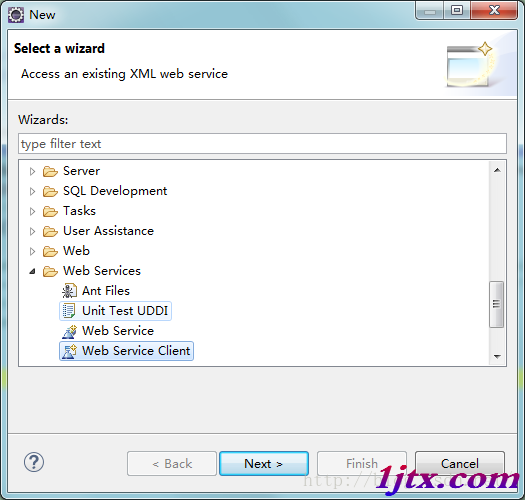
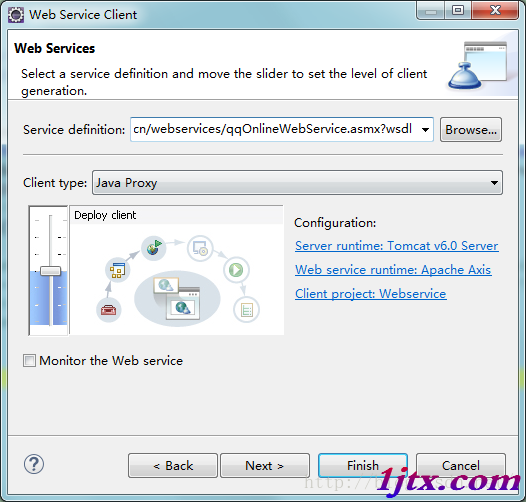
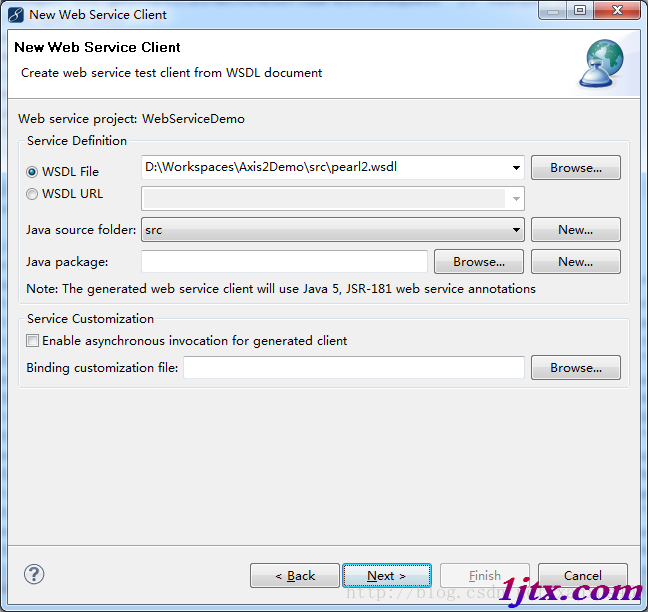
New → Other → Web Services → Web Service ClientFinish 自動生成客戶端代碼優點:可視化、整合 IDE 調試;缺點:難以納入自動化構建流程。
流程與 Eclipse 類似:New → Other → Web Service → Web Service Client,介面略有差異,核心功能一致。
<plugin>
    <groupId>org.apache.cxf</groupId>
    <artifactId>cxf-codegen-plugin</artifactId>
    <version>3.5.5</version>
    <executions>
        <execution>
            <id>generate-sources</id>
            <phase>generate-sources</phase>
            <configuration>
                <sourceRoot>${project.build.directory}/generated-sources/cxf</sourceRoot>
                <wsdlOptions>
                    <wsdlOption>
                        <wsdl>${basedir}/src/main/resources/wsdl/service.wsdl</wsdl>
                        <extraargs>
                            <extraarg>-p</extraarg>
                            <extraarg>com.myapp.ws</extraarg>
                            <extraarg>-client</extraarg>
                            <extraarg>-verbose</extraarg>
                        </extraargs>
                    </wsdlOption>
                </wsdlOptions>
            </configuration>
            <goals>
                <goal>wsdl2java</goal>
            </goals>
        </execution>
    </executions>
</plugin>
執行 mvn generate-sources 即可自動生成代碼到 target/generated-sources/cxf,IDE 可將其標記為 Sources Root。
無論哪種生成方式,運行時均需以下依賴:
<dependencies>
    <!-- Apache Axis 1.x 相容 -->
    <dependency>
        <groupId>org.apache.axis</groupId>
        <artifactId>axis</artifactId>
        <version>1.4</version>
    </dependency>
    <dependency>
        <groupId>commons-discovery</groupId>
        <artifactId>commons-discovery</artifactId>
        <version>0.5</version>
    </dependency>
    <dependency>
        <groupId>commons-logging</groupId>
        <artifactId>commons-logging</artifactId>
        <version>1.2</version>
    </dependency>
    <dependency>
        <groupId>javax.xml</groupId>
        <artifactId>jaxrpc</artifactId>
        <version>1.1</version>
    </dependency>
    <dependency>
        <groupId>javax.xml.soap</groupId>
        <artifactId>saaj-api</artifactId>
        <version>1.3.5</version>
    </dependency>
    <dependency>
        <groupId>wsdl4j</groupId>
        <artifactId>wsdl4j</artifactId>
        <version>1.6.3</version>
    </dependency>

    <!-- 現代替代:Apache CXF (推薦) -->
    <dependency>
        <groupId>org.apache.cxf</groupId>
        <artifactId>cxf-rt-frontend-jaxws</artifactId>
        <version>3.5.5</version>
    </dependency>
    <dependency>
        <groupId>org.apache.cxf</groupId>
        <artifactId>cxf-rt-transports-http</artifactId>
        <version>3.5.5</version>
    </dependency>
</dependencies>
public class DynamicClient {
    public static void main(String[] args) throws Exception {
        JaxWsDynamicClientFactory factory = JaxWsDynamicClientFactory.newInstance();
        Client client = factory.createClient("https://localhost:8080/service?wsdl");

        // 呼叫 sayHello(String name)
        Object[] result = client.invoke("sayHello", "World");
        System.out.println("回應:" + result[0]);
    }
}
| 問題 | 原因與解決 |
|---|---|
| 生成代碼包含重複類 | WSDL 引用多個 Schema 定義相同類型,使用 -b 綁定文件自定義包名 |
| javax.xml.ws.WebServiceException: Cannot find port | WSDL 中 service/port 名稱與調用不匹配,檢查生成代碼中的 @WebServiceRef |
| SSLHandshakeException | HTTPS 服務需導入憑證至 JVM truststore 或配置 SSLContext |
| 命名空間不匹配 | 客戶端生成代碼的 targetNamespace 與服務端不一致,檢查 @WebService 注解 |
cxf-codegen-plugin 在構建階段自動生成,源碼不提交倉庫src/main/resources/wsdl/ 版本控制SOAPFaultException、WebServiceException 轉換為業務異常BindingProviderProperties.CONNECT_TIMEOUT、REQUEST_TIMEOUT從 WSDL 生成 Java 客戶端的四條路徑:
配合 CXF 運行時依賴,即可構建穩健的 WebService 消費端。