CoordinatorLayout + AppBarLayout + CollapsingToolbarLayout + FloatingActionButton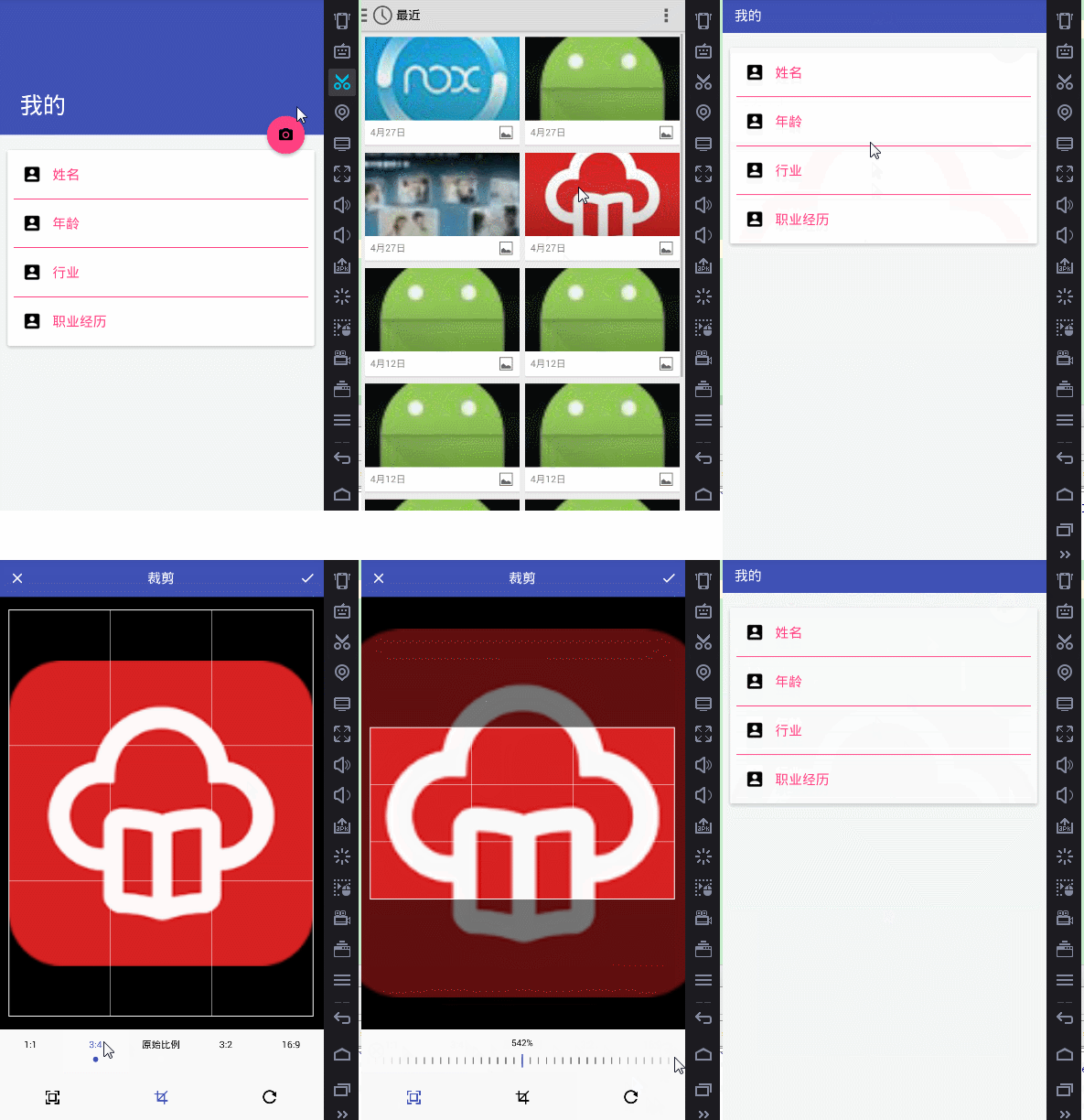
dependencies {
    implementation 'com.android.support:appcompat-v7:24.+'
    implementation 'com.android.support:design:24.+'
    implementation 'com.android.support:cardview-v7:24.+'
    implementation 'com.jakewharton:butterknife:7.0.1'
    implementation 'io.reactivex.rxjava2:rxandroid:2.0.1'
    // RxPaparazzo 0.5.2 排除 okhttp/okio 衝突
    implementation ('com.github.miguelbcr:RxPaparazzo:0.5.2-2.x') {
        exclude group: 'com.squareup.okhttp3', module: 'okhttp'
        exclude group: 'com.squareup.okhttp3', module: 'okio'
    }
}public class MainActivity extends AppCompatActivity {
@Bind(R.id.iv_appbar) ImageView ivAppbar;
@Bind(R.id.main_toolbar) Toolbar toolbar;
@Override
protected void onCreate(Bundle savedInstanceState) {
super.onCreate(savedInstanceState);
setContentView(R.layout.activity_main);
ButterKnife.bind(this);
setSupportActionBar(toolbar);
getSupportActionBar().setTitle("我的");
}
@OnClick(R.id.btn_float)
public void onFabClick(View view) { showImageSourceDialog(view); }
private void showImageSourceDialog(View view) {
UCrop.Options options = buildCropOptions(view.getContext());
new AlertDialog.Builder(view.getContext())
.setTitle("設置背景圖片")
.setMessage("如何獲取圖片?")
.setPositiveButton("相冊", (dialog, which) -> pickImage(REQUEST_GALLERY, options))
.setNegativeButton("拍照", (dialog, which) -> pickImage(REQUEST_CAMERA, options))
.setNeutralButton("取消", (dialog, which) -> dialog.dismiss())
.show();
}
private UCrop.Options buildCropOptions(Context context) {
UCrop.Options options = new UCrop.Options();
int color = ContextCompat.getColor(context, R.color.colorPrimary);
options.setToolbarColor(color);
options.setStatusBarColor(ContextCompat.getColor(context, R.color.colorPrimaryDark));
options.setActiveWidgetColor(color);
return options;
}
private void pickImage(int source, UCrop.Options options) {
RxPaparazzo.single(this)
.crop(options)
.usingGallery() // 或 .usingCamera()
.subscribeOn(Schedulers.io())
.observeOn(AndroidSchedulers.mainThread())
.subscribe(response -> {
if (response.resultCode() == Activity.RESULT_OK) {
File file = response.data().getFile();
Bitmap bitmap = BitmapFactory.decodeFile(file.getPath());
ivAppbar.setImageBitmap(bitmap);
} else if (response.resultCode() == Activity.RESULT_CANCELED) {
Toast.makeText(this, source == REQUEST_GALLERY ? "取消相冊" : "取消拍照", Toast.LENGTH_SHORT).show();
} else {
Toast.makeText(this, "未知錯誤", Toast.LENGTH_SHORT).show();
}
});
}
@Override protected void onDestroy() {
super.onDestroy();
ButterKnife.unbind(this);
}
}.crop(options) 直接集成 UCrop,無需手動啟動裁剪 Activity。subscribeOn(Schedulers.io()) 執行 IO 密集型操作(文件讀寫、裁剪),observeOn(AndroidSchedulers.mainThread()) 回主線程更新 UI。FileProvider、存儲權限申請,極大減少樣板代碼。UCrop.Options 統一品牌風格。exclude。BitmapFactory.Options.inSampleSize 壓縮或使用 Compressor 庫二次壓縮。onActivityResult 回調,若 Activity 因配置變更重建,需確保 RxPaparazzo 實例不丟失(庫已處理)。RxPaparazzo + UCrop 組合實現了「選圖 → 裁剪/旋轉/縮放 → 回調」全流程,代碼簡潔、異步非阻塞、Material Design 風格開箱即用。適合需高質量用戶頭像/背景圖編輯的 App。