在視覺化編程盛行的今天,多數 GUI 開發工具都提供了拖拉式的控件排版功能。然而對於 Java 開發者而言,成熟穩定的視覺化工具較少,許多時候仍需手寫代碼來控制界面佈局。SWT(Standard Widget Toolkit)作為 Eclipse 的圖形庫,提供了強大的佈局管理機制,讓開發者能精確控制控件位置與大小。本文將系統講解 SWT 中五種核心佈局——FillLayout、RowLayout、GridLayout、FormLayout 與 StackLayout——的特性、用法與實戰技巧。
FillLayout 是最基礎的佈局,它將所有子控件沿水平或垂直方向依次排列,並強制每個控件擁有相同的寬度或高度。適用於工具欄、按鈕組等簡單場景。
FillLayout layout = new FillLayout(); // 預設水平
shell.setLayout(layout);
若需垂直排列,可指定類型:
FillLayout layout = new FillLayout(SWT.VERTICAL);
shell.setLayout(layout);或直接在構造函數傳入:new FillLayout(SWT.VERTICAL)。
圖 1 展示水平排列的三個按鈕,各自佔據相同寬度:
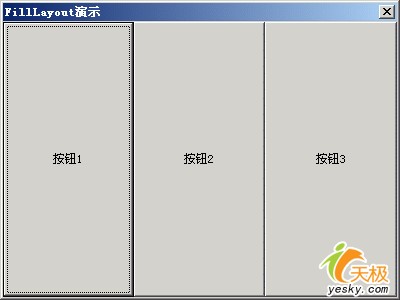
圖 1 使用水平 FillLayout 的 Shell 界面
圖 2 則為垂直排列效果:
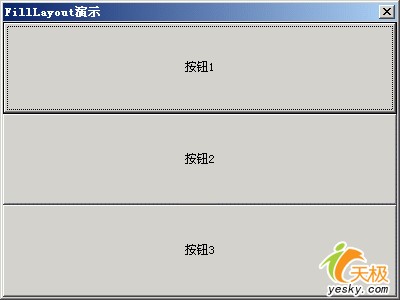
圖 2 使用垂直 FillLayout 的 Shell 界面
RowLayout 與 FillLayout 類似,但更靈活:控件大小可不一致,且會在一行排滿後自動換行。配合 RowData 可單獨設置每個控件的尺寸。
spacing:控件間距marginLeft、marginTop:起始邊距justify:為 true 時嘗試拉伸控件填滿行/列RowLayout layout = new RowLayout(SWT.HORIZONTAL);
layout.spacing = 30;
layout.marginLeft = 30;
layout.marginTop = 30;
shell.setLayout(layout);
RowData rowData = new RowData();
rowData.height = 50;
rowData.width = 100;
Button btn1 = new Button(shell, SWT.PUSH);
btn1.setText("按鈕1");
btn1.setLayoutData(rowData); // 僅 btn1 套用固定尺寸圖 3 展示 RowLayout 效果,按鈕 1 尺寸固定,其餘按鈕自適應:
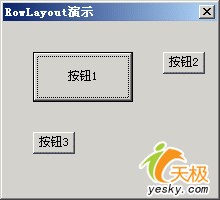
圖 3 RowLayout 效果圖
GridLayout 是 SWT 佈局的核心,支援多列、跨列/跨行、嵌套 Composite 等複雜結構,能滿足 90% 以上的界面需求。
GridLayout():單列,列寬不等GridLayout(int numColumns, boolean makeColumnsEqualWidth):指定列數與是否等寬每個控件通過 GridData 設置佈局數據:
horizontalSpan、verticalSpan:跨列/跨行grabExcessHorizontalSpace:是否搶佔多餘空間horizontalAlignment、verticalAlignment:對齊方式(BEGINNING, CENTER, END, FILL)widthHint、heightHint:建議尺寸GridLayout layout = new GridLayout();
layout.numColumns = 3;
layout.makeColumnsEqualWidth = true;
shell.setLayout(layout);
// 第 1 行第 1 列:按鈕 1
GridData data = new GridData(GridData.FILL_BOTH);
data.widthHint = 200;
Button one = new Button(shell, SWT.PUSH);
one.setText("按鈕1");
one.setLayoutData(data);
// 第 1 行第 2-3 列:嵌套 Composite 放 3 個按鈕
Composite composite = new Composite(shell, SWT.NONE);
data = new GridData(GridData.FILL_BOTH);
data.horizontalSpan = 2;
composite.setLayoutData(data);
GridLayout innerLayout = new GridLayout();
innerLayout.numColumns = 1;
innerLayout.marginHeight = 15;
innerLayout.marginRight = 150;
composite.setLayout(innerLayout);
// ... 在 composite 上添加按鈕 2、3、4
// 最後一行:跨 3 列、跨 2 行的大按鈕
data = new GridData();
data.horizontalAlignment = GridData.FILL;
data.grabExcessHorizontalSpace = true;
data.horizontalSpan = 3;
data.verticalSpan = 2;
data.heightHint = 150;
Button five = new Button(shell, SWT.PUSH);
five.setText("按鈕5");
five.setLayoutData(data);
shell.pack();
shell.open();此例展示了多列、跨列、嵌套 Composite、搶佔空間等核心技巧,是掌握 GridLayout 的最佳範本。
FormLayout 複雜但強大,通過 FormData + FormAttachment 實現控件邊緣與父容器邊緣、或其他控件邊緣的相對定位。適合需精確響應式調整的界面。
FormData data = new FormData();
data.left = new FormAttachment(40); // 距左邊 40%
button.setLayoutData(data);data.left = new FormAttachment(40);
data.right = new FormAttachment(60); // 寬度佔 20%,永遠水平居中注意:left < right,且 left + (100-right) = 按鈕寬度比例。若 left==right 則寬度為 0。
data.left = new FormAttachment(0, 20);  // 距左邊 20 像素
data.top = new FormAttachment(0, 40);   // 距頂部 40 像素
// 等同於 setLocation(20, 40)// 按鈕 1
Button btn1 = new Button(shell, SWT.PUSH);
FormData d1 = new FormData();
d1.top = new FormAttachment(20);
d1.left = new FormAttachment(40);
d1.right = new FormAttachment(50);
btn1.setLayoutData(d1);
// 按鈕 2:水平置中於 btn1,垂直緊貼 btn1 底部
Button btn2 = new Button(shell, SWT.PUSH);
FormData d2 = new FormData();
d2.left = new FormAttachment(btn1, 0, SWT.CENTER);
d2.top = new FormAttachment(btn1);
btn2.setLayoutData(d2);FormAttachment(control, offset, alignment) 可實現豐富的相對定位邏輯。
StackLayout 位於 org.eclipse.swt.custom 包,將多個控件疊放在同一位置,同一時刻僅顯示 topControl 指定的控件。常用於向導、分頁、視圖切換。
topControl,預設為 null(無控件顯示)。topControl 並調用 shell.layout() 重新佈局。StackLayout layout = new StackLayout();
shell.setLayout(layout);
Button one = new Button(shell, SWT.PUSH); one.setText("按鈕1");
Button two = new Button(shell, SWT.PUSH); two.setText("按鈕2");
Button three = new Button(shell, SWT.PUSH); three.setText("按鈕3");
layout.topControl = one; // 初始顯示第一個
// 選擇監聽器:點擊當前按鈕切換到下一個
class CycleAdapter extends SelectionAdapter {
Shell shell; StackLayout layout;
CycleAdapter(Shell s, StackLayout l) { shell = s; layout = l; }
public void widgetSelected(SelectionEvent e) {
Control[] children = shell.getChildren();
int idx = 0;
for (; idx < children.length; idx++)
if (children[idx] == layout.topControl) break;
idx = (idx + 1) % children.length;
layout.topControl = children[idx];
shell.layout();
}
}
CycleAdapter adapter = new CycleAdapter(shell, layout);
one.addSelectionListener(adapter);
two.addSelectionListener(adapter);
three.addSelectionListener(adapter);點擊當前顯示的按鈕,三個按鈕循環輪換顯示。
| 佈局 | 適用場景 | 複雜度 | 靈活度 |
|---|---|---|---|
| FillLayout | 工具欄、按鈕組等等寬/等高線性排列 | 極低 | 低 |
| RowLayout | 流式排列、需換行、控件大小不一 | 低 | 中 |
| GridLayout | 表單、對話框、複雜結構、嵌套佈局 | 中 | 高 |
| FormLayout | 精確響應式、控件間複雜相對定位 | 高 | 最高 |
| StackLayout | 卡片切換、向導頁面、視圖切換 | 低 | 特定用途 |
實際開發中,GridLayout 是主力,配合嵌套 Composite 可構建任意複雜界面;FormLayout 用於局部精細控制;StackLayout 專職視圖切換。掌握這五種佈局的組合運用,是編寫專業 SWT/JFace 應用的關鍵技能。