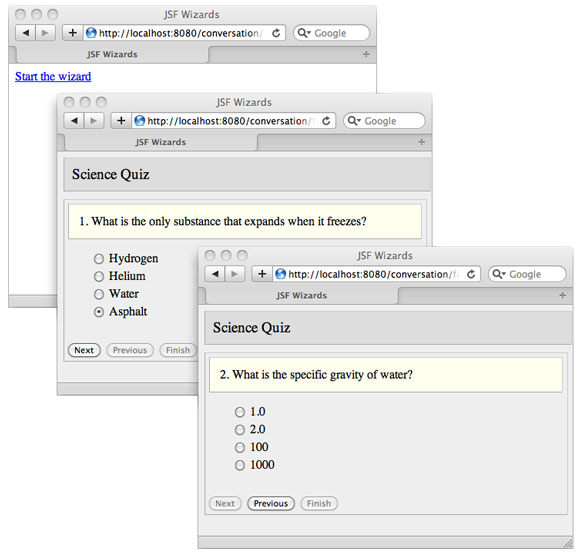
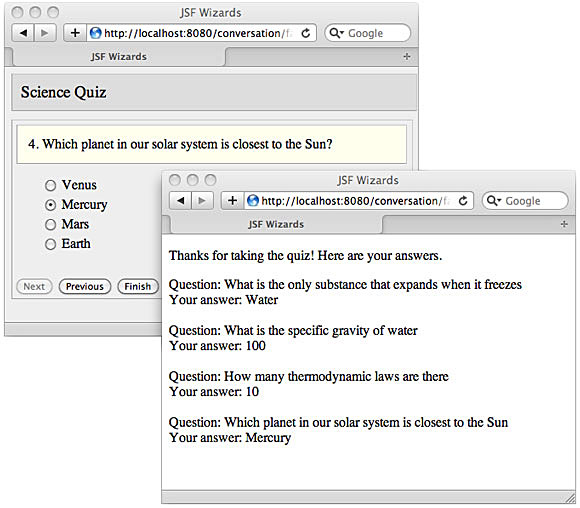
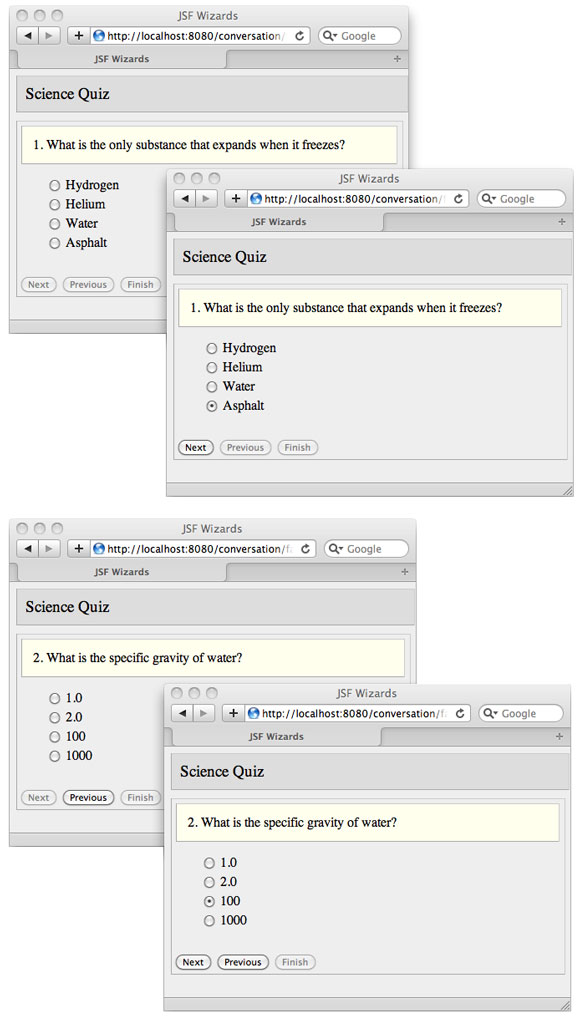
Java EE 6 引入的 JSF 2 與 CDI (Contexts and Dependency Injection) 為 Web 開發帶來現代化體驗。本文示範如何整合 Facelets 模板、Ajax、CDI 依賴注入、Producer 方法與 Conversation 作用域,以極少代碼實現功能完整的多步驟線上測驗向導。
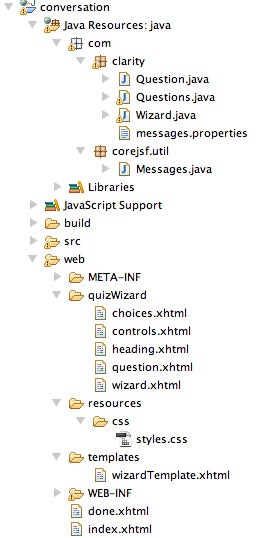
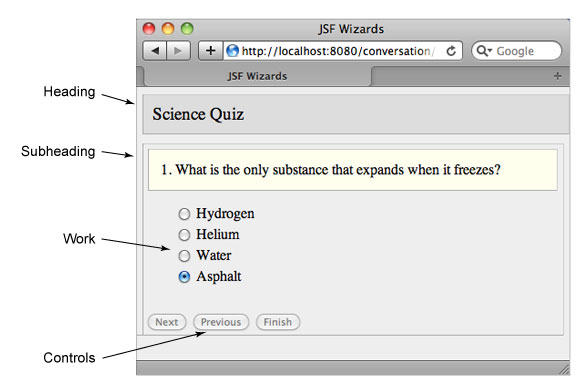
wizardTemplate.xhtml) 封裝共用結構,向導視圖 (wizard.xhtml) 組合 heading、question、choices、controls 四個片段Question (單題/選項/答案)、Questions (題庫陣列)Wizard Bean,核心邏輯集中於此templates/wizardTemplate.xhtml)<ui:insert name="windowTitle">#{msgs.windowTitle}</ui:insert>
<h:outputStylesheet library="css" name="styles.css" target="head"/>
<ui:insert name="heading"/>
<div class="wizardPanel">
<div class="subheading"><ui:insert name="subheading"/></div>
<div class="work"><ui:insert name="work"/></div>
<div class="controls"><ui:insert name="controls"/></div>
</div>
quizWizard/wizard.xhtml)<ui:composition template="/templates/wizardTemplate.xhtml">
<ui:define name="heading"><ui:include src="heading.xhtml"/></ui:define>
<ui:define name="subheading"><ui:include src="question.xhtml"/></ui:define>
<ui:define name="work"><ui:include src="choices.xhtml"/></ui:define>
<ui:define name="controls"><ui:include src="controls.xhtml"/></ui:define>
</ui:composition>
模板封裝結構與樣式,視圖專注內容差異,CSS 再分離外觀,三層解耦極大提升復用性。
choices.xhtml)<h:form id="choices">
<h:selectOneRadio value="#{questions[wizard.cursor].answer}" layout="pageDirection">
<f:selectItems value="#{questions[wizard.cursor].choices}"/>
<f:ajax render=":buttons"/> <!-- 選擇後更新按鈕狀態 -->
</h:selectOneRadio>
</h:form>
controls.xhtml)<h:form id="buttons">
<f:ajax render=":question :choices buttons">
<h:commandButton id="next" value="#{msgs.nextButtonText}"
disabled="#{not wizard.nextButtonEnabled}" actionListener="#{wizard.nextButtonClicked}"/>
<h:commandButton id="previous" value="#{msgs.previousButtonText}"
disabled="#{not wizard.previousButtonEnabled}" actionListener="#{wizard.previousButtonClicked}"/>
</f:ajax>
<h:commandButton id="finish" value="#{msgs.finishButtonText}"
disabled="#{not wizard.finishButtonEnabled}" action="#{wizard.end}"/> <!-- 導航非 Ajax -->
</h:form>
所有互動皆為 Ajax 局部渲染:選擇答案→啟用 Next/Previous;翻頁→同步更新題目、選項、按鈕。Finish 觸發完整導航至總結頁。
@Named
@ConversationScoped
public class Wizard implements Serializable {
    @Inject private Conversation conversation;
    private Questions questions = new Questions();
    private int cursor = 0;

    @Produces @Named
    public Question[] getQuestions() { return questions.getQuestions(); }

    public void nextButtonClicked(ActionEvent e) { incrementCursor(); }
    public void previousButtonClicked(ActionEvent e) { decrementCursor(); }
    public void incrementCursor() { ++cursor; }
    public void decrementCursor() { --cursor; }
    public int getCursor() { return cursor; }
    public void resetCursor() { cursor = 0; }

    public boolean getNextButtonEnabled() {
        return cursor != questions.size() - 1 && questions.getQuestions()[cursor].isAnswered();
    }
    public boolean getPreviousButtonEnabled() { return cursor > 0; }
    public boolean getFinishButtonEnabled() {
        return cursor == questions.size() - 1 && questions.getQuestions()[cursor].isAnswered();
    }

    public String start() {
        conversation.begin();  // 升級為長期對話
        return "quizWizard/wizard";
    }
    public String end() {
        conversation.end();    // 結束對話,銷毀 Bean
        return "/done";
    }
    private void setCurrentQuestionUnanswered() { ... }
}
@ManagedBean,提供可程式化控制生命週期的作用域。對話始於 start() 的 conversation.begin(),終於 end() 的 conversation.end(),橫跨多請求,避免 Session 濫用與 Request 過短的兩難。getQuestions() 以 Producer 方法產出 Questions Bean,EL 表達式 #{questions[...]} 直接引用,無需額外註解類別,實現「即時產出、無縫注入」。所有字串從 messages.properties 載入,透過 #{msgs.key} 存取,首頁連結 <h:commandLink value="#{msgs.startWizard}" action="#{wizard.start}"/> 即啟動向導。
JSF 2 + CDI 讓複雜的多步驟向導變得清晰優雅:
完整原始碼可下載參考,這是構建健壯、可重用 Web 應用的現代範本。