Spring AOP 支援兩種代理方式:JDK 動態代理 (需實作介面) 與 CGLIB 代理 (無需介面,直接代理類)。本文透過完整範例示範如何使用 CGLIB 實現無介面的 AOP 切面編程,針對 UserManagerImpl 類的 add* 方法織入安全檢查邏輯。
未實作任何介面的普通 POJO,包含 addUser 與 deleteUser 兩個方法:
package com.rx.spring.cglib;

public class UserManagerImpl {
    public void addUser(String username, String password) {
        System.out.println("-------UserManagerImpl.addUser()----------");
    }
    public void deleteUser(int id) {
        System.out.println("-------UserManagerImpl.deleteUser()----------");
    }
}定義前置通知 checkSecurity,接收 JoinPoint 參數以獲取方法引數、方法名等資訊:
package com.rx.spring.cglib;

import org.aspectj.lang.JoinPoint;

public class SecurityHandler {
    private void checkSecurity(JoinPoint joinPoint) {
        Object[] args = joinPoint.getArgs();
        for (int i = 0; i < args.length; i++) {
            System.out.println(args[i]);
        }
        System.out.println(joinPoint.getSignature().getName());
        System.out.println("----------checkSecurity()---------------");
    }
}透過 ClassPathXmlApplicationContext 載入配置,獲取 userManager bean 並呼叫方法驗證 AOP 效果:
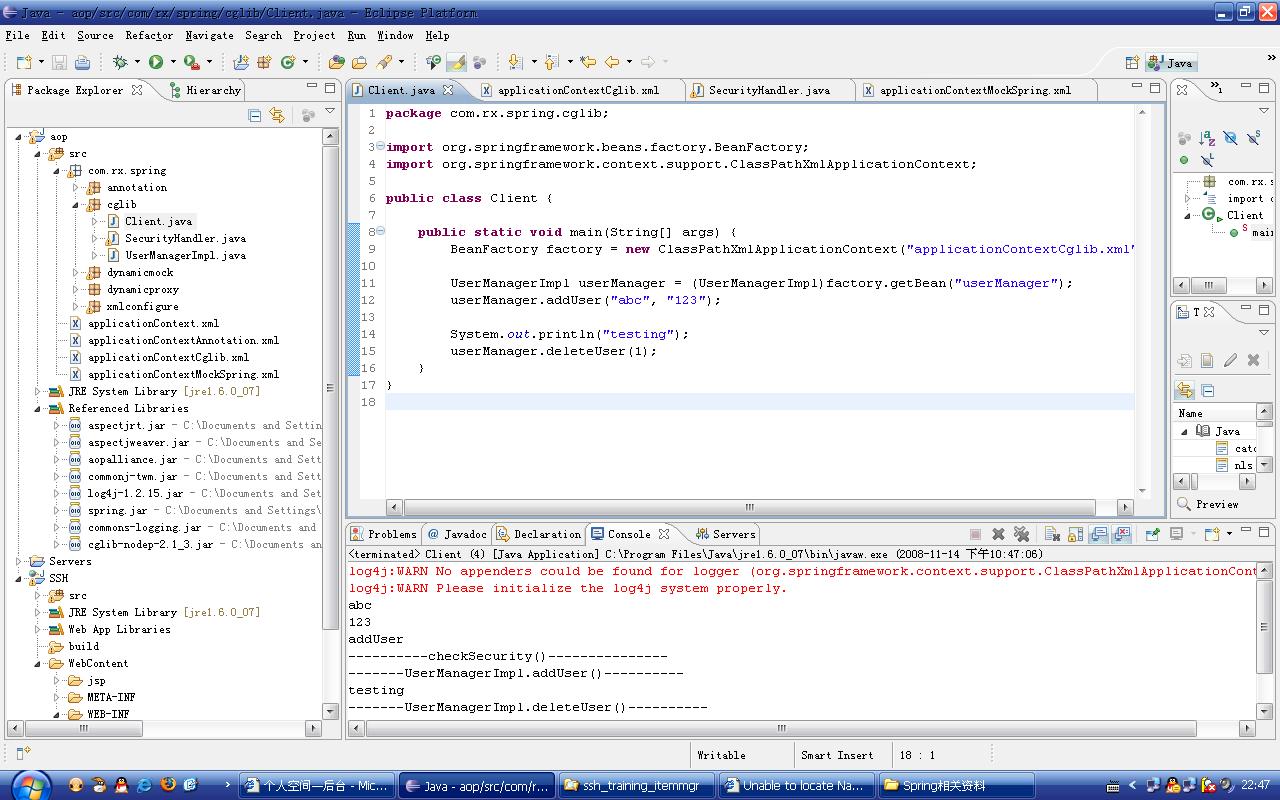
package com.rx.spring.cglib;

import org.springframework.beans.factory.BeanFactory;
import org.springframework.context.support.ClassPathXmlApplicationContext;

public class Client {
    public static void main(String[] args) {
        BeanFactory factory = new ClassPathXmlApplicationContext("applicationContextCglib.xml");
        UserManagerImpl userManager = (UserManagerImpl) factory.getBean("userManager");
        userManager.addUser("abc", "123");
        System.out.println("testing");
        userManager.deleteUser(1);
    }
}關鍵配置點:
<aop:aspectj-autoproxy proxy-target-class="true"/> (範例中被註解,但實際需啟用或透過 <aop:config> 隱含支援)<aop:config> 內宣告 <aop:aspect> 關聯 securityHandler beanexecution(* com.rx.spring.cglib.UserManagerImpl.add*(..)) 匹配所有以 add 開頭的方法<aop:before method="checkSecurity" pointcut-ref="allAddMethod"/><?xml version="1.0" encoding="UTF-8"?>
<beans xmlns="https://www.springframework.org/schema/beans"
xmlns:xsi="https://www.w3.org/2001/XMLSchema-instance"
xmlns:aop="https://www.springframework.org/schema/aop"
xmlns:tx="https://www.springframework.org/schema/tx"
xsi:schemaLocation="
https://www.springframework.org/schema/beans https://www.springframework.org/schema/beans/spring-beans-2.0.xsd
https://www.springframework.org/schema/aop https://www.springframework.org/schema/aop/spring-aop-2.0.xsd
https://www.springframework.org/schema/tx https://www.springframework.org/schema/tx/spring-tx-2.0.xsd">
<!-- 啟用 CGLIB 代理,proxy-target-class="true" 為關鍵 -->
<aop:aspectj-autoproxy proxy-target-class="true"/>
<bean id="securityHandler" class="com.rx.spring.cglib.SecurityHandler"/>
<bean id="userManager" class="com.rx.spring.cglib.UserManagerImpl"/>
<aop:config>
<aop:aspect id="security" ref="securityHandler">
<aop:pointcut id="allAddMethod" expression="execution(* com.rx.spring.cglib.UserManagerImpl.add*(..))"/>
<aop:before method="checkSecurity" pointcut-ref="allAddMethod"/>
</aop:aspect>
</aop:config>
</beans>運行 Client.main() 後,控制台輸出:
abc
123
addUser
----------checkSecurity()---------------
-------UserManagerImpl.addUser()----------
testing
-------UserManagerImpl.deleteUser()----------
可見:
addUser 呼叫前,checkSecurity 先執行,印出引數 abc、123 及方法名deleteUser 不匹配切點,未觸發通知| 項目 | 說明 |
|---|---|
| 代理模式 | CGLIB (繼承目標類生成子類),無需介面 |
| 啟用方式 | proxy-target-class="true" 或 <aop:config> 內隱含 |
| 切點運算式 | AspectJ 語法,execution(* pkg.Class.method*(..)) |
| 通知類型 | 前置通知 (aop:before),亦支援後置、環繞、拋出、返回通知 |
| JoinPoint | 提供方法簽名、引數、目標物件等上下文資訊 |
final 方法將被忽略proxy-target-class=true,無額外配置即可使用 CGLIB