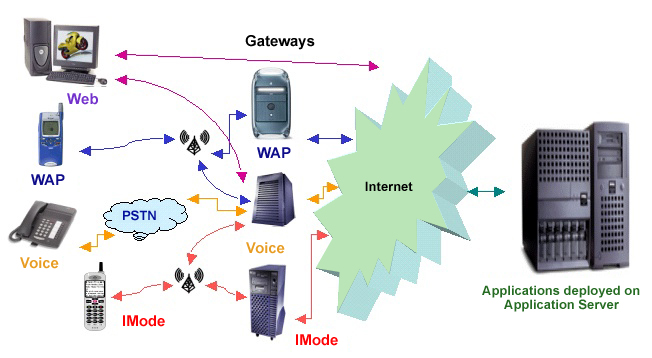
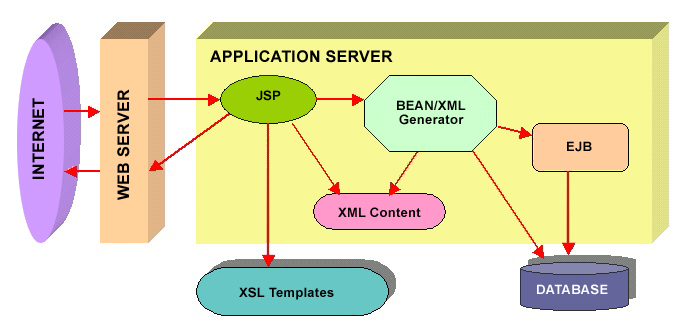
面對 PC 瀏覽器、WAP 手機、iMode 設備等異構終端,以及多語言國際化需求,傳統為每端開發獨立版本成本極高。本文提出基於 J2EE 的「單一數據源、多端轉換、國際化解耦」架構:JSP 識別終端與語言 → XML 生成器產出統一數據 → XSLT 樣式表轉換為目標格式(HTML/WML/cHTML) → ResourceBundle 提供多語言文本,實現代碼複用率 90% 以上。
<%@ page import="javax.xml.transform.*" %>
<%@ page import="java.util.*, java.net.*" %>
<%
    // 1. 解析語言參數,默認 en_US
    String language = request.getParameter("language");
    String country = request.getParameter("country");
    if (language == null) language = "en";
    if (country == null) country = "US";
    country = country.toUpperCase();

    // 2. 識別終端類型
    String userAgent = request.getHeader("User-Agent");
    String pageType = "Web", contentType = "text/html;charset=UTF-8", xslName = "articles-html-form.xsl";

    if (userAgent.startsWith("Mozilla")) {
        pageType = "Web"; contentType = "text/html;charset=UTF-8"; xslName = "articles-html-form.xsl";
    } else if (userAgent.startsWith("Microsoft URL")) { // iMode 模擬器特徵
        pageType = "IMode"; contentType = "text/html;charset=UTF-8"; xslName = "articles-imode-form.xsl";
    } else if (userAgent.startsWith("Nokia")) { // Nokia WAP Toolkit 特徵
        pageType = "Wap"; contentType = "text/vnd.wap.wml"; xslName = "articles-wml-form.xsl";
    }

    // 3. 執行轉換流程
    showPage(pageType, language, country, response, contentType, xslName);
%>
<%
    private void showPage(String pageType, String lang, String country,
                          HttpServletResponse resp, String contentType, String xslName) {
        try {
            resp.setContentType(contentType);
            TransformerFactory factory = TransformerFactory.newInstance();

            // 獲取 XML 數據
            String xmlStr = OptionsXML.getOptionsXML(pageType, lang, country, resp);
            StreamSource xmlSource = new StreamSource(new StringReader(xmlStr));
            StreamSource xslSource = new StreamSource(getServletContext().getResourceAsStream(xslName));

            // 轉換輸出
            Transformer transformer = factory.newTransformer(xslSource);
            transformer.transform(xmlSource, new StreamResult(resp.getOutputStream()));
        } catch (Exception e) { e.printStackTrace(); }
    }
%>
public class OptionsXML {
    public static String getOptionsXML(String pageType, String lang, String country, HttpServletResponse resp) {
        Locale locale = new Locale(lang, country);
        ResourceBundle rb = ResourceBundle.getBundle("ArticlesGUI", locale);

        GenerateXML xml = new GenerateXML();
        xml.addPageTitle(rb.getString(pageType + "_Options_Page_Heading"));
        Element form = xml.addForm(1, "optionform", true);

        String url = "YourResponse.jsp?language=" + lang + "&country=" + country;
        xml.addLink(1, "_self",
            rb.getString(pageType + "_Options_Page_Option_1"), " ",
            url + "&optionType=1",
            rb.getString(pageType + "_Options_Page_Option_1"), form, true);

        return xml.getGeneratedXMLString();
    }
}
# ArticlesGUI_ja_JP.properties (日文)
Web_Options_Page_Heading=\u65e5\u672c\u30fbWayne's Demo
Wap_Options_Page_Heading=\u65e5\u672c\u30fbDemo
IMode_Options_Page_Heading=\u65e5\u672c\u30fbDemo -- iMode

Web_Options_Page_Option_1=\u9078\u629e\u9078\u9805 1
Wap_Options_Page_Option_1=\u9078\u9805 1
IMode_Options_Page_Option_1=\u9078\u9805 1

# ArticlesGUI_en_US.properties (英文)
Web_Options_Page_Heading=Wayne's Demo
Wap_Options_Page_Heading=Demo
IMode_Options_Page_Heading=Demo -- iMode
| 擴展類型 | 操作步驟 | 代碼變更量 |
|---|---|---|
| 新終端 (如 VoiceXML) | 1. JSP 添加 User-Agent 識別 2. 定義 pageType="VOICE" 3. 編寫 articles-voice-form.xsl 4. ResourceBundle 添加 VOICE_* 鍵值 | 零業務邏輯修改 |
| 新語言 (如韓文) | 1. 創建 ArticlesGUI_ko_KO.properties 2. 所有鍵值填入 Unicode 韓文 3. URL 參數 language=ko&country=KO | 零代碼修改 |
# 圖片本地化(同樣利用 pageType 前綴)
Web_Welcome_Image=web.gif
Wap_Welcome_Image=wap.wbmp
IMode_Welcome_Image=imode.jpg

# Java 代碼獲取
String img = rb.getString(pageType + "_Welcome_Image");

# 日期/數字/貨幣本地化
Locale locale = new Locale("ja", "JP");
DateFormat df = DateFormat.getDateInstance(DateFormat.FULL, locale);
NumberFormat nf = NumberFormat.getCurrencyInstance(locale);
String localizedDate = df.format(new Date());
String localizedPrice = nf.format(12345.67);