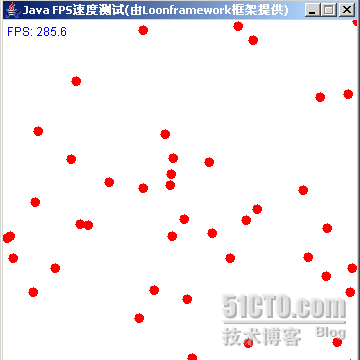
FPS(Frames Per Second)是圖形應用、遊戲效能的核心指標。本文實作一套基於 System.nanoTime() 的高精度 FPS 統計元件 FPSListen,結合固定時間步長遊戲迴圈,展示 50 顆彈球碰撞邊界的流暢動畫,實測單獨執行可達 380 FPS,IDE 內約 280 FPS。
public class FPSListen {
    public static final int TARGET_FPS = 500;
    public static final long PERIOD_NS = 1_000_000_000L / TARGET_FPS; // 2,000,000 ns = 2ms
    public static final long MAX_INTERVAL_NS = 1_000_000_000L; // 1秒

    private double currentFPS = 0;
    private long frameCount = 0, intervalAcc = 0, lastTime = System.nanoTime();
    private DecimalFormat df = new DecimalFormat("0.0");

    public void makeFPS() {
        frameCount++;
        intervalAcc += PERIOD_NS;
        if (intervalAcc >= MAX_INTERVAL_NS) {
            long now = System.nanoTime();
            long realElapsed = now - lastTime;
            currentFPS = (frameCount * 1_000_000_000.0) / realElapsed;
            frameCount = 0; intervalAcc = 0; lastTime = now;
        }
    }
    public String getFPS() { return df.format(currentFPS); }
    // 可選:啟用 OpenGL 管線加速
    public void enableOpenGL() {
        System.setProperty("sun.java2d.opengl", "True");
        System.setProperty("sun.java2d.translaccel", "True");
    }
}
關鍵點:
nanoTime() 而非 currentTimeMillis(),精度從毫秒提升至納秒。PERIOD_NS,每滿 1 秒統計一次實際 FPS,避免每幀計算開銷。FPS = frameCount * 1e9 / realElapsedNs 精確反映真實繪製速率。public class BallPanel extends Panel implements Runnable {
private Ball[] balls = new Ball[50];
private FPSListen fps = new FPSListen();
private Image offscreen; Graphics offG;
public void run() {
long before = System.nanoTime(); fps.setTime(before);
while (running) {
gameUpdate(); // 邏輯更新
repaint(); // 觸發繪製
long after = System.nanoTime();
long diff = after - before;
long sleep = (FPSListen.PERIOD_NS - diff) / 1_000_000; // ns -> ms
if (sleep > 0) { try { Thread.sleep(sleep); } catch (InterruptedException ignored) {} }
else { Thread.yield(); } // 超時補償
before = System.nanoTime();
fps.makeFPS();
}
}
public void paint(Graphics g) {
offG.setColor(Color.WHITE); offG.fillRect(0,0,WIDTH,HEIGHT);
offG.setColor(Color.BLUE); offG.drawString("FPS: " + fps.getFPS(), 4, 16);
for (Ball b : balls) b.draw(offG);
g.drawImage(offscreen, 0, 0, this);
}
}迴圈特色:
Thread.yield() 讓出 CPU,避免雪球效應。offscreen 畫好再一次 drawImage 送顯示。public class Ball {
private int x, y, vx, vy; // 位置、速度
public void move() {
x += vx; y += vy;
if (x < 0 || x > WIDTH - SIZE) vx = -vx;
if (y < 0 || y > HEIGHT - SIZE) vy = -vy;
}
public void draw(Graphics g) { g.fillOval(x, y, SIZE, SIZE); }
}-Dsun.java2d.opengl=True 使用 OpenGL 管線(Windows/Linux 需驅動支援)。BufferStrategy(Frame/Canvas.createBufferStrategy(2))替代手動 BufferedImage,獲取硬體頁面翻轉。Ball、Rectangle 等高頻分配物件,減輕 GC 壓力。本文轉載自「Java究竟怎麼玩」博客,原文地址:https://cping1982.blog.51cto.com/601635/116709