Java 作為一門純粹的面向對象語言,提供了強大的 OOP 實現機制。然而,許多開發者在實際編碼時,往往只是將 Java 當作「帶類別的 C 語言」來用,未能真正發揮面向對象的威力。本文將以一個計算球體體積與表面積的簡單需求為例,層層遞進地展示從「面向過程」到「結構化編程」,再到真正的「面向對象設計」與「圖形化介面開發」的完整演進過程,幫助讀者建立正確的 OOP 思維。
大多數初學者或習慣結構化思維的程式設計師,面對「輸入半徑,輸出體積與表面積」這個需求,通常會寫出如下程式碼:
class Sphere {
    public static void main(String[] args) {
        EasyReader console = new EasyReader();
        System.out.print("Enter the radius: ");
        double radius = console.readDouble();
        System.out.println("Radius = " + radius);
        double volume = 4.0 / 3.0 * Math.PI * radius * radius * radius;
        System.out.println("Volume = " + volume);
        double surfArea = 4.0 * Math.PI * radius * radius;
        System.out.println("Surface area = " + surfArea);
    }
}
搭配一個處理控制台輸入的 EasyReader 工具類(此處省略細節),程式確實能跑、能出結果。但從軟體工程角度來看,這是極差的設計:
main 方法裡。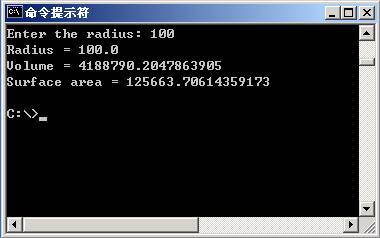
進階一步,將計算邏輯抽取為 private static 方法,並引入 DecimalFormat 格式化輸出:
import java.text.DecimalFormat;

class Sphere {
    private static double volume(double r) {
        return 4.0 / 3.0 * Math.PI * r * r * r;
    }
    private static double surfaceArea(double r) {
        return 4.0 * Math.PI * r * r;
    }
    public static void main(String[] args) {
        EasyReader console = new EasyReader();
        System.out.print("Enter the radius: ");
        double radius = console.readDouble();
        DecimalFormat f3 = new DecimalFormat("0.000");
        System.out.println();
        System.out.println("Radius = " + f3.format(radius));
        System.out.println("Volume = " + f3.format(volume(radius)));
        System.out.println("Surface area = " + f3.format(surfaceArea(radius)));
        System.out.println();
    }
}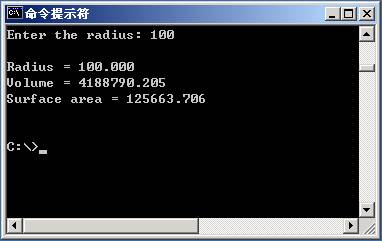
雖然輸出變漂亮了,且計算邏輯可在本類內部複用,但本質上仍是結構化風格:Model(資料模型)與 UI(使用者介面)仍綁在同一個類別裡,換個介面就得改主類別,違反「單一職責原則」。
真正的 OOP 設計,核心在於「每個類別只做一件事,並把它做好」。對於本例:
toString() 等行為。class Sphere {
private double myRadius;
private double myCenterX;
private double myCenterY;
public Sphere(double x, double y, double r) {
myCenterX = x; myCenterY = y; myRadius = r;
}
public double getRadius() { return myRadius; }
public void setRadius(double r) { myRadius = r; }
public double volume() {
return 4.0 / 3.0 * Math.PI * myRadius * myRadius * myRadius;
}
public double surfaceArea() {
return 4.0 * Math.PI * myRadius * myRadius;
}
@Override
public String toString() {
return "Sphere [Center = (" + myCenterX + ", " + myCenterY + ") Radius = " + myRadius + "]";
}
}import java.text.DecimalFormat;
class TestSphere {
public static void main(String[] args) {
EasyReader console = new EasyReader();
System.out.print("Enter the radius: ");
double radius = console.readDouble();
DecimalFormat f3 = new DecimalFormat("0.000");
Sphere balloon = new Sphere(0, 0, radius);
System.out.println();
System.out.println(balloon);
System.out.println("Volume = " + f3.format(balloon.volume()));
System.out.println("Surface area = " + f3.format(balloon.surfaceArea()));
System.out.println();
}
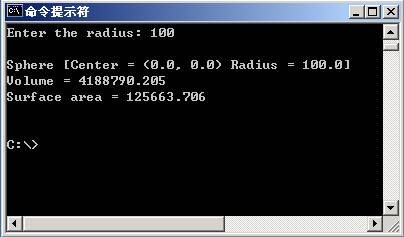
}
此時類別關係圖與循序圖清晰展示了職責分離:
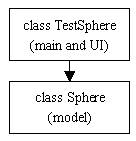
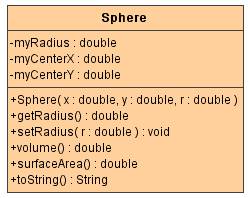
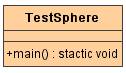
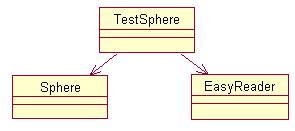
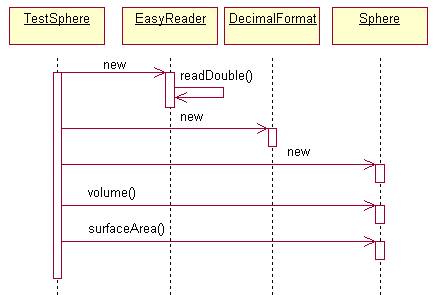
這種分離讓不同程式設計師可並行開發:一人負責 Model,一人負責 UI,介面穩定後再整合。這正是 OOP 在工程層面的核心價值——支援大規模協作開發。
有了 Model/UI 分離,替換介面變得極其容易。以下以 Swing 實作 SphereWindow,完全復用 Sphere 模型:
import java.awt.*;
import java.awt.event.*;
import javax.swing.*;
import javax.swing.border.*;
import java.text.DecimalFormat;

public class SphereWindow extends JFrame implements ActionListener {
    private JTextField radiusIn, volumeOut, surfAreaOut;
    private Sphere balloon;
    private DecimalFormat f3 = new DecimalFormat("0.000");

    public SphereWindow() {
        super("Spheres: volume and surface area");
        JPanel view = new JPanel();
        view.setLayout(new GridLayout(6, 2, 10, 10));
        view.setBorder(new EmptyBorder(10, 10, 10, 10));

        view.add(new JLabel("Radius = ", SwingConstants.RIGHT));
        radiusIn = new JTextField(8);
        radiusIn.setBackground(Color.yellow);
        radiusIn.addActionListener(this);
        view.add(radiusIn);

        view.add(new JLabel("Volume = ", SwingConstants.RIGHT));
        volumeOut = new JTextField(8);
        volumeOut.setEditable(false);
        volumeOut.setBackground(Color.white);
        view.add(volumeOut);

        view.add(new JLabel("Surface area = ", SwingConstants.RIGHT));
        surfAreaOut = new JTextField(8);
        surfAreaOut.setEditable(false);
        surfAreaOut.setBackground(Color.white);
        view.add(surfAreaOut);

        view.add(new JPanel()); // reserved
        Container c = getContentPane();
        c.add(view, BorderLayout.CENTER);
        balloon = new Sphere(0, 0, 100);
    }

    @Override
    public void actionPerformed(ActionEvent e) {
        String s = radiusIn.getText();
        double r = Double.parseDouble(s);
        balloon.setRadius(r);
        radiusIn.setText(" " + f3.format(r));
        volumeOut.setText(" " + f3.format(balloon.volume()));
        surfAreaOut.setText(" " + f3.format(balloon.surfaceArea()));
    }

    public static void main(String[] args) {
        SphereWindow w = new SphereWindow();
        w.setSize(300, 250);
        w.addWindowListener(new ExitButtonListener());
        w.setVisible(true); // JDK 1.5+ 建議用 setVisible(true)
    }
}

class ExitButtonListener extends WindowAdapter {
    @Override
    public void windowClosing(WindowEvent e) { System.exit(0); }
}
此時架構已演進為經典的 Model-View 分離(MVC 的雛形),Sphere 完全不知情也無需修改,即可支援 Console、Swing、未來的 Web 或 Mobile 介面。
| 階段 | 核心特徵 | 缺點 | 適用場景 |
|---|---|---|---|
| 普通實作 | 所有邏輯在 main,無結構 | 耦合極高、不可複用、難維護 | 一次性腳本、教學示範 |
| 結構化 | 抽取 static 方法、格式化輸出 | Model/UI 未分離、跨介面難複用 | 小型工具、單一介面專案 |
| 面向對象 | Model/UI 分離、封裝、多型、複用 | 初期設計稍費時 | 所有正式專案、團隊協作、長期維護 |
| GUI 擴充 | View 可換裝、Model 零修改 | 需掌握 GUI 框架 | 桌面應用、富客戶端 |
本文以一個最簡單的數學計算為例,完整演示了從「寫代碼」到「設計系統」的思維轉變。掌握這條演進路徑,才是真正入了 Java 面向對象的門。