首頁
編程語言
C語言|JAVA編程
Python編程
網頁編程
ASP編程|PHP編程
JSP編程
數據庫
MYSQL數據庫|SqlServer數據庫
Oracle數據庫|DB2數據庫
您现在的位置: 程式碼之家 >> 編程語言 >  >> Java 程式設計 >> Java 相關知識

Eclipse 插件依賴解析神器:Dependency Walker 自動發現未解析依賴

     編輯:Java 相關知識

問題背景

Manifest 中聲明依賴,但插件未加載。PDE「Plug-in Dependencies」視圖僅顯示已成功加載的插件,無法定位缺失環節。手工遍歷 plugin.xml 極其低效。

Eclipse 插件依賴機制

依賴聲明

plugin.xml 中 <requires> 區塊聲明:

<requires>
  <import plugin="org.eclipse.swt" export="true"/>
  <import plugin="org.eclipse.core.runtime"/>
</requires>

插件搜索路徑

  1. <targetPlatform>/eclipse/plugins
  2. <targetPlatform>/eclipse/links 下 .link 文件指向的 <somePath>/eclipse/plugins

Dependency Walker 實現原理

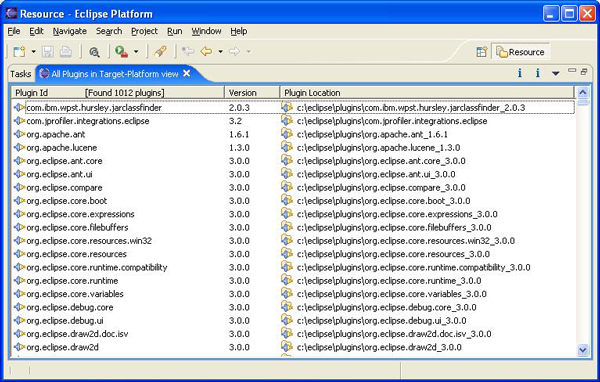
步驟 1:枚舉所有物理插件

  • 讀取目標平台位置
  • 解析 links 目錄獲取鏈接路徑
  • 掃描所有插件根目錄,解析 plugin.xml 獲取 ID、版本、路徑
  • 構建插件列表(SWT Table 顯示)

All Plugins View

步驟 2:遞歸遍歷依賴鏈

  • 解析用戶選中插件的 plugin.xml/fragment.xml
  • 獲取 <import plugin="..."/> 列表
  • 對每個依賴 ID,查找對應插件(多版本取最高版)
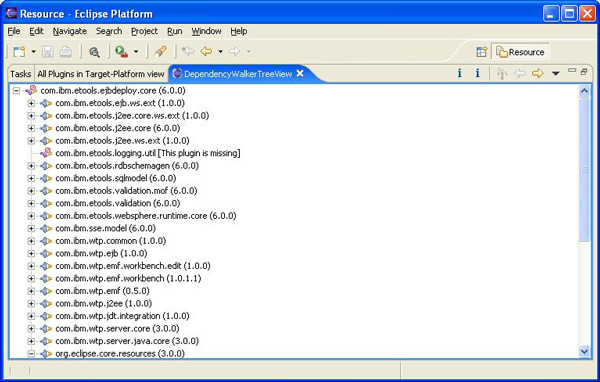
  • 構建樹狀視圖,標記缺失插件(紅圈)
  • 遞歸處理下一層依賴

版本比較算法

將版本號按 . 分割為整數數組,逐位比較,選擇較高版本。

Arrays.sort(plugins, new Comparator() {
  public int compare(Object o1, Object o2) {
    // 版本號分割比較邏輯...
  }
});

運行結果

樹狀視圖直觀展示完整依賴鏈,缺失插件明確標記。

Dependency Walker Tree View

使用方法

  1. 源碼導入為 Eclipse 專案
  2. 插件解壓至 /eclipse/plugins
  3. Window → Show View → Others → DependencyWalker → All Plugins in Target-Platform
  4. 雙擊插件查看依賴樹

總結

自動化依賴掃描 + 版本衝突解決 + 可視化樹狀展示 = 快速定位未解析插件依賴的利器。

  1. 上一篇文章:
  2. 下一篇文章:
Copyright © 程式碼之家 All Rights Reserved