「Java 做不好桌面」的爭論由來已久。儘管 Swing 和 Java 2D 擁有超十年歷史,且有 JIDE、JGoodies、TWaver 等優秀組件庫,但構建視覺驚艷的桌面應用仍具挑戰。本系列旨在通過生動實例,展示 Java 2D 的強大繪圖能力——只要多一點創意與耐心,你的 Java 程序同樣可以「驚艷」。
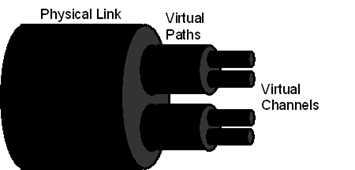
在網絡通訊領域,協議間存在層層承載關係:IP 協議可承載於 SDH、ATM 之上;同時 IP 又可承載 VoIP 等上層協議。用相互嵌套的立體套管隱喻這種「承載」關係,直觀且專業。
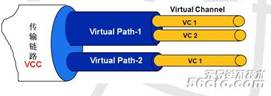
完整代碼見 PipleComponent 類,核心在 createPiple() 方法:
private Shape createPiple(Graphics2D g2d, int x, int y, int width, int height,
                          Color color, Shape parentHollowShape) {
    // 1. 裁剪區域:若有父套管,僅繪製右半部(避免遮擋)
    if (parentHollowShape != null) {
        Rectangle bounds = parentHollowShape.getBounds();
        Rectangle rightClip = new Rectangle(bounds.x + bounds.width/2, bounds.y, 3000, bounds.height);
        Area clip = new Area(parentHollowShape);
        clip.add(new Area(rightClip));
        g2d.setClip(clip);
    }

    // 2. 立體管體構建:左圓 + 矩形 - 右圓 = 管體輪廓
    int circleWidth = height / 3;
    GradientPaint paint = new GradientPaint(x, y, color.brighter(),
                                            x, y + (int)(height * 0.65), color.darker(), true);
    g2d.setPaint(paint);

    Ellipse2D.Double leftCircle = new Ellipse2D.Double(x - circleWidth/2, y, circleWidth, height);
    Ellipse2D.Double rightCircle = new Ellipse2D.Double(x + width - circleWidth/2, y, circleWidth, height);

    int thickness = 4;
    Ellipse2D.Double rightHollowCircle = new Ellipse2D.Double(
        rightCircle.getX() + thickness, rightCircle.getY() + thickness,
        rightCircle.getWidth() - thickness*2, rightCircle.getHeight() - thickness*2);

    Rectangle rect = new Rectangle(x, y, width, height);
    Area area = new Area(leftCircle);
    area.add(new Area(rect));
    area.subtract(new Area(rightCircle)); // 布爾運算構建管體
    g2d.fill(area);

    // 3. 右端面陰影與高光
    g2d.setColor(color.darker());
    g2d.fill(rightCircle);

    paint = new GradientPaint(x, y, Color.darkGray,
                              x, y + (int)(height * 0.4), Color.lightGray, true);
    g2d.setPaint(paint);
    g2d.fill(rightHollowCircle); // 內圓高光

    g2d.setClip(null); // 恢復裁剪
    return rightHollowCircle; // 返回內圓供子套管使用
}
| 技術點 | 應用場景 | 核心 API |
|---|---|---|
| 漸變填充 | 管體立體感、端面高光 | GradientPaint |
| 裁剪區域 | 父子套管遮擋處理 | Graphics2D.setClip(Shape) |
| Area 布爾運算 | 管體輪廓構建(加/減/交) | java.awt.geom.Area |
| 隨機色彩 | 多層套管區分度 | TWaverUtil.getRandomColor() 或 new Color(r,g,b,alpha) |
若掌握上述技巧,可嘗試實現下圖效果——多層級、多方向的協議承載拓撲: