Java 從設計之初便全面支援 Unicode,使多語言字串處理變得直觀便捷。NetBeans IDE 更進一步提供視覺化國際化工具,大幅減輕開發者負擔。
NetBeans 允許在不同 DesignLocale 下維護不同的 UI 視圖。開發者可先在熟悉的語言環境下完成介面設計,再逐步添加目標語系。前提是專案已加入對應的 Locale(參考上一篇)。
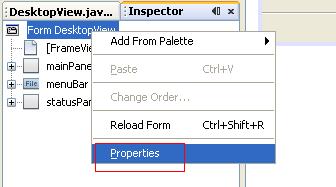
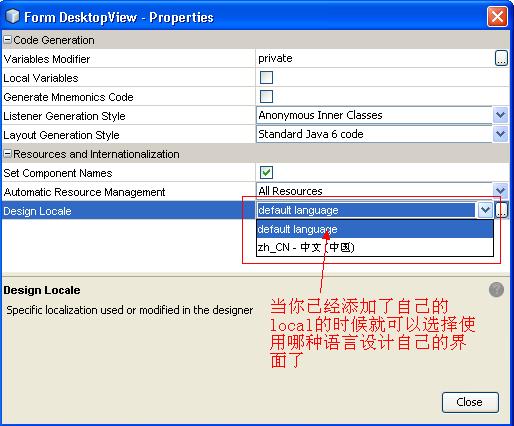
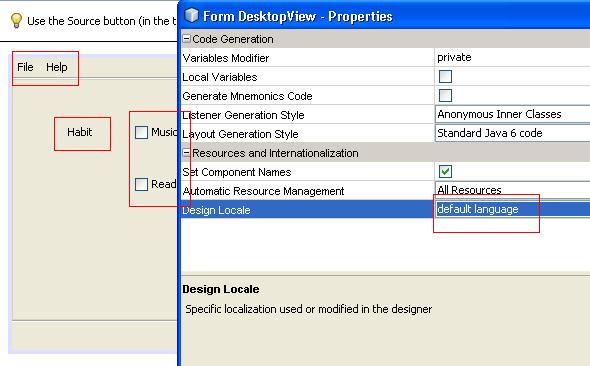
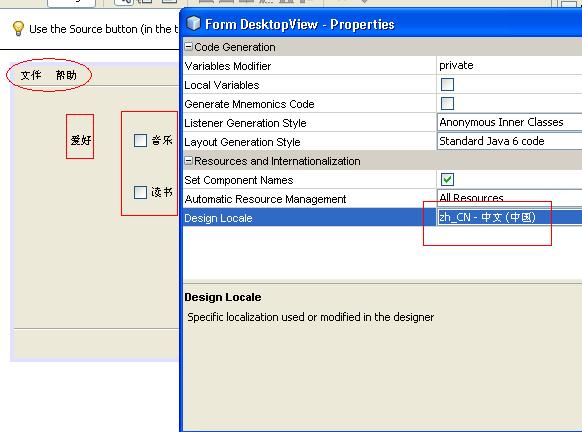
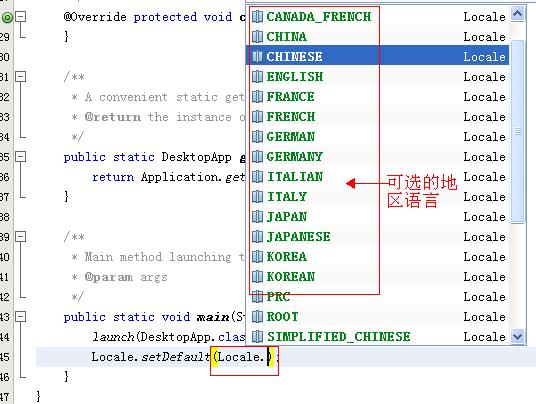
若不想更改作業系統語言,可在 main() 首行加入:
Locale.setDefault("目標語言代碼");NetBeans 提供豐富的語言選擇清單:
不同地區的數值、貨幣、百分比表示差異極大,NetBeans 整合 java.text.NumberFormat 提供完整支援:
import java.awt.*;
import java.awt.event.*;
import java.text.*;
import java.util.*;
import javax.swing.*;

public class NumberFormatTest {
    public static void main(String[] args) {
        JFrame frame = new NumberFormatFrame();
        frame.setDefaultCloseOperation(JFrame.EXIT_ON_CLOSE);
        frame.setVisible(true);
    }
}

class NumberFormatFrame extends JFrame {
    public NumberFormatFrame() {
        setTitle("NumberFormatTest");
        setLayout(new GridBagLayout());

        ActionListener listener = e -> updateDisplay();

        JPanel p = new JPanel();
        addRadioButton(p, numberRadioButton, rbGroup, listener);
        addRadioButton(p, currencyRadioButton, rbGroup, listener);
        addRadioButton(p, percentRadioButton, rbGroup, listener);

        add(new JLabel("Local:"), new GBC(0, 0).setAnchor(GBC.EAST));
        add(p, new GBC(1, 1));
        add(parseButton, new GBC(0, 2).setInsets(2));
        add(localeCombo, new GBC(1, 0).setAnchor(GBC.WEST));
        add(numberText, new GBC(1, 2).setFill(GBC.HORIZONTAL));

        locales = NumberFormat.getAvailableLocales();
        for (Locale loc : locales)
            localeCombo.addItem(loc.getDisplayName());
        localeCombo.setSelectedItem(Locale.getDefault().getDisplayName());

        currentNumber = 123456.78;
        updateDisplay();

        localeCombo.addActionListener(listener);
        parseButton.addActionListener(e -> {
            String s = numberText.getText().trim();
            try {
                Number n = currentNumberFormat.parse(s);
                if (n != null) {
                    currentNumber = n.doubleValue();
                    updateDisplay();
                } else {
                    numberText.setText("Parse error: " + s);
                }
            } catch (ParseException ex) {
                numberText.setText("Parse error: " + s);
            }
        });
        pack();
    }

    private void addRadioButton(Container p, JRadioButton b, ButtonGroup g, ActionListener listener) {
        b.setSelected(g.getButtonCount() == 0);
        b.addActionListener(listener);
        g.add(b);
        p.add(b);
    }

    public void updateDisplay() {
        Locale currentLocale = locales[localeCombo.getSelectedIndex()];
        currentNumberFormat = null;
        if (numberRadioButton.isSelected())
            currentNumberFormat = NumberFormat.getNumberInstance(currentLocale);
        else if (currencyRadioButton.isSelected())
            currentNumberFormat = NumberFormat.getCurrencyInstance(currentLocale);
        else if (percentRadioButton.isSelected())
            currentNumberFormat = NumberFormat.getPercentInstance(currentLocale);
        numberText.setText(currentNumberFormat.format(currentNumber));
    }

    private Locale[] locales;
    private double currentNumber;
    private JComboBox localeCombo = new JComboBox();
    private JButton parseButton = new JButton("Parse");
    private JTextField numberText = new JTextField(30);
    private JRadioButton numberRadioButton = new JRadioButton("Number");
    private JRadioButton currencyRadioButton = new JRadioButton("Currency");
    private JRadioButton percentRadioButton = new JRadioButton("Percent");
    private ButtonGroup rbGroup = new ButtonGroup();
    private NumberFormat currentNumberFormat;
}package testapp.Local;
import java.awt.*;
public class GBC extends GridBagConstraints {
public GBC(int gridx, int gridy) {
this.gridx = gridx; this.gridy = gridy;
}
public GBC(int gridx, int gridy, int gridwidth, int gridheight) {
this.gridx = gridx; this.gridy = gridy;
this.gridwidth = gridwidth; this.gridheight = gridheight;
}
public GBC setAnchor(int anchor) { this.anchor = anchor; return this; }
public GBC setFill(int fill) { this.fill = fill; return this; }
public GBC setWeight(double weightx, double weighty) { this.weightx = weightx; this.weighty = weighty; return this; }
public GBC setInsets(int distance) { this.insets = new Insets(distance, distance, distance, distance); return this; }
public GBC setInsets(int top, int left, int bottom, int right) { this.insets = new Insets(top, left, bottom, right); return this; }
public GBC setIpad(int ipadx, int ipady) { this.ipadx = ipadx; this.ipady = ipady; return this; }
}日期時間國際化將於下篇介紹。掌握 NumberFormat 三大靜態工廠方法(getNumberInstance、getCurrencyInstance、getPercentInstance)即可應對大多數數值顯示需求。