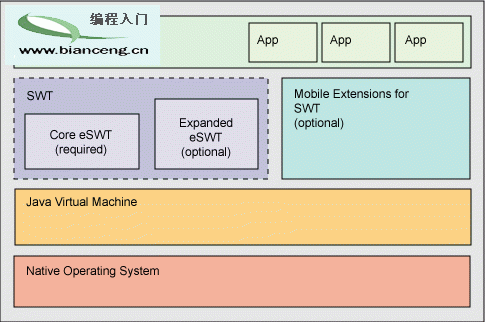
eRCP 將 Eclipse RCP 引入嵌入式/移動領域,包含 eSWT (核心/擴展/移動擴展)、eJFace、eWorkbench、eUpdate 四大組件。本文通過代碼示例展示在 PocketPC/智能手機上構建原生觀感應用。
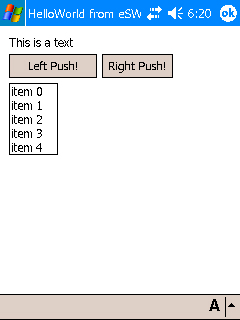
public class HelloWorldeSWT {
  public static void main(String[] args) {
    Display display = new Display();
    final Shell shell = new Shell(display);

    Text text = new Text(shell, SWT.SINGLE);
    text.setText("This is a text");

    Button buttonleft = new Button(shell, SWT.PUSH);
    buttonleft.setText("Left Push!");

    Button buttonright = new Button(shell, SWT.PUSH);
    buttonright.setText("Right Push!");
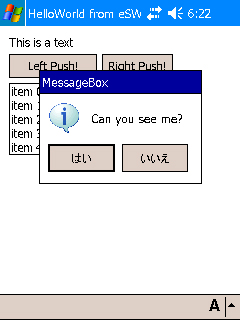
    buttonright.addSelectionListener(new SelectionListener() {
      public void widgetSelected(SelectionEvent e) {
        MessageBox mb = new MessageBox(shell, SWT.ICON_INFORMATION | SWT.YES | SWT.NO);
        mb.setText("MessageBox");
        mb.setMessage("Can you see me?");
        mb.open();
      }
      public void widgetDefaultSelected(SelectionEvent e) {}
    });

    List list = new List(shell, SWT.MULTI | SWT.BORDER);
    for (int i=0; i<5; i++) list.add("item " + i);

    shell.setText("HelloWorld from eSWT");
    FormLayout layout = new FormLayout();
    layout.spacing = 5; layout.marginHeight = layout.marginWidth = 9;
    shell.setLayout(layout);
    // FormData 佈局代碼省略...

    shell.setSize(240, 320);
    shell.open();
    while (!shell.isDisposed()) {
      if (!display.readAndDispatch()) display.sleep();
    }
    display.dispose();
  }
}
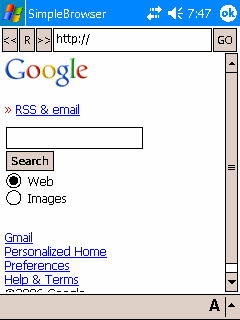
Browser 控件實現前進/後退/重載/跳轉 URL。
public class BrowserTest {
  static Button prev, reload, next, go;
  static Text url;
  static Browser browser;
  // ... 佈局與事件綁定代碼 ...
  browser = new Browser(shell, SWT.NONE);
  browser.setUrl("https://www.google.com");
  // ...
}
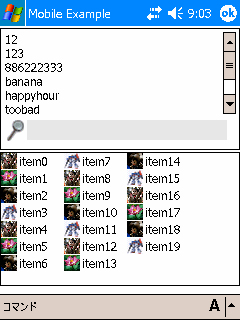
final MobileShell shell = new MobileShell(display);
Command fsCmd = new Command(shell, Command.SELECT, 0);
fsCmd.setText("FullScreen");
fsCmd.addSelectionListener(... shell.setFullScreenMode(true) ...);

SortedList sl = new SortedList(shell, SWT.MULTI|SWT.V_SCROLL|SWT.BORDER, SortedList.FILTER);
sl.add("banana"); sl.add("123"); // ...

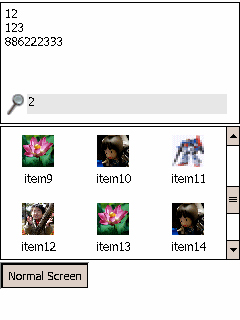
ListView lv = new ListView(shell, SWT.MULTI|SWT.BORDER);
for (int i=0; i<20; i++) lv.add("item"+i, image[i%4]);

Command lowCmd = new Command(lv, Command.SELECT, 0);
lowCmd.setText("LOW");
lowCmd.addSelectionListener(... lv.setLayoutDensity(ListView.LOW) ...);
CheckBoxTableViewer、CheckBoxTreeViewer、ComboViewer、ListViewer、TableViewer、TreeViewer。參考 JFace 教程快速上手。
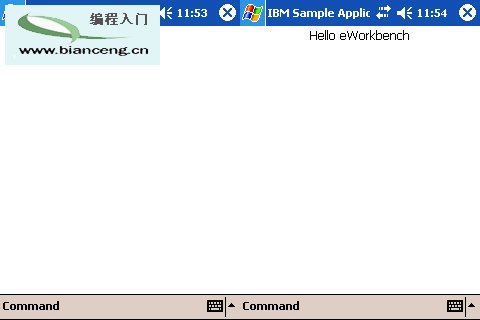
public class DefaultView extends ViewPart {
  public void createPartControl(Composite parent) {
    Composite c = new Composite(parent, SWT.NONE);
    c.setLayout(new FillLayout());
    new Label(c, SWT.CENTER).setText("Hello eWorkbench!");
  }
  public void setFocus() {}
}
<extension point="org.eclipse.ui.views">
  <view id="com.ibm.ercp.app.defaultView" name="Sample DefaultView"
        class="com.ibm.ercp.app.views.DefaultView" icon="icons/sample.gif"
        category="org.eclipse.ercp.eworkbench.viewCategory" />
</extension>
<extension point="org.eclipse.ercp.eworkbench.applications">
  <application id="com.ibm.ercp.application" name="IBM Sample Application" singleton="true">
    <views normal="com.ibm.ercp.app.views.normal" />
  </application>
</extension>
提供邏輯與 UI,支持插件動態安裝、調度、OGSI 整合。開發中,可編寫自定義更新功能或使用工作台應用配置。
eRCP 為嵌入式設備帶來 Eclipse 級開發體驗:原生性能、標準組件模型、工作台框架、更新管理。源碼:配套源碼